How does Server-side Tracking affect page speed?
Page speed is a crucial factor for both SEO and user experience, every marketer knows that. Google research shows that even a one-second delay in load time can reduce conversions by up to 20%, and more than half of users will leave a site if it takes over 3 seconds to load.
Server-side Tracking addresses this by shifting data collection from the browser to your server, reducing the amount of JavaScript and third-party scripts that slow down your site. This leads to faster page loads and higher search rankings. Additionally, Server-side Tracking helps maintain accurate data by bypassing ad blockers and browser restrictions, ensuring your analytics and marketing efforts remain effective.
In this guide, you’ll learn how Server-side Tracking impacts server response time, minimizes the flicker effect, and supports better Core Web Vitals for a faster, more reliable website experience.
Why is page speed so important?
Faster load times by Server-side Tracking
One of the benefits of Server-side Tracking is the reduction of client-side load. Instead of scripts and tags being loaded in the user's browser (client side), this is now done on the server side. This means that your browser has less work to do, making pages load faster.
Because these scripts and tags are now executed directly on the server instead of in your browser, the entire loading process becomes more efficient. This is beneficial for both the website visitor and SEO ranking in Google. And because everything takes place on the server, you have better insight into what data is collected and where it is sent.
Reduce server response time: minimize external dependencies
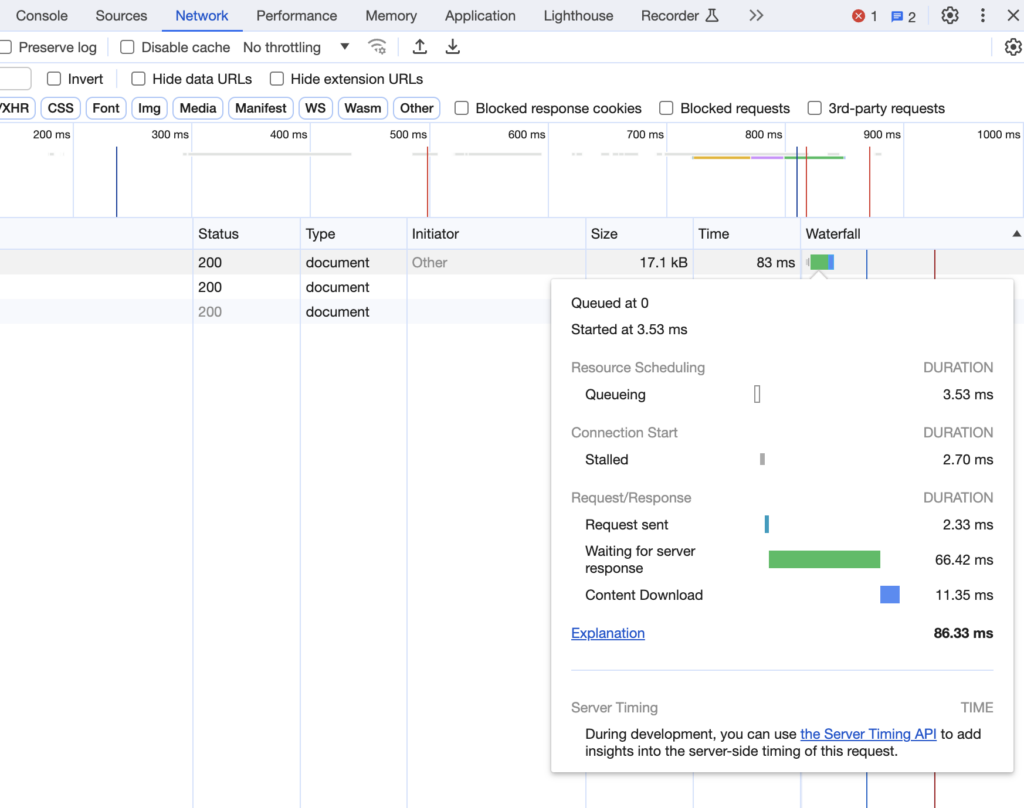
A faster website starts with the server response time (server response time). Delays caused by external services such as analytics tools or ad networks can affect loading speed. This is because the server must wait for a response from an external source over which it has no control, which can lead to potential delays or inconsistencies in server performance. By minimizing external dependencies through Server-side Tracking, you gain more direct control over processing, resulting in faster response times.

Efficient data processing with local hosting
With traditional client side tracking, data from a European website visitor is often sent to a server in the United States, causing delays. But with Server-side Tracking, hosted domestically, this data is processed locally. This significantly reduces data transmission time, resulting in faster website load times and more efficient processing of Google Analytics data. This change has an immediate positive impact: web page load times shorten and data processing efficiency increases.
Minimizes Flicker Effect
Another advantage of Server-side Tracking is that it minimizes the so-called flicker effect. The flicker effect occurs when different tags and scripts are executed on the client side, causing content or tags to briefly appear or disappear as scripts load, resulting in visible delays. Client-side tracking is a common cause, as scripts compete for resources and may load out of sequence. Server-side Tracking minimizes this issue by processing tags before the page is rendered, ensuring that content displays consistently and immediately. This not only improves perceived performance but also boosts engagement and conversion rates.
Server-side Tracking and Google's Core Web Vitals
Google’s Core Web Vitals — Largest Contentful Paint (LCP), First Input Delay (FID), and Cumulative Layout Shift (CLS) — are essential metrics for measuring user experience and directly influence search rankings. Server-side tracking reduces render-blocking scripts, lowers total blocking time, and minimizes layout shifts by decreasing the amount of JavaScript executed in the browser. Sites that optimize these metrics see higher engagement, better retention, and improved SEO performance.
Trial and error
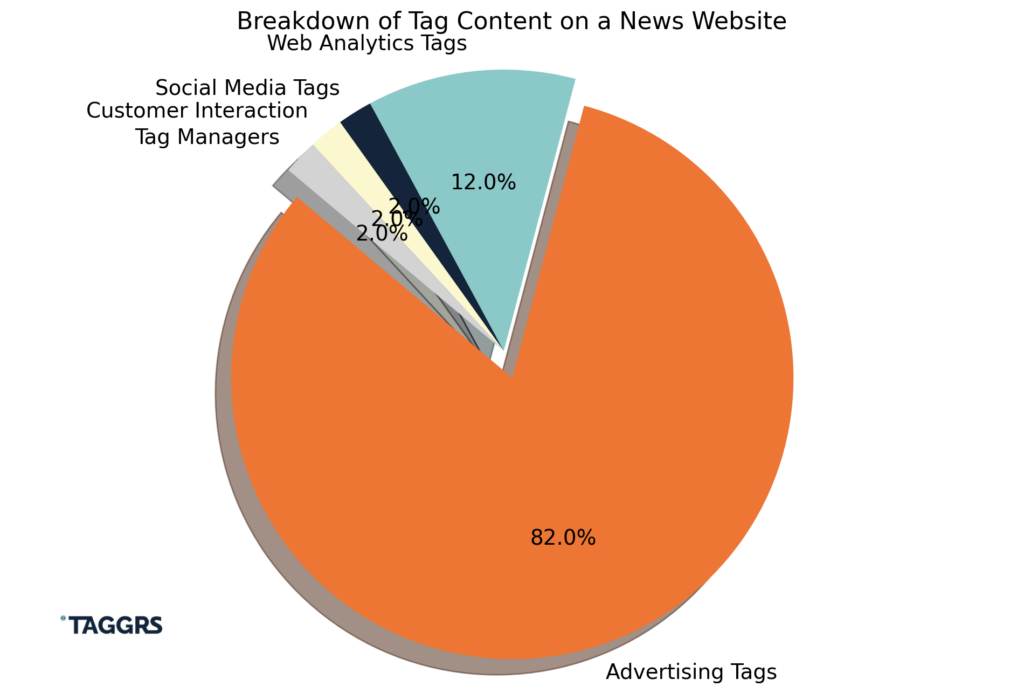
But the real question is, does it work? Recent research shows that page speed varies significantly between websites that use tracker tags and those that don't. Specifically, the study, which focused on the 50 largest news websites worldwide, showed that average page speed dropped from 9.46 seconds to just 2.69 seconds for publishers who did not use trackers.
What was noticed is that 82% of all tags used are advertising tags. By moving these third-party tags to a server container instead of loading them into the browser, you reduce the amount of JavaScript and HTTP requests that need to be processed. This not only speeds up the loading speed of your website, but also significantly improves the user experience.

Page speed test online
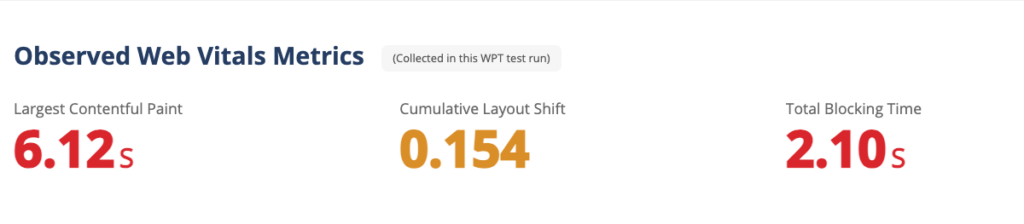
The second measurement conducted before and after the introduction of Server-side Tracking was done for Flowhub, an online marketing agency. Examining the Core Web Vitals, there is a noticeable shift in Cumulative Layout Shift, from 0.635 to 0.154. This is a significant improvement.
Total blocking time: an important factor for mobile conversions
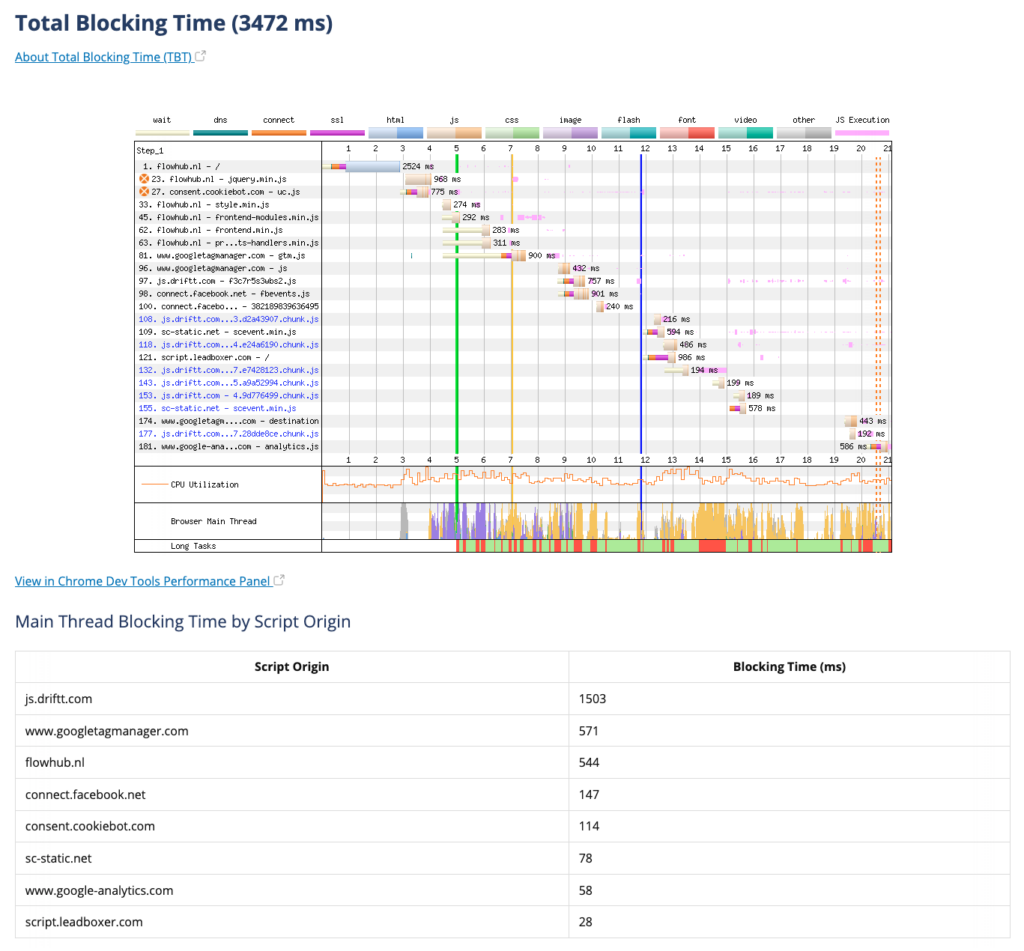
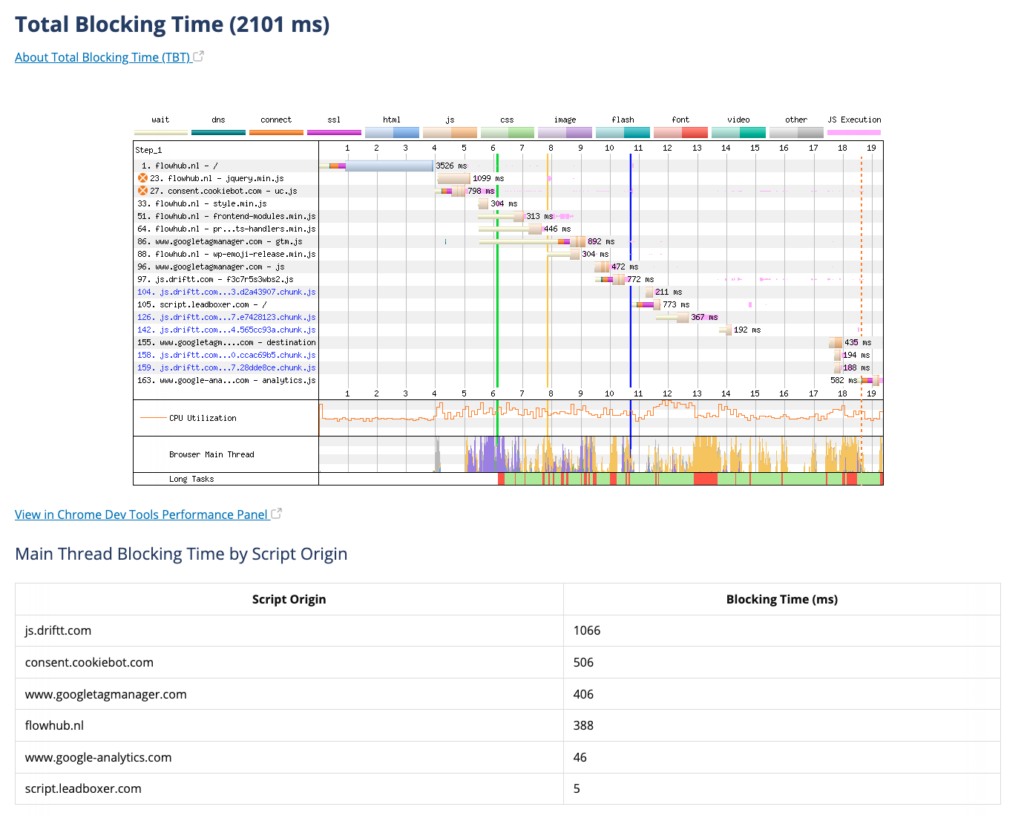
One of the key performance indicators for mobile PageSpeed is total blocking time. A decrease was noted from 3472 milliseconds (ms) to 2101 ms in this key metric. That's a difference of 1371 ms, which can affect user experience and conversion rates.
At Webpagetest, you can dig deeper into the metrics and take a closer look at the blocking time per script. The findings indicate that the introduction of Server Side Tracking contributes significantly to this improvement.