

TikTok Server-side Tracking
- Reduce dependence on cookies
- Gain next-level conversion tracking accuracy
- More tracked data = more insights for your TikTok campaigns
- Increase your GDPR compliance
- Integrate with your Google Tag Manager setup
What is TikTok Server-side Tracking?
TikTok Server-Side Tracking is an advanced method for measuring the performance of your ad campaigns without your data being affected by browser limitations or privacy tools. Instead of placing tracking pixels and cookies directly in the visitor’s browser (known as client-side tracking), server-side tracking first sends the data to a secure server.
Main benefits
- More control over your data: You have greater control over the data you share with TikTok and other platforms. This is important to comply with privacy regulations and to prevent your data from being misused.
- More accurate measurements: Server Side Tracking is more accurate than client-side tracking because it is less sensitive to browser limitations and privacy tools.
- Better insights into your performance: With Server Side Tracking, you gain better insights into the performance of your ad campaigns. This helps you optimize your campaigns and improve your results.
Reduce the reliance on third-party cookies
Third-party cookies have long been a valuable tool for marketers, but they also raise privacy concerns for internet users. As more browsers, software, and devices move to block third-party cookies, traditional tracking methods are becoming less reliable.
No worries, there’s an alternative: Server-side Tracking. This solution allows you to accurately measure the effectiveness of your TikTok ads without compromising user privacy. With server-side tracking, you can maintain precise data collection and continue monitoring which ads perform best, empowering you to optimize your TikTok campaigns even in a cookieless world.
Next-level conversion precision for your TikTok campaigns
Accurate conversion tracking is essential for successful TikTok campaigns. Unfortunately, with the blocking of third-party cookies, 10-30% of data is already being missed. This is a problem because platforms like Google and TikTok rely heavily on algorithms and data. The more marketing data you send to these platforms, the better your results can be.
Server Side Tracking is ideal for enriching your data so you can send it to the ad platforms. The server container acts as an HTTP API endpoint, allowing you to send data from various sources to Google Tag Manager, such as your CRM data. This way, you can include additional user data in GTM and forward it to the ad platforms.
Result: More conversions in your campaigns.
Build brand trust through GDPR compliance
Server-side Tracking is a robust solution for achieving compliance with the General Data Protection Regulation. With TAGGRS, aligning your TikTok campaigns with GDPR standards becomes straightforward and efficient.
TAGGRS gives you granular control over the data you share with TikTok and other marketing platforms. You can easily filter out sensitive personal information, ensuring that only compliant data is processed and transmitted while protecting your customers' privacy. And not just that. TAGGRS infrastructure has servers worldwide, including within the EU, so your data can be stored and processed in accordance with GDPR’s data residency requirements.
By implementing TikTok server-side tracking with TAGGRS, you maintain GDPR compliance while still accessing high-quality data to optimize your marketing performance. This approach allows you to protect your users’ privacy and build trust, all while maximizing the effectiveness of your TikTok advertising campaigns.
Expert insight
Setting up TikTok Server-side Tracking
Our Server-side Tracking experts have developed step-by-step manuals for setting up the TikTok Pixel, configuring the TikTok Events API, and implementing event deduplication in Google Tag Manager. Learn how to go server-side on TikTok, ensuring accurate conversion measurement and GDPR compliance for your campaigns.
In the video below, Lowie Verschelden demonstrates step by step how to set up TikTok Server Side Tracking.
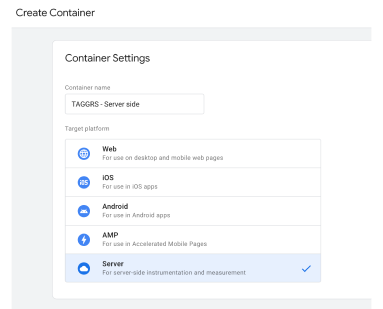
1. Create a Google Tag Manager Server Container
This is the first step, as you need a server container to manage your server side tags. With a server container, you can place tags on your website without having to modify the code. It allows you to manage tags from one central location. We’ve written a blog that outlines how to set up a solid foundation in 7 steps, so you can get started with server side tracking.
2. Install the TikTok Pixel
Tracking conversions is essential for the success of your TikTok ad campaigns. With the TikTok Pixel, you can track visitor actions on your website, such as viewing a product or completing a purchase. This way, you can clearly see how well your ads are performing and make adjustments where needed.
3. Set up the TikTok Events API
The TikTok Events API is a tool that tracks what visitors do on your website after seeing your TikTok ad. Instead of the traditional tracking method using pixels, this API sends the information directly from your server to TikTok. This gives you better and clearer insights into user actions on your site. It is recommended to run the Pixel and Events API side by side.

4. Ensure event deduplication is set up
Ensure optimal tracking accuracy with TikTok Event Deduplication. This prevents duplicate conversion counts and guarantees a more reliable display of your conversion data. The result? Clean data that allows you to make better decisions and optimize your TikTok ad performance.
5. Test your settings
Make sure to test your tracking settings to ensure everything is working correctly. This is a crucial step to avoid any issues with your tracking later on.
Key Takeaways
• This page explains what TikTok Server-side Tracking is, its benefits for your ad campaigns, and how to set it up in Google Tag Manager using TAGGRS.
• Server-side Tracking is beneficial for your TikTok ads as it provides more accurate conversion data, reduces data loss due to third-party cookie restrictions, improves campaign optimization, and helps ensure compliance with privacy regulations like GDPR.
• Using Server-side Tracking alongside the TikTok Pixel is recommended to run server-side tracking (using the TikTok Events API) alongside the TikTok Pixel. This dual setup helps maximize data capture and ensures event deduplication for cleaner reporting.
• Through Server-side Tracking, you can send a wide range of data to TikTok, including user actions (conversions, page views), user identifiers (hashed emails, phone numbers), and event parameters. Integrating data from sources like your CRM is also possible.