

LinkedIn Server-side Tracking
- Minimize reliance on third-party cookies
- Achieve consistent cross-browser tracking
- Uncover richer campaign insights
- Gain granular data control and GDPR compliance
- Integrate CRM and offline data
- Streamline setup with Google Tag Manager
What is LinkedIn Server-side Tracking?
LinkedIn server-side tracking is a solution to measure the performance of your LinkedIn ad campaigns, even when browser privacy settings or ad blockers would otherwise limit your data. Instead of relying on tracking pixels and cookies placed directly in your visitors’ browsers (client-side tracking), server-side tracking sends conversion and event data from your website to your own secure server first, then forwards it to LinkedIn using the LinkedIn Conversion API.
Main benefits
- Greater control over your data: You have granular control over the information you share with LinkedIn, enabling you to filter, anonymize, or limit data for enhanced privacy and compliance with regulations like GDPR and CCPA.
- More accuracy in data collection: LinkedIn server-side tracking is less affected by browser restrictions and privacy tools, ensuring more reliable campaign reporting and attribution than traditional client-side tracking.
- Laser-focused LinkedIn ad campaigns: Access more dependable and comprehensive data, empowering you to optimize your LinkedIn ad campaigns and achieve improved results.
Move beyond third-party cookies
Achieve consistent cross-browser conversion tracking
Accurate conversion tracking is essential for optimizing your LinkedIn ad campaigns. With third-party cookies being blocked and privacy features on the rise, LinkedIn conversion data can be lost using traditional client-side tracking. This impacts LinkedIn’s ability to optimize your campaigns and deliver strong ROI.
LinkedIn server-side tracking with TAGGRS solves this by collecting conversion data on your secure server and sending it to LinkedIn via the Conversion API. This reduces browser compatibility issues and bypasses ad blockers, ensuring consistent, accurate tracking across all browsers and devices. Plus, you can combine online and offline data (like CRM records or in-store conversions) for a more complete view of your LinkedIn campaign performance.
Result: More reliable LinkedIn data, improved attribution, and better optimization for higher conversion rates and campaign performance.
Future-proof your tracking with GDPR compliance
TAGGRS Server-side Tracking gives you full control over what data is collected, processed, and shared with LinkedIn. Filter, anonymize, or hash sensitive data to protect user privacy and meet the strictest privacy requirements according to GDPR. This granular control not only helps you comply with these privacy laws but also builds trust with your audience by ensuring a privacy-first experience.
With our independent server infrastructure, TAGGRS lets you store data within the EU, ensuring local data residency. Reduce reliance on third-party cookies and create a privacy-first experience, while still collecting valuable insights to optimize your LinkedIn campaigns.
Expert insight
When you send parameters in the URL, such as UTM tags, the cookie lifespan in Safari and Firefox is limited to 1 day! With server side tracking, the lifespan of this cookie is extended, ensuring that all conversions are attributed to the correct source.
Setting up LinkedIn Server-side Tracking
From implementing the LinkedIn Insight Tag to setting up the LinkedIn Conversions API and to configuring event deduplication in Google Tag Manager — our Server-side Tracking experts have created extensive guides so you can set up LinkedIn tracking ensuring accurate campaign measurement and GDPR compliance.
In the video below, Lowie Verschelden shows you step by step how to set up LinkedIn Server-side Tracking.
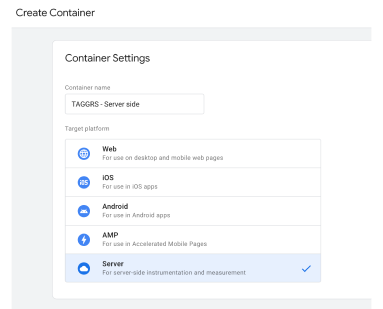
1. Create a Google Tag Manager Server Container
This is the first step because you need a server container to manage your server side tags. A server container allows you to place tags on your website without needing to modify your website's code. It enables you to manage tags from one central location. We have written a blog on how to set up a solid foundation in 7 steps so you can start with server side tracking.
2. Install the LinkedIn Insight Tag
The LinkedIn Insight Tag lets you track key actions visitors take on your website. These valuable insights not only help you measure your LinkedIn campaign performance, but also optimize your ad spend and build highly targeted audiences for LinkedIn ads. The Insight Tag is essential for understanding visitor behavior after they see your promoted content, giving you the data you need to improve your LinkedIn marketing strategy.
3. Set up the LinkedIn Conversion API
The LinkedIn Conversion API is an advanced server-side solution that lets you track and optimize conversions from your website. This API ensures more reliable conversion tracking, bypasses ad blockers and browser restrictions, and supports accurate attribution for your LinkedIn campaigns.

4. Set up event deduplication
When using both the LinkedIn Insight Tag (client-side) and the LinkedIn Conversions API (server-side), the same conversion event may be recorded twice. Event deduplication matches events using unique event IDs to ensure each conversion is counted only once. This process maintains data accuracy and prevents inflated conversion metrics, allowing for precise campaign measurement and reporting.
5. Test your settings
Make sure to test your tracking settings to ensure everything is working correctly. This is a crucial step to avoid encountering issues with your tracking later on.
Key Takeaways
• This page explains what LinkedIn server-side tracking is, its key benefits for your ad campaigns, and how to set it up in Google Tag Manager using TAGGRS.
• Implementing LinkedIn server-side tracking helps you create laser-focused LinkedIn ad campaigns by providing more accurate and reliable data for campaign optimization, leading to higher ROI and lower CAC.
• You can connect your Google Tag Manager setup, CRM, and offline data sources to LinkedIn, allowing for a unified and comprehensive strategy for conversion tracking and audience targeting.
• You have full control over the data you want to share with LinkedIn and other platforms, so you can filter, anonymize sensitive information, and protect your customers your customers' data.