

Snapchat Server-side Tracking
- Overcome browser tracking restrictions
- Achieve lossless conversion tracking
- Send richer event data to Snapchat for improved campaign optimization
- Enhanced privacy and GDPR compliance
- Streamlined implementation and management in your GTM setup
What is Snapchat Server-side Tracking?
Snapchat Server-side Tracking is a method for measuring the performance of your Snapchat campaigns without your data being affected by browser limitations or privacy tools. Instead of placing tracking pixels and cookies directly in the visitor’s browser (client-side tracking), server-side tracking first sends the data to a secure server before relaying it to Snapchat.
Main benefits
- Enhanced data control: You determine exactly what information is shared with Snapchat and other platforms, making it easier to comply with privacy regulations and to filter or anonymize sensitive data.
- Improved measurement accuracy: Server-side Tracking for Snapchat is less affected by browser restrictions and privacy tools, resulting in more dependable conversion data than standard client-side tracking.
- Deeper campaign insights: Gain access to more comprehensive and reliable data for your Snapchat campaigns, allowing for more detailed analysis and more effective campaign optimization.
Switch from third-party to first-party data
Third-party cookies have long been a valuable tool for marketers, but they also raise significant privacy concerns for internet users. Today, most browsers, software, and mobile devices block third-party cookies by default, making traditional tracking methods increasingly unreliable.
Server-side Tracking provides a robust alternative. This approach enables you to accurately measure the effectiveness of your Snapchat ads without compromising user privacy or relying on third-party cookies. With server-side tracking, you can continue to monitor which ads drive results and optimize your Snapchat campaigns with confidence, ensuring your data remains accurate and privacy-compliant.
Accurate conversion tracking
Accurate conversion tracking is critical for optimizing Snapchat campaigns. With third-party cookies increasingly blocked, conversion data can get lost, limiting the effectiveness of Snapchat’s algorithms and your campaign performance.
Snapchat server-side tracking addresses this issue by allowing you to send enriched data directly from a secure server to Snapchat. Using a server container as an HTTP API endpoint, you can integrate data from sources like your CRM into Google Tag Manager and forward it to Snapchat.
Result: More complete and reliable conversion data, helping you improve campaign measurement and drive better results.
Better aligned with GDPR
Expert insight
Setting up Snapchat Server-side Tracking
With TAGGRS, you gain access to step-by-step manuals for installing the Snap Pixel, configuring the Snapchat Conversion API, and setting up event deduplication in Google Tag Manager. These guides enable you to deploy Snapchat tracking designed for accurate conversion measurement and GDPR compliance.
In the video below, Lowie Verschelden shows step by step how to set up Snapchat server side tracking.
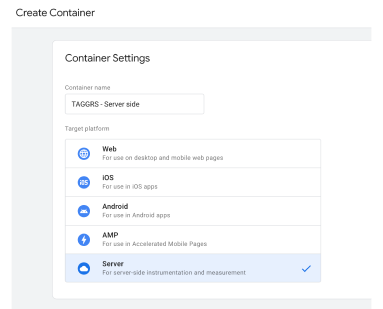
1. Create a Google Tag Manager Server Container
2. Setting up the Snapchat Pixel
With the Snapchat Pixel, you can track actions that people take on your website. These valuable insights help you not only measure campaign performance but also optimize your spending and create specific audiences to target on Snapchat. It is the key to understanding visitor behavior after they have seen your promoted snap.

3. Set up the Snapchat Conversions API
The Snapchat Conversions API is an advanced solution that allows advertisers to measure and optimize conversions on their websites. Instead of relying on traditional tracking pixels, this API sends web event data directly from the advertiser's server to Snapchat.

4. Ensure that event deduplication is enabled
Ensure optimal tracking accuracy with Snapchat Event Deduplication. This prevents duplicate conversion counts and guarantees a more reliable representation of your conversion data. The result? Clean data that allows you to make informed decisions and optimize your Snapchat advertising results.

Test your settings
Make sure to test your tracking settings to ensure that everything is working correctly. This is a crucial step to avoid encountering issues with your tracking later.
Key Takeaways
- This page explains what Snapchat Server-side Tracking is, its benefits for your ad campaigns, and how to set it up in Google Tag Manager using TAGGRS.
- Server-side tracking improves your Snapchat ads by providing more accurate conversion data, reducing data loss from third-party cookie restrictions, enhancing campaign optimization, and supporting compliance with privacy regulations like GDPR.
- For best results, use Server-side Tracking together with the Snapchat Pixel and the Snapchat Conversion API. This dual setup maximizes data capture and enables event deduplication for more reliable reporting.
- With Server-side Tracking, you can send a wide range of data to Snapchat—including user actions, identifiers, and event parameters—and integrate data from sources like your CRM for a more complete view of your campaign performance.