

What is Server-side Tracking?
Server-side Tracking moves data collection out of the visitor's browser and onto a server you control. Instead of your website sending data straight to Google Analytics, Meta or Google Ads, it sends data to your own server first. From there, you decide which data gets forwarded, where and in what form.
Safari, Firefox and Brave block third-party cookies by default, which puts roughly 20% of global traffic outside the reach of conventional tracking, and that's before you factor in other mechanisms that are costing you data. Safari's ITP caps the life of browser cookies at as little as seven days, so a visitor who converts two weeks after clicking your ad can't be attributed to the channel that brought them in. Ad blockers strip requests before they ever fire. Google's decision to keep third-party cookies in Chrome didn't fix any of this. Instead, the erosion of browser-collected data is gradual and not tied to a single deadline.
Server-side Tracking helps you get a first-party data foundation that survives the next browser update.
Where do you want to start?

See what data you’re currently losing
Scan your site and get every ad pixel, server-side connection, cookie and consent setting in one report, each with a status and a recommended fix. Free, no account needed.

Understand the fundamentals
A 13-chapter guide explaining where tracking breaks, what the gaps cost your campaigns, plus a five-question self-assessment.

Start building your setup
The full Server-side Tracking implementation checklist, from web container through subdomain to hosting.
Server-side Tracking vs. Client-side tracking
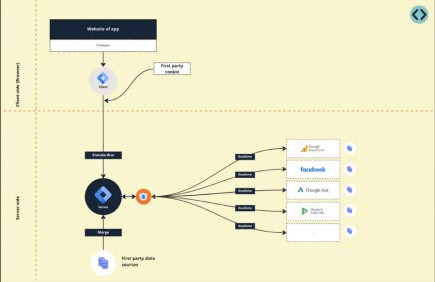
Server-side Tracking is an alternative to client-side tracking, the traditional way of tagging. Here you place pixels and cookies, directly in the user's browser. From there, user data is sent to the software you use (Google Analytics 4, Google Ads , etc.). The disadvantage of this is that this data stream can be blocked.
With Server-side Tracking, the data flow runs differently. Here, you load the tracking scripts from your own domain and send the data to your own server first. This creates an intermediate layer. From your own server, you can decide which data to share with which software. The big advantage of this method is that the data stream is far harder to block.
Server-side Tracking
- Data is collected on a server you control
- Rarely blocked by ad blockers
- Doesn't depend on third-party cookies
- Cookie lifespan is extendable
- You control what data each platform receives before it leaves
- Tracking is handled off-browser
- Data is processed in the region you choose
- Moderate setup effort
Client-side tracking
- Data is collected in the visitor's browser
- Extended cookie lifespans with first-party identity
- Blocked by ad blockers
- Third-party cookies blocked in Safari, Firefox and Brave
- Cookie lifespan as short as 7 days under ITP
- No control over what each platform receives
- Every pixel is another script on the page
- Data is processed wherever the vendor's servers are
- Low setup effort
The benefits of Server-side Tracking
Here are five things you get back when data collection moves to the server.
Check out our full breakdown of Server-side Tracking benefits.
1. More data at your disposal
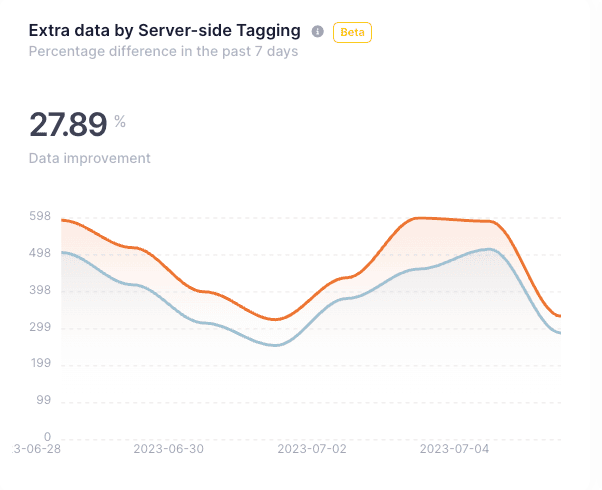
Server-side collection picks up conversions that browser-based tracking either loses or can't connect to a campaign, such as a request an ad blocker would have filtered out, or a purchase that happens two weeks after the click, long after Safari has dropped the cookie that identified it. Those events reach your server because they don't depend on a third-party request surviving browser limitations.
That matters because ad platforms are increasingly algorithm-driven as they use conversion data to decide how much to bid and who to target. Smart Bidding strategies like Target CPA and Target ROAS train on your conversion history. Performance Max goes further, with you having to supply the assets, budget and a conversion goal, and Google determining the targeting. That makes your conversion data the main thing you can still influence. A fuller set of conversions gives algorithms a more complete picture to work from.
More good data in, more conversions out. The free tracking checker shows you which of your pixels are currently firing and which aren't.
2. Privacy compliance
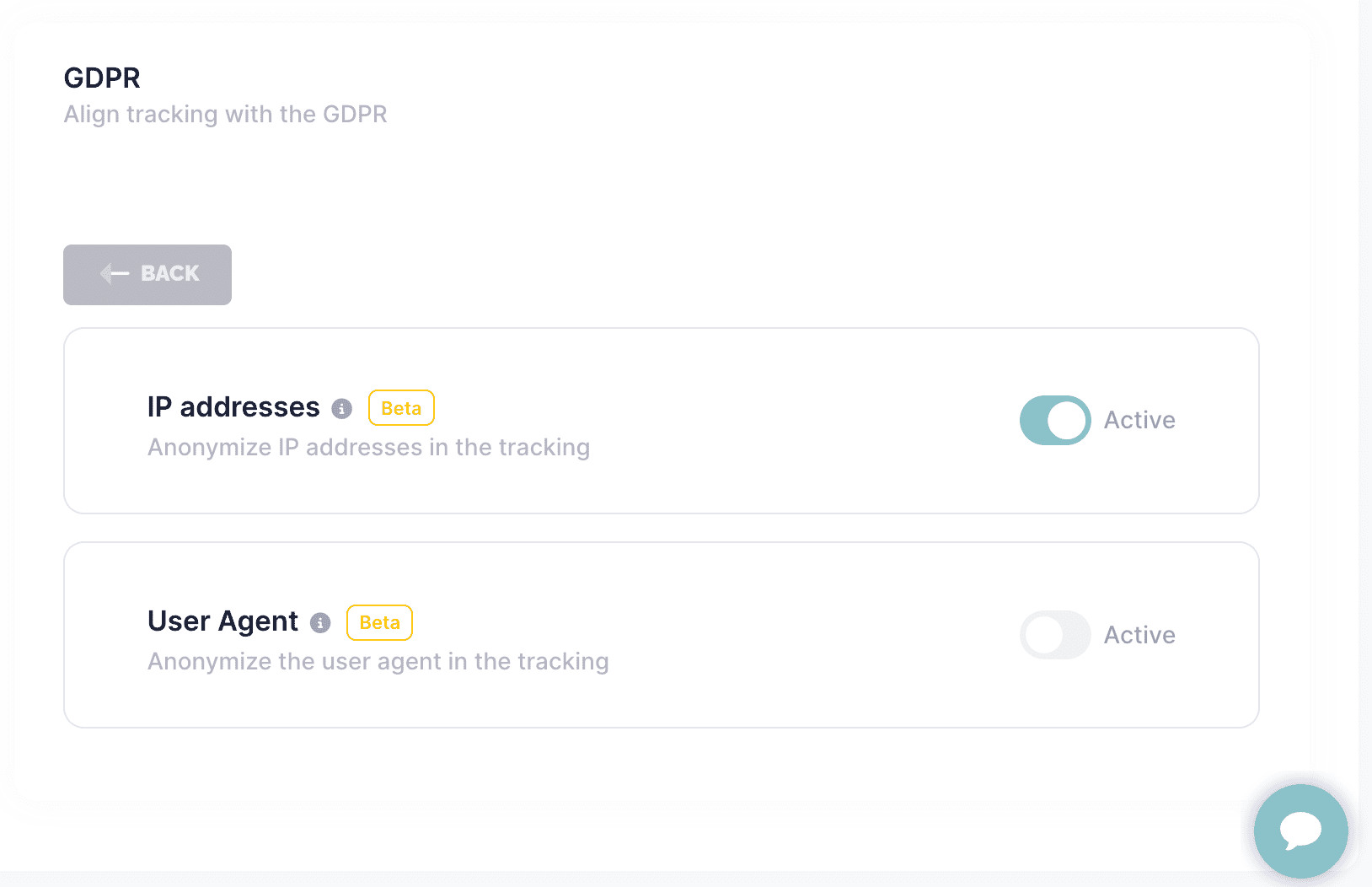
Server-side Tracking doesn't remove the need for consent, but it does change how much of the data flow you can see and control. You choose the region where your processing happens and decide which fields go into each request before it's forwarded. For instance, this means that Google Ads can receive a conversion value without the visitor's IP address.
3. Improved site performance
Every client-side pixel is a separate script the browser has to fetch and run, on the same device that's rendering your page. Each one sets up its own third-party connection.
With Server-side Tracking, tags that would otherwise run in the browser can be handled on the server instead. How much comes off the page depends on which tools you use and whether they support server-side collection.
Check out our page speed study.

4. More control over your data
With client-side tracking, you make the data available to every tag you install. A pixel running on the page can read what's around it, such as the URL and its parameters, the data layer, and in some cases even form fields.
Server-side, the data reaches your container first and you decide what goes into each request from there. Meta and GA4 can each receive a different set of fields. In some industries, this matters a lot – consider health-related sites, government affairs and other sensitive issues.
5. Better flexibility
Your most valuable conversion data often isn't on your website, but rather in your CRM, transaction system or call tracking.
A server container can be set up to accept data from other systems, not just from the browser, which opens the door to reporting a conversion when the deal closes rather than when someone reaches a thank-you page. Attribution depends on storing the click ID when the visit happens and keeping it with the record. Google Ads limits how long after a click an offline conversion can still be imported, which is currently 90 days, and your account's conversion window applies on top of that. Hashed customer details can also be sent alongside a conversion, which is how Enhanced Conversions work.
Set up Server-side Tracking for your platform
Each platform has its own setup. Pick yours for the step-by-step guide.
Ad platforms & analytics
- Google Analytics 4 (GA4)
- Google Ads
- Meta/Facebook or use the fully hosted Meta CAPI Gateway
- TikTok
- Snapchat
CMS & CRM
Are there any disadvantages to Server-side Tracking?
Every solution has some drawbacks, and so does Server-side Tracking. The four main disadvantages are:
1. Not every software has the capability for Server-side Tracking yet
A good example of this is Hotjar. You can only install this tag client side. By using the Google Tag Manager setup that we recommend, this is not a problem. You can install both server-side and client-side tags in it.
2. The complexity
Server-side Tracking is an additional dimension you add to the existing structure, and the debugging is less familiar than in the web container. Our documentation and debugging guide cover the setup step by step.
3. The cost
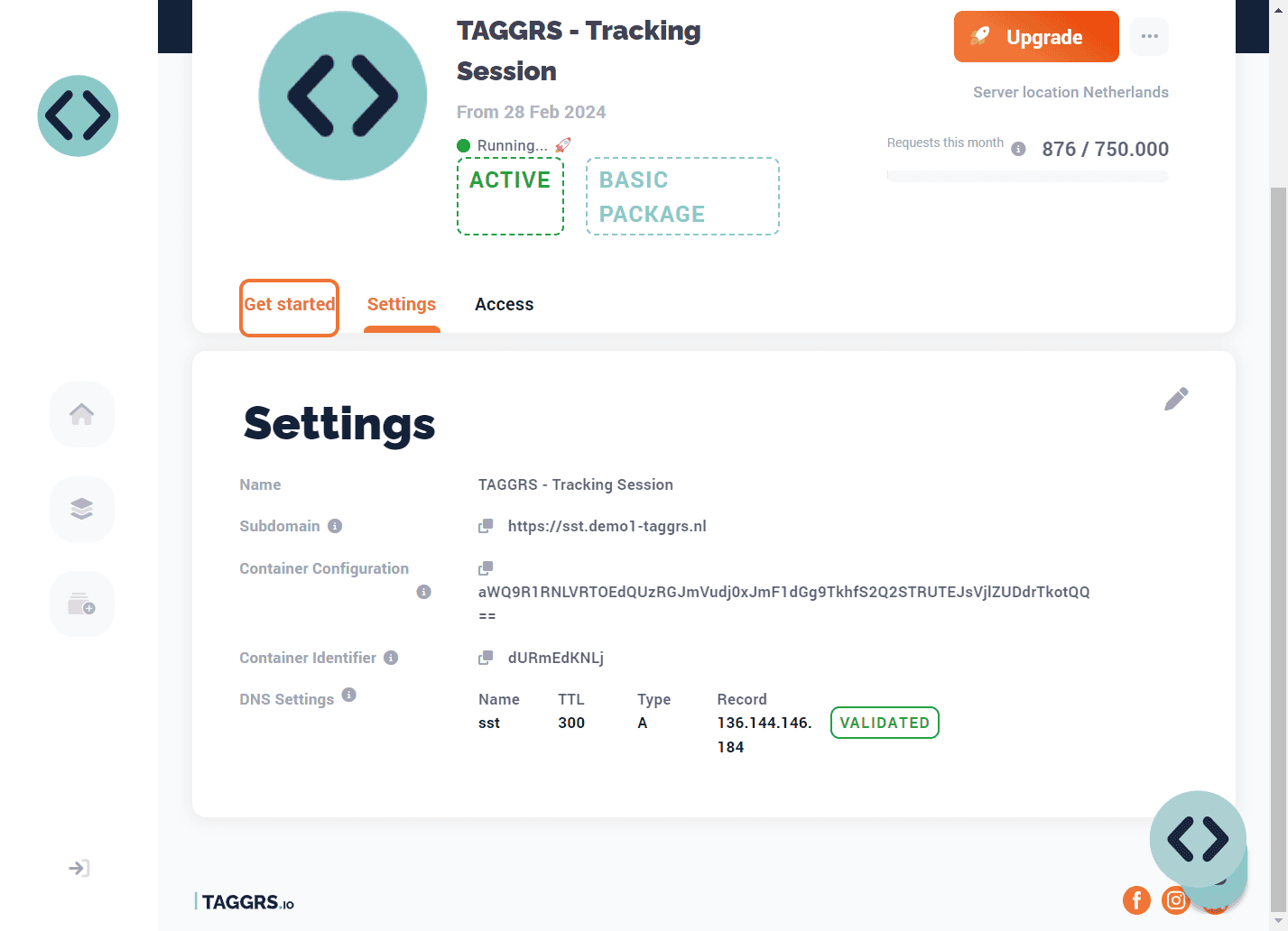
To use Server-side Tracking through Google Tag Manager, you need server space. At TAGGRS, we have developed a focused Server-side Tracking hosting product. We offer a free subscription up to 10,000 requests, while our paid subscriptions start as low as €25 per month.
4. Your numbers will change
After switching, you'll usually see more conversions recorded than before. This is one of your goals, but it means historical comparisons break at the switchover date. Plan for a period of parallel measurement so you can explain the shift to stakeholders and don’t get surprised by it.
What is the difference between a web container and a server container?
A web container runs in the visitor's browser. Tags fire there and send data straight to the platforms you've configured. A server container runs on a server you control. It receives data first and from there, you decide what gets sent to which platform.
In most setups, the two work together. The web container collects the event and passes it to the server container, which handles the forwarding.
Have any other questions about Server-side Tracking? Check out our detailed FAQ.
A note on capitalization: We write Server-side Tracking with capitals throughout. For us, it means more than moving tracking from the browser to a server. It covers how you handle data ownership, accuracy and privacy along with it.
What the regulations actually require
Server-side Tracking is not a way around consent. Under the ePrivacy Directive, storing or reading information on a user's device requires consent regardless of whether the cookie is first-party or third-party. A first-party setup doesn't exempt you, and server-side setups still set cookies. Moving collection to your own server changes where data is processed and who controls it, but it doesn't change whether you need user permission to collect it.
What it does change is your position. You decide what leaves your server, you can anonymize or drop fields before forwarding data to other tools, and you choose the region where processing happens. That's a considerably stronger place to answer a DPO's questions.
More detail:
How do you get started with Server-side Tracking?
There are several ways to implement Server-side Tracking, but we prefer Google Tag Manager. Most companies are already using it, so you're extending your existing tag structure rather than starting over. You can also remove it again just as easily, which makes it low-risk to test. If you only need Meta, the Meta CAPI Gateway is a more specific, fully hosted alternative that skips the container setup.
Companies use GTM in different ways. Online stores collect ecommerce data, while B2B companies track leads. The setup differs accordingly, but four things are needed in every case, plus one that depends on your site:
- A Google Tag Manager web container
- A Google Tag Manager server container
- A subdomain for the server
- Hosting for the server
- Optional: A working data layer (recommended for ecommerce)
We can help you with the implementation or you can work through our documentation on your own.
Frequently asked questions
Server-side Tracking is about where and how user data is collected: directly on your server, not in the browser. This approach improves data accuracy and privacy by reducing reliance on browser scripts. You gain more control over what’s collected and how it’s processed before sending it to analytics or marketing platforms. Server-side tagging is about how you manage and send that data. Instead of running tracking tags (like analytics or marketing pixels) in the user’s browser, you use a dedicated tag management server. This server receives data from your website or app, processes it according to your rules, and then forwards it to third-party platforms. This setup acts as a secure buffer, letting you decide exactly what data is shared, enrich or anonymize it, and stay compliant with privacy regulations like GDPR.