Self-hosting server-side GTM vs managed hosting: What it actually costs you operationally

 Mariusz Brucki | 9 November 2026 | Last updated:
| Quick summary: Self-hosting server-side GTM means running Google’s free Docker container on your own servers, and the alternative is handing it to a managed provider. Both run the same Google software. The difference is who handles the work around it: domains and security certificates, scaling for traffic peaks, software updates, monitoring, and ad blocker resilience. Self-hosting makes sense for large teams with an existing platform engineering function and strict rules about third-party data processors. For most other teams, a managed provider usually costs less once engineering time is counted. |
Google gives away the server-side Tag Manager container for free. The Docker image sits in a public registry and the manual setup guide fits on a single page. A capable engineer can have a container running and responding on a virtual server before lunch.
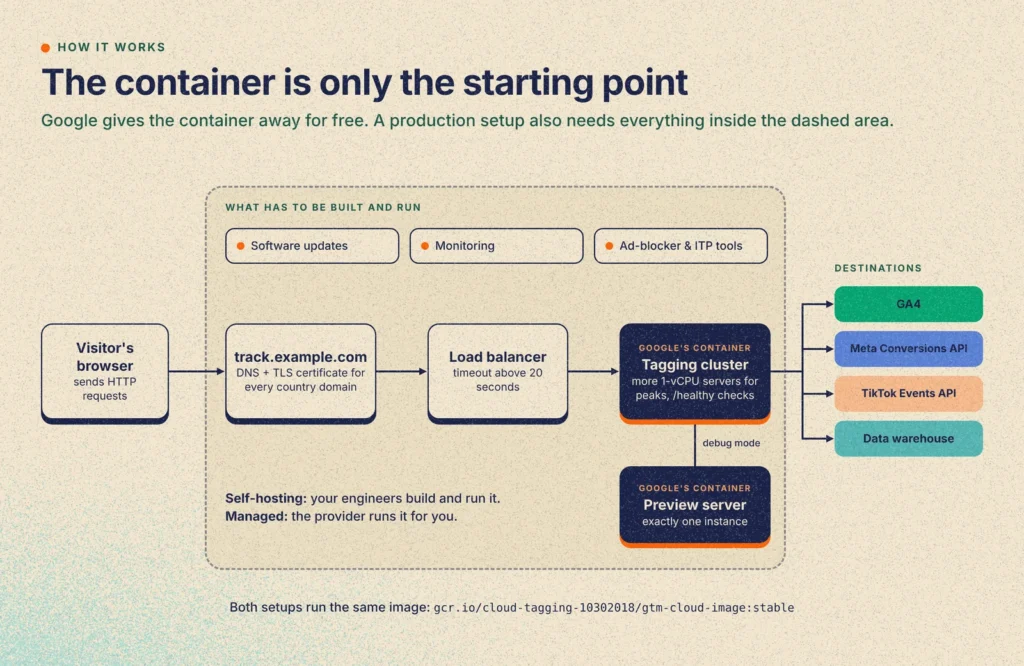
Running that container is only the starting point. A production tagging setup also needs custom domains, TLS certificates (the security certificates that let browsers connect over HTTPS), the ability to add more servers during traffic peaks, software upgrades, and privacy governance across your connected platforms.
That leaves teams with a practical architecture choice. You can build and run that surrounding layer in-house on your own virtual machines or Kubernetes cluster, keeping full control over your network boundary and raw request logs. Or you can use a managed sGTM provider that operates the routing, certificates, upgrades, and edge tooling for you.
Both paths run the exact same Google container image under the hood. Looking at the concrete operational work on each side is the clearest way to decide which model fits your team.
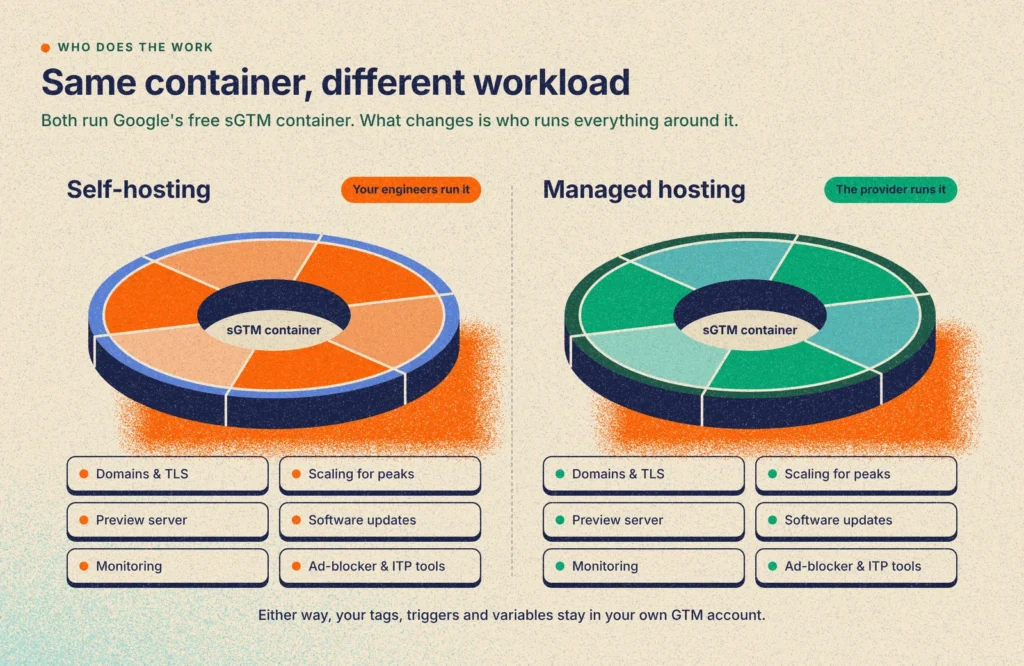
Self-hosting server-side GTM vs managed sGTM at a glance
| Self-hosting on your own servers | Managed sGTM hosting | |
| Software | Same Google container | Same Google container |
| Setup | Your engineers build routing, certificates, scaling and monitoring | Paste a configuration string into a dashboard |
| Multiple country domains | Certificates and routing managed per domain by your team | Add domains in a dashboard |
| Software updates | Your team watches for new versions, tests and redeploys | Handled by the provider |
| Ad blocker and Safari tools | Built and maintained in-house | Included |
| Data processing | The tagging server runs on your own infrastructure | Requests pass through the provider under a data processing agreement |
| Ongoing cost | Server bills plus engineering time | Monthly plan based on request volume |
| Best fit | Very high volume, existing platform team, strict processor rules | Most teams and agencies |
Why teams look beyond Google Cloud Run for sGTM hosting
When teams first test server-side Google Tag Manager (sGTM), they usually start with Google's automatic provisioning inside the GTM interface. Google's server-side tagging fundamentals course notes that this one-click deployment is meant only for testing, since it creates a single Cloud Run instance fixed to us-central1 in Iowa.
Turning Cloud Run into a production setup changes the bill and the architecture quickly. Google's Cloud Run setup guide recommends a minimum of two tagging instances at roughly $45 a month each (1 vCPU and 0.5 GB memory with CPU always allocated) plus a separate preview server, and Google’s custom domain docs recommend adding a global external Application Load Balancer, which distributes incoming traffic across your servers (priced at about $18 a month for the forwarding rule plus data processing).
By default, Cloud Run also logs incoming requests, which Google warns can incur significant Cloud Logging charges above roughly a million requests a month ($0.50 per GiB past the 50 GiB monthly free tier) unless you edit the default log sink in the Logs Router. At 10 million events a month, a rough Cloud Run estimate already lands around $110 to $155+ per month in baseline infrastructure ($90 for two tagging instances, $18+ for the load balancer, and up to $45 if the preview server stays warm), before counting traffic spikes or unexcluded request logs.
Beyond the invoice, Google Cloud is still a US provider under US jurisdiction, and many organizations already standardize their infrastructure on AWS, Azure, or European virtual machine and Kubernetes hosts rather than running a separate GCP billing account just for marketing tags. Those trade-offs are compared in more detail in Google Cloud Run vs managed sGTM hosting.
Once a team rules out Cloud Run, the choice splits into two paths. Option A is self-hosting outside Google Cloud: pulling Google's Docker image onto your own virtual machines (VMs) or Kubernetes cluster, and building the routing, TLS, scaling, and monitoring in-house. Option B is using a managed sGTM hosting provider that runs that infrastructure layer for you.
A common situation looks like this. A multi-country website runs across multiple country domains, handles sensitive health or financial data, and processes hundreds of millions to roughly a billion requests per month. Its engineering team decides to build sGTM in-house on its own VMs.
Why your sGTM hosting choice affects your data quality
A server container sits in the live path of both your analytical reporting and your ad platform signals. It processes incoming HTTP requests from browsers in real time, sets first-party cookies for consented visitors, strips personal identifiers, and forwards clean events to GA4, product analytics, data warehouses, and advertising APIs. If the container goes down or drops connections during a traffic peak, the visitor's browser tab has already closed, so those events are lost from both your reports and your bidding models.
On the analytics side, the hosting setup directly controls cookie durability and session quality. Safari's Intelligent Tracking Prevention (ITP) caps browser-set JavaScript cookies at seven days, whereas Google's server-side tagging fundamentals note that a first-party server container can set cookies with the HttpOnly flag, making them more durable. That durability depends on the hosting setup. Safari compares the IP address behind your tagging subdomain with the one behind your main site, and a server-set cookie from a subdomain that resolves to a different IP range can still be capped at seven days. Where the tagging server is hosted is part of what decides whether your cookies last. Our article on Safari’s 7-day cookie cap covers how same-origin routing avoids this. If a tagging subdomain's TLS certificate expires or its routing breaks, returning visitors get reset to new users, and multi-session funnel and attribution reports fall apart.
Ad blockers add a second layer of signal loss before an event even reaches your server. Standard browser calls to googletagmanager.com or recognizable analytics endpoints are blocked by default filter lists such as EasyPrivacy, which skews pageview counts, conversion rates, and channel attribution in GA4. Routing requests through your own domain and masking the loader and request paths helps consented analytics and marketing hits reach the container instead of being stripped in the browser.
For paid media, ad platforms also recommend sending events from both the browser and the server with deduplication. Meta calls this a redundant setup using a matching event_id, and an example response in Meta’s Dataset Quality API docs states that similar advertisers who set up the Conversions API for Search events alongside the Pixel saw a median of 32.9% "additional conversions reported" compared with Pixel-only setups.
How server-side GTM hosting works
This section covers what running the container actually involves. If you are not the person who would build it, the short version is that Google provides the software and your team, or a provider, has to supply everything around it.
Google officially supports self-hosting outside Google Cloud. In Google's manual setup guide, only Cloud Run and App Engine are automated, while other environments run the Node.js server inside the public Docker image gcr.io/cloud-tagging-10302018/gtm-cloud-image:stable:
- Two deployments: You run a group of servers (a cluster) for live traffic and a separate preview server that powers GTM’s debug mode. Google’s guide says to run exactly one preview server and not to scale it beyond one instance.
- Environment variables: Both read CONTAINER_CONFIG (from GTM: container settings -> "Manually provision tagging server"). The preview server sets RUN_AS_PREVIEW_SERVER=true. The tagging cluster sets PREVIEW_SERVER_URL (must be HTTPS) and optionally PORT (default 8080). GOOGLE_APPLICATION_CREDENTIALS and GOOGLE_CLOUD_PROJECT are needed only if you use BigQuery or Firestore from outside GCP.
- Scaling and health checks: Each server uses at most one virtual processor (vCPU), and extra processors aren’t used and make automatic scaling worse, so you handle more traffic by adding servers rather than making them bigger. Each server exposes a /healthy address that monitoring tools check to confirm it’s still running, and any load balancer or CDN in front of it needs a timeout above 20 seconds or preview mode stops working.
Two other products often get confused with sGTM hosting. Standalone gateways like Meta's Conversions API Gateway and the gateway products sold by sGTM providers are for teams that don't run sGTM. Data flows directly from the browser Pixel to the gateway and on to Meta, which skips the server container and its Transformations.
Similarly, Google Tag Gateway forwards Google tag requests through your CDN unchanged, for Google tags only. Google reports an 11% signal uplift and promotes running it alongside sGTM. It covers Google products only, so it doesn’t replace sGTM for Meta, TikTok, or control over personally identifiable information (PII). In our experience, combining the two can interfere with an existing server configuration, so we generally recommend choosing one, as covered in Google Tag Gateway vs Server-side GTM.
Option A: Self-hosting sGTM on your own VMs or Kubernetes
Kubernetes is a common system for running and scaling containers across many servers.
When a multi-country team builds sGTM in-house on its own VMs, pulling and starting the Docker container is only the first step. The rest of the engineering scope sits in the surrounding layers that Google's manual guide leaves to your team.
Multi-domain routing, TLS, and cookies
Because those durable HttpOnly cookies only work in a first-party context, Google's manual setup guide recommends hosting the tagging server on the same origin as your website (such as example.com/metrics) or on a custom subdomain (track.example.com).
Across multiple country domains, getting first-party cookies on each site means managing a separate tagging subdomain (or same-origin path) per market. Each domain needs its own DNS record, TLS certificate, routing rule, and ingress config. You also have to register every server container URL in GTM Container Settings with matching URL paths so preview mode works across all of them.
Watching the registry and manual upgrades
Google’s public registry shows twelve tagged releases between February 2024 and October 2026, roughly one every three months, with a major version about once a year.
Google's release notes page lists version numbers with one-line notes like "Updated base image version for security updates," and Google sends no release announcements. A self-hoster has to watch the registry, pull and test the new image, redeploy the preview server and the cluster with a rollback plan, and retire the old instances. You also have to run and secure that public HTTPS preview server yourself, and restart servers periodically as Google's manual guide recommends.
Autoscaling, monitoring, and ad-blocker resilience
Consider a campaign email going out at 9:00 a.m. across five countries just as a sale opens. Because each instance uses at most 1 vCPU, you need horizontal autoscaling, capacity planning for peaks, and /healthy alerting with an on-call engineer so tracking doesn't stop silently. If a setup is built by one person without a shared platform team, alerts also need a clear handover so someone still gets paged after that person changes roles.
Pointing a subdomain at your own VM doesn't stop ad blockers from matching standard paths like gtm.js or /g/collect either. On a self-hosted stack, bot filtering, request validation, and custom loader paths or script masking are built and maintained in-house.
Platform tag templates: Not a self-hosting gap
A common mistake is claiming self-hosters lack Meta or TikTok tags. They don't. Both publish official sGTM templates that run on any host: Meta's Conversions API Tag (setup guide) and TikTok's Events API template.
Still, these official templates are basic. Meta's template.tpl sends one POST per event without batching, retries, or error logging. Meta’s repository has a backlog of open issues, and TikTok’s repository hasn’t been updated since May 2024. Third-party and community templates in the GTM Community Template Gallery add deduplication helpers, consent handling, and logging, and they work on self-hosted containers too.
Option B: Using a managed sGTM hosting provider
Managed providers (such as TAGGRS and Stape) run the same gtm-cloud-image container for you, wrapped in a control plane built for marketing workloads. Your container configuration still lives in your own Google Tag Manager account, where you control every Client, Tag, Trigger, and Variable.
What moves to the provider is the infrastructure lifecycle underneath the container. You paste your CONTAINER_CONFIG string into the dashboard, and the platform deploys the load-balanced tagging cluster and the single preview server, monitors /healthy, and rolls out new gtm-cloud-image versions automatically without your team maintaining deployment scripts.
Multi-domain routing and edge tools are bundled into the platform as well. Instead of managing certificate renewals across every market and building custom reverse proxies in-house, you add your country subdomains in the dashboard, point the DNS records, and turn on built-in tools for ad-blocker script masking, Safari ITP cookie recovery, bot filtering, and request analytics.
Privacy and EU data sovereignty: What actually differs
PII stripping is done with Google-native Transformations inside your own GTM server container. They work the same way self-hosted or on any provider, as shown in Transformations in GTM. Server-side tagging and cookie durability also don't replace user consent: your container still has to enforce choices from your Consent Management Platform (CMP).
The real self-hosting advantage is that raw requests don't pass through, and aren't logged on, third-party sGTM vendor infrastructure. On a managed provider, logging policies matter. For example, Stape's optional Logs feature omits cookies and PII fields, yet stores "the full web address of an HTTP transaction, including its path and query parameters" with 3 to 10 days retention on paid plans.
TAGGRS doesn't expose a raw request-URL log viewer in the dashboard, counts request categories for billing and analytics, and logs system activity for security monitoring under its security controls. Providers address processor risk with a Data Processing Agreement (DPA), EU hosting, and retention terms you can negotiate on Enterprise plans, while self-hosters avoid a third-party processor and produce their own access controls, audits, and processing records internally.
In Europe, physical server location is also separate from corporate jurisdiction and onward transfers. US cloud or sGTM providers fall under the US CLOUD Act (18 U.S.C. § 2713), where a lawful US demand covers data in a US provider's custody or control regardless of whether it's stored in the US or Europe.
Once your container forwards events to US ad platforms, that onward transfer still requires a GDPR legal basis and a transfer framework such as the EU-US Data Privacy Framework (upheld by the EU General Court in September 2025, with an appeal pending). Teams handling sensitive health or financial data should review their processor chain and transfer safeguards with their Data Protection Officer (DPO) or legal counsel. See European Server-side Tracking for the full chain.
Billing and the true cost of ownership
Managed providers bill by request volume, counting the incoming HTTP requests your server container receives. As the Enhanced Tracking Script docs and provider pricing pages explain, any incoming HTTP request that hits the container counts toward your monthly plan, whereas outgoing calls from the container to ad platforms don't.
GA4 can batch several events into a single hit. At the same time, gtm.js script loads, cookie recovery calls, ad-blocker detection probes, preview traffic, and bots all add incoming HTTP requests, so the same site traffic can produce different bills. Lower tiers enforce a hard cap (forwarding pauses unless auto-upgrade is on), while Enterprise contracts set custom headroom.
At high volume (hundreds of millions to roughly a billion requests a month across multiple country domains), what does self-hosting cost in practice? As a rough staffing estimate rather than a published figure, building and running sGTM in-house at that scale takes about one senior engineer in year one and half a full-time engineer after that, plus VM and bandwidth bills. For a fair budget comparison, teams should weigh that internal engineering time and compute bill against an Enterprise managed quote rather than self-serve list prices.
Self-hosting vs managed sGTM: Detailed technical comparison
| Area | Option A: Self-hosting (VMs / Kubernetes) | Option B: Managed sGTM provider |
| Runtime & setup | Runs gtm-cloud-image:stable (max 1 vCPU/instance); deploy cluster, 1 non-autoscaled preview server, load balancer (>20s timeout), and /healthy checks in-house | Runs the same gtm-cloud-image:stable; cluster, preview server, and scaling deploy automatically from CONTAINER_CONFIG |
| Multiple country domains | Manage DNS records, TLS certificates, ingress rules, and GTM Container Settings URLs per domain yourself | Add domains in dashboard and point DNS; SSL renewal and routing are managed |
| Image upgrades | Watch GCR manually (11 releases from Feb 2024 to Oct 2026), test, redeploy, and maintain rollback scripts | Tested and rolled out automatically by the provider |
| Ad-blocker & ITP tools | Build and patch custom loader paths, script masking, bot filters, and cookie logic in-house | Bundled platform tools for script masking, ITP cookie recovery, and bot filtering |
| Privacy & compliance | GTM Transformations strip PII; raw requests stay off third-party logs; internal team writes security and audit paperwork | GTM Transformations strip PII; requests transit vendor servers under a DPA, EU hosting options, and vendor certifications |
| Cost structure | VM/bandwidth bill + ~1 full-time engineer in year 1 and ~0.5 ongoing (estimate) | Fixed monthly request tiers, or custom Enterprise contract at scale |
When to self-host sGTM and when to use managed hosting
Self-hosting sGTM on your own VMs or Kubernetes cluster is a strong fit for teams that already run a 24/7 container or VM platform with on-call engineers, have strict data-residency or "no third-party processor" rules for health or financial data, and want to staff upgrades and monitoring long term.
When you factor in engineering time, a full in-house build on your own VMs across multiple domains rarely makes sense on cost alone below roughly 500 million requests a month. This threshold is for fully self-hosting on your own servers with your own engineering team. Comparisons between managed hosting and Google Cloud Run usually land much lower, because Cloud Run removes some of the infrastructure work but keeps the idle server costs.
Where those scale, platform, and compliance conditions aren't in place, or when an agency is managing containers across multiple client accounts, a managed provider takes on the certificate management, upgrades, and edge maintenance listed above.
Where TAGGRS fits
For teams that want European data sovereignty and managed infrastructure without running the container stack in-house, TAGGRS provides sGTM hosting built around European compliance. TAGGRS is a Dutch company with EU hosting on UpCloud in the Netherlands, Germany, Belgium, France, Sweden, and Norway, public status at status.taggrs.io, and ISO/IEC 27001:2022 certification from DEKRA. (For accuracy: if you use standalone Meta CAPI Gateway hosting instead of sGTM, that gateway runs on Google Cloud rather than UpCloud.)
Its Enhanced Tracking Script (ETS v3) replaces the standard GTM snippet, masking the script and encrypting consented event request paths before they reach the container, with no proxy needed on your side. While no script bypasses every blocker (for example, EasyPrivacy added a .js?tg=$~third-party rule), request path encryption provides broader resilience, recovering roughly 9% to 30% more measured traffic depending on how heavily a website's audience uses ad blockers.
On the TAGGRS pricing page, plans start at Free (10K requests, no card), Basic (€22/month billed annually for 750K), Pro (€57/month for 3M), and Ultimate (€127/month for 10M, compared with the roughly $110 to $155+ baseline Cloud Run estimate at that volume), with live chat, help desk, and phone support. TAGGRS Enterprise offers unlimited requests, custom SLAs, SAML SSO, a dedicated technical account manager, and setup in about 4 weeks. See TAGGRS vs Stape for a platform comparison.
Conclusion
Google's Docker image makes it straightforward to run sGTM on your own VMs or Kubernetes cluster outside Google Cloud when you need direct control over your network boundary and raw request logs. Alongside the container itself, a production setup covers multi-domain TLS, a non-autoscaled preview server, GCR image rollouts, ad-blocker resilience, and on-call monitoring, which you can either staff on your own platform or hand off to a managed host.
To check your current setup, run the free website tracking checker. You can also model your numbers in the ROI calculator or get started with TAGGRS’ free plan (10,000 requests/month). The practical question is less whether your team can build it and more whether it wants to keep running it two years from now, after the engineer who built it has moved on.
FAQ
What is the difference between self-hosted and managed server-side GTM?
Both run the same Google container software. With self-hosting, your team runs the servers and handles domains, security certificates, scaling, software updates and monitoring. With managed hosting, a provider handles that infrastructure while you keep full control of your tags and configuration in your own GTM account.
Can I move from self-hosted sGTM to a managed provider later?
Yes. Your container configuration lives in your GTM account rather than on the server, so moving providers means pointing your tagging domain at new infrastructure and pasting your configuration string. Your tags, triggers and variables stay the same.
Does Google officially support self-hosting sGTM outside Google Cloud?
Yes. Google's manual setup guide documents running gcr.io/cloud-tagging-10302018/gtm-cloud-image:stable on any Docker host or Kubernetes cluster. You run a tagging cluster (at most 1 vCPU per instance) and 1 non-autoscaled preview server, and manage TLS, load balancing (>20s timeout), and manual upgrades yourself.
Do I have to build custom Meta CAPI and TikTok tags if I self-host?
No. Meta and TikTok publish official sGTM templates that run on any host, though both are basic (Meta's sends one POST per event without batching, retries, or error logging, and TikTok's repo was last updated in May 2024). Third-party community templates work on self-hosted containers too.
Is PII stripping more secure on a self-hosted sGTM server than on a managed provider?
Inside the container, PII stripping uses the same Google-native Transformations on both. The difference is upstream: on your own VMs, raw HTTP requests don't pass through or get logged on a third-party sGTM vendor's servers, whereas on a managed provider they are governed by a DPA, EU hosting, and log retention policies.
Why is my sGTM request count higher than the event count in my GA4 reports?
sGTM hosts process every incoming HTTP call to your tagging domain, including gtm.js script loads, cookie recovery, ad-blocker probes, preview sessions, and bots, while GA4 can also batch multiple events into one hit. Outgoing calls from the server container to ad platforms don't add to your request bill.
At what traffic volume does self-hosting sGTM make financial sense?
Once you include engineering time (roughly one senior engineer in year one and half a full-time engineer ongoing, as an estimate), a full multi-domain build on your own VMs outside Google Cloud usually only starts making financial sense around 500 million requests a month or more. Teams at that scale weigh their staffing and VM bill against an Enterprise managed contract alongside their own platform capacity and processor rules.