TAGGRS vs Stape for Server-side Tracking: A comparison

 Małgorzata Poddębniak | 7 September 2026 | Last updated:
 Server-side Tracking moves the collection and distribution of your analytics and conversion data out of the visitor's browser and onto a server you control. Tags fire to a server-side Google Tag Manager container first, and that container forwards events onward to GA4, Meta, Google Ads and every other destination. The result is data that survives ad blockers and browser tracking prevention, along with a single place to strip identifiers and apply consent rules and enrichments to the data before anything reaches a third party.
That container has to run somewhere. Hosting it yourself on Google Cloud Run or App Engine means taking on infrastructure, scaling and a usage-based bill that's difficult to predict, which is the core problem that both TAGGRS and Stape solve, apart from enhancing the performance.
Key differences between TAGGRS and Stape
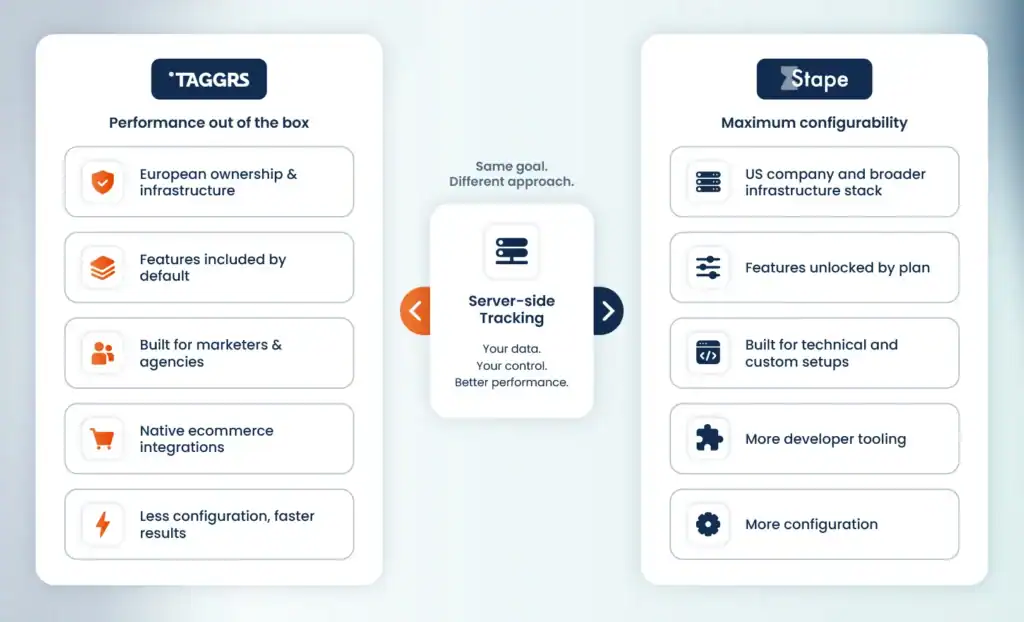
TAGGRS is a Dutch company that provides managed sGTM hosting on independent EU infrastructure, ensuring your data stays fully under European jurisdiction. The entire data chain is European, from hosting through to enrichment. Our main goal is to give organizations full control over optimizing their data for performance in a secure and privacy-friendly way. Users can benefit from out-of-the-box features that help improve their data quality, including the Enhanced Tracking Script, cookie recovery, analytics and integrations with major ecommerce platforms.
Stape is a US-registered company that provides managed sGTM hosting on Google Cloud. Their platform is aimed at tracking specialists who want to build custom solutions and are comfortable configuring them. It is built around power-ups, individual components you enable and configure per container, with access to them distributed across the plan tiers.
TAGGRS pushes the technical complexity to the backend. The features most marketers need are available by default and don’t have to be assembled from optional parts. The ecommerce apps and template gallery cover the standard destinations out of the box. The product is built around agencies and marketing teams setting up Server-side Tracking without a developer alongside them.
Stape's catalog points at a different user. Native mobile and backend SDKs, a provisioning API, MCP servers, an in-container database, file proxy and request scheduling are tools for building custom tracking infrastructure, and its power-ups are enabled and configured per container.
If you want Server-side Tracking that works from the start, with the tools most marketers actually need for a boost in performance already included, TAGGRS will be the right choice for you. If you want to customize everything and are comfortable with the highly technical configuration, Stape gives you more of that.
This page works through key similarities and differences between TAGGRS and Stape, along with pricing, features, compliance, support, how each of them suits agency needs and which one will be the right platform depending on your requirements.
What both platforms provide
Both products host your server-side Google Tag Manager container, replacing a self-managed setup on Google Cloud Run or App Engine.
Both handle:
- Provisioning and patching the sGTM container image
- A first-party tracking subdomain (sgtm.yourdomain.com) with managed SSL, as well as a same origin domain (yourdomain.com/sgtm)
- Autoscaling under traffic spikes
- Serving gtm.js from your own domain, so ad blockers pass it over
- A dashboard for request volume and debugging
Neither platform replaces GTM. You still build tags, triggers and variables in Google's server container interface.
Both TAGGRS and Stape are managed infrastructure plus a set of features sitting in front of that container.
This puts the decision on which platform to choose on the following aspects:
- Who controls the infrastructure
- What you pay per request
- Which features are available for each plan
- Which integrations exist
- How much configuration you want to do yourself
Infrastructure and jurisdiction
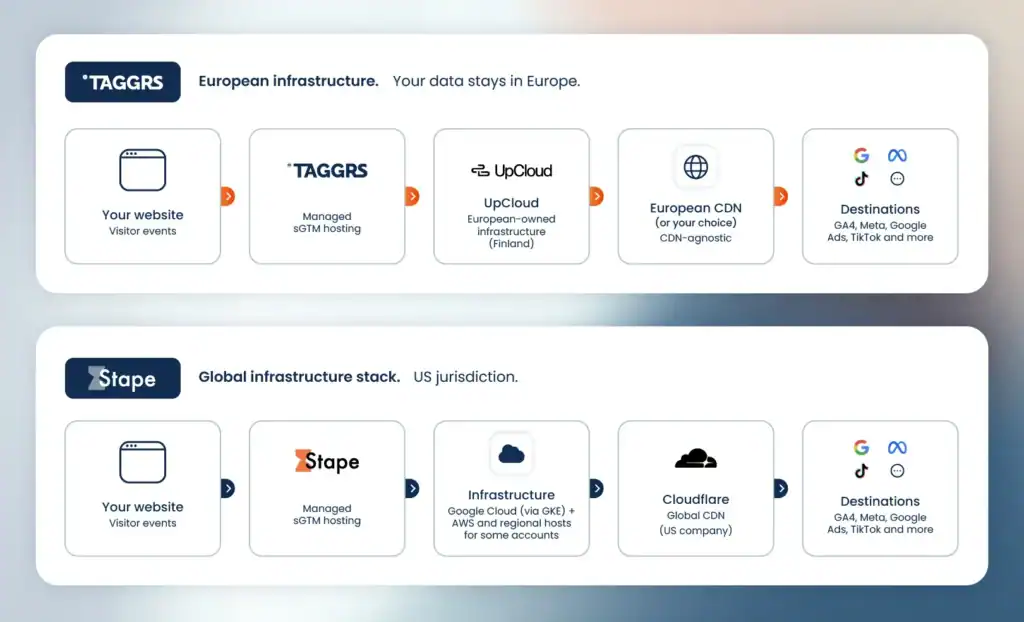
The infrastructure aspect is the clearest difference between the two platforms.
| TAGGRS | Stape | |
| Legal entity | TAGGRS, Heerenveen, Netherlands | Stape Inc., Dover, Delaware, USA |
| Corporate jurisdiction | Netherlands | United States |
| Founded | 2022 | 2021 |
| Team locations | Netherlands, Germany | US, Ukraine |
| Infrastructure | UpCloud (Finland) – European-owned | Google Cloud Platform via Google Kubernetes Engine; AWS and regional hosts for some global accounts |
| EU infrastructure | Standard on every account, ability to choose from 26 countries | Stape Europe on Scaleway (French provider), four zones, selected at registration |
| CDN | CDN-agnostic | Global CDN via Cloudflare (US company) |
What this means in practice
Stape Europe runs on Scaleway across four EU zones. However, that doesn’t change the EU sovereignty and US Cloud act part.
The difference is in corporate control. The US CLOUD Act reaches data held or controlled by companies subject to US jurisdiction, wherever the servers physically sit. Stape's parent entity is registered in Delaware. Their global product runs on Google Cloud and their CDN on Cloudflare, both of which are US-controlled companies.
TAGGRS is a Dutch company running on European-owned providers. Every entity in the chain sits under European jurisdiction, which puts US legal orders outside its reach.
Stape's own EU hosting page states plainly that their European servers alone don't make a Google Analytics setup GDPR-compliant and that pseudonymization still has to be configured manually in the sGTM interface.
The infrastructure you choose is something you can’t change later. Everything else in your setup stays adjustable; the ownership of the servers is fixed on the day you choose a vendor.
Pricing
Both platforms use flat monthly subscriptions per container. Neither charges usage-based egress or per-operation fees.
TAGGRS (EUR, annual billing; monthly runs roughly 13% higher):
| Plan | Price/month | Requests | Per 1,000 requests |
| Free | €0 | 10,000 | — |
| Basic | €22 | 750,000 | €0.029 |
| Pro | €57 | 3,000,000 | €0.019 |
| Ultimate | €127 | 10,000,000 | €0.013 |
| Enterprise | Custom | Unlimited | — |
Stape (USD, annual billing; monthly runs 20% higher). Intermediate "+" tiers exist between the named plans:
| Plan | Price/month | Billed yearly | Requests | Per 1,000 requests |
| Free | $0 | – | 10,000 | – |
| Pro | $17 | $200 | 500,000 | $0.034 |
| Business | $83 | $1,000 | 5,000,000 | $0.017 |
| Enterprise | $167 | $2,000 | 20,000,000 | $0.008 |
| Custom | Quote | Quote | Unlimited | – |
At roughly €0.88 to the dollar, Stape's tiers land near €15, €73 and €147.
The TAGGRS free tier covers 10,000 requests a month with no card required, and it carries the same tracking capabilities as the paid plans. Cookie recovery, Enhanced Tracking Script, analytics dashboard and data enrichment features are all included in the free plan. This gives you the ability to really test the setup before you commit to anything.
These prices describe capacity. What each tier includes is a separate question, and the two platforms answer it differently.
Feature access by plan
On Stape, feature access is tied to plan tiers. On TAGGRS, everything that affects the quality of your data is included on every plan, including Free.
Here's how Stape maps features to price:
| Stape feature | Lowest plan including it | Price |
| Logs (3 days), Cookie Keeper (standard cookies), Bot Detection, Ad Blocker Info, Stape Store | Pro | $17/mo |
| Enricher, Monitoring, Multi-domain, multi-zone infrastructure, File Proxy, Block Request by IP, 10-day logs | Business | $83/mo |
| Account manager, 50 domains, log export to S3/GCS | Enterprise | $167/mo |
| SSO, dedicated IP, private cluster, custom DPA | Custom | Quote |
| Support SLA | Community forum on Free; up to 3 business days on Pro; 2 on Business; 1 on Enterprise | – |
On TAGGRS, the tracking capabilities are identical on every plan, including Free:
- Enhanced Tracking Script
- Data Enrichment
- Cookie Recovery
- Analytics & monitoring
- PII anonymizer
- Google service account
- CDN compatibility
Stape includes the service account, its Global CDN, and the Anonymizer and Custom Loader equivalents on Free as well. Their Cookie Keeper starts at Pro ($17), and the Enricher and Monitoring start at Business ($83).
Four TAGGRS features sit above the Free tier:
- The Consent Approval Graph from Basic (€22), with the Conversions by consent graph from Pro (€57)
- Multi-domain from Pro (€57)
- A dedicated account manager from Ultimate (€127)
- SSO, custom infrastructure, SLAs and onboarding on Enterprise
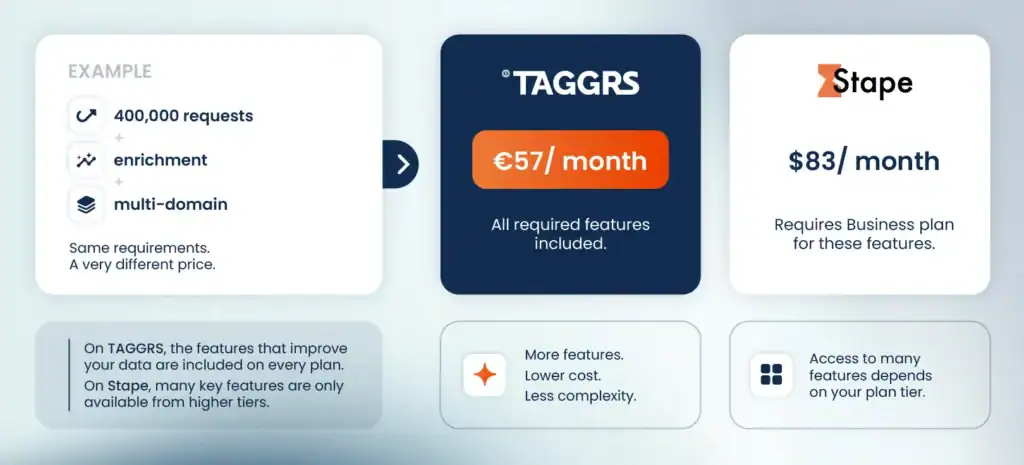
On Stape, a site that needs a Business-tier feature moves to that tier whatever its request volume. On TAGGRS, request volume is what moves a site between plans. The gap is widest for lower-traffic sites with fuller feature requirements, so it helps to put numbers on it.
Example
A site doing 400,000 requests a month needs data enrichment and multi-domain tracking. On Stape, the Enricher and Multi Domains both start on Business, so the site pays $83/month and carries 5M of capacity that it doesn’t really need. On TAGGRS, enrichment is part of every plan, and multi-domain starts at Pro, so the same site pays €57 and carries 3M.
How a "request" is counted
Both platforms bill based on requests. A request is broader than an event. An event is a single tracked hit such as page_view or purchase. A request is any HTTP call your server container receives, which also covers script loads like gtm.js, gtag.js and analytics.js, cookie-setting calls, GTM preview and debug traffic, and bots or crawlers reaching your subdomain directly. Therefore, your request count is always higher than your event count on either platform.
Two consequences follow:
- First, the number in your GA4 events report understates the plan you need, often by a wide margin.
- Second, traffic you'd never think of as tracking still consumes allowance, such as a crawler hitting your tagging subdomain, or using preview mode to debug a new tag.
Stape's calculator asks separately for pageviews, other events, number of sGTM clients, and whether you use Custom Loader, Cookie Keeper, Enricher, File Proxy and Stape Store, because each of those increases your request total.
Seeing what's consuming your plan
The TAGGRS Analytics dashboard includes a Request distribution graph with a Show categories toggle that breaks your total into its actual sources:
Enhanced Tracking Script, GA4, Google Tag, Google Tag Manager Preview Mode, Google Tag Manager Tracking Script, Service Worker, Set Cookie, Other (bots, crawlers, direct subdomain visits)
That turns plan usage into something you can act on. If your volume climbs unexpectedly, you can see whether that’s caused by traffic growth, a service worker firing more than expected or bot traffic hitting your subdomain, and then you can address it rather than having to immediately upgrade to a higher tier.
On Pro and above, the Bot traffic graph breaks automated traffic down by named crawler, so a volume spike can be attributed to a platform recrawl rather than investigated as a tracking fault.
TAGGRS vs Stape: Feature by feature
Ad-blocker and tracking-prevention resilience
Ad blockers, Firefox's Enhanced Tracking Protection and Brave's Shields all work the same way, recognizing tracking scripts and requests and stopping them before they load. Both platforms address this, and the difference is in where they intervene.
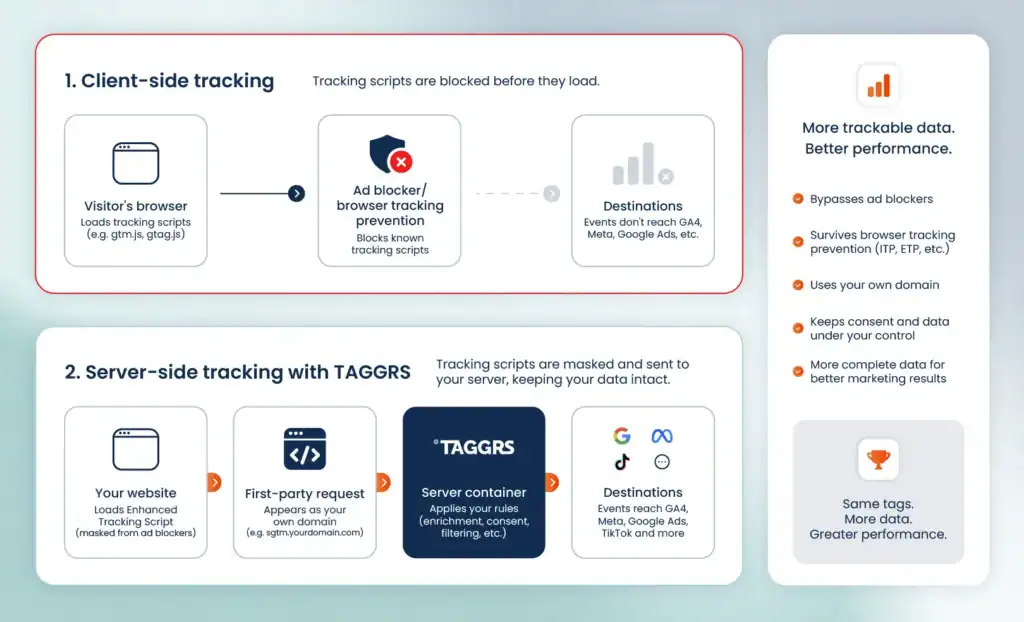
Stape's Custom Loader rewrites the gtm.js and gtag.js paths so the script arrives from your domain under a name that ad blocker filter lists don't recognize. This method is outdated, as all major ad blockers detect this pattern.
TAGGRS's Enhanced Tracking Script takes it one step further, by masking GTM and GA4 references at the browser level before the request leaves the page, leaving no trace for ad blockers. This has a significant uplift in trackable data and therefore your performance.
Further reading: How to recover data lost to ad blockers.
Cookie lifetime
Blocking is one problem, cookie lifetime is another. Safari's Intelligent Tracking Prevention caps how long cookies survive, including cookies your server sets when they reach the browser from a different IP than the site itself. Once a cookie expires, a returning visitor registers as new and their conversion is credited to the wrong session rather than the campaign that brought them in. On products with long decision cycles, this is where a lot of attribution goes missing.
Both platforms solve this issue. A first-party master cookie holds the visitor's ID, and any marketing cookie the browser has dropped gets rebuilt from it. Both extend the lifetime of supported cookies from the seven days allowed by ITP to as much as 13 months, which keeps returning visitors recognizable and attribution windows open.
The difference is the plan you need.
- TAGGRS Cookie Recovery is on every plan, Free included. It runs on the Enhanced Tracking Script.
- Stape Cookie Keeper starts at Pro ($17) for the supported cookie list. Cookies you define yourself require Business ($83).
Data enrichment
Enrichment adds context to an event after it reaches your server and before it goes on to GA4, Meta or Google Ads. Bot detection runs at the same point, keeping crawler traffic out of your reports and out of the conversion data you send to ad platforms.
- TAGGRS Data Enricher adds geographic location, device type and browser details to every incoming event, and filters bot traffic before it reaches your reports or the conversion data you send to ad platforms. This is available on every plan, including Free.
- Stape splits this across tiers. GEO Headers and User Agent Info cover geographic and device signals from Free. The Enricher requires Business ($83).
Profit-based conversion values
Most conversion tracking sends revenue to the ad platforms, which means the bidding algorithms optimize toward turnover rather than margin. A high-revenue order on a low-margin product looks like a win.
TAGGRS lets you send profit as the conversion value instead, calculated in the server container so cost prices never reach the browser. The POAS Tracking Connector reads a JSON product feed you already maintain in a tool like Channable, looks up every item in the order and returns the profit for that order as a single variable you can use as the conversion value in Google Ads, Meta and GA4.
Stape offers a POAS Data Feed from their Pro plan ($17).
Analytics, logging and debugging
TAGGRS gives you an analytics dashboard built around four headline KPIs, each with its change against the previous period:
- Total GA4 events – your baseline volume and the first place where broken tracking shows up
- Tracking prevention impact – the share of events Safari's ITP, Firefox's ETP and similar would have blocked on a client-only setup
- Adblock impacted events – the share of events that would have been blocked by ad blockers, recovered through the Enhanced Tracking Script
- Consent rate – the percentage of users who granted consent and to what extent
Each KPI drills into a graph that explains the movement. Signal Comparison plots server-side volume against the comparable client-side volume. The gap between those lines is your uplift.
The Bot traffic graph on Pro and above shows automated traffic over time, broken down by named source such as AdsBot-Google and Meta Crawler. When request volume spikes unexpectedly, this is where you check before having to search for a broken tag, and it separates automated from human traffic when you need to explain container volume to a client.
Improved data quality, Browser Analytics and Consent Approvals sit behind the other three, breaking recovery down by source, showing your browser mix, and splitting consent into Granted, Denied by Default and Not Set. Everything filters by event name, device, browser and domain.
TAGGRS measures uplift from incoming server container data, so the figure holds up even when consent handling or a client-side tag is misconfigured. There's also a webhook tester for firing test events at endpoints while live data stays untouched.
The Conversions by consent graph splits conversion volume and value by consent state, so you can see how much revenue is falling outside full consent and never reaching GA4 or Google Ads in full. That turns cookie banner work into a business case with a number behind it.
Stape Analytics is available on every plan and covers a number of statistics on the surface level It reports requests recovered from ad blockers and from browser tracking prevention, breaks traffic down by browser, separates bot requests, and splits requests by consent choice into Opt in, Opt out and Not set. Its Requests by client view splits GA4 and Data Client traffic by individual event name with a recovery percentage for each.
Stape Analytics is off by default in new containers and depends on the Custom Loader power-up, and it excludes offline server-to-server traffic such as CRM webhooks. Paid plans add request logs recording incoming and outgoing requests with client, event name and status code, retained 3 days on Pro and 10 on Business. Monitoring, from Business upwards, alerts against rules you define.
The TAGGRS dashboard is on from the moment a container connects and reports uplift from the gap between two measured series, so the number holds up regardless of how the client-side tags are configured. The Conversions by consent graph on Pro and above reports what the missing data is worth in revenue, which is the question a marketer is actually asked.
Consent and privacy controls
TAGGRS provides PII anonymizer (IP and user agent) on all plans, plus the Consent Approval Graph from Basic upward. It reports the consent state actually transmitted to Google via the GCD and gcs parameters rather than what users clicked in the banner, and breaks results out across four Consent Mode parameters separately, covering conversion measurement, retargeting, Enhanced Conversions and analytics. Event filtering works across all tracked events, so consent can be read at any point in the funnel. It analyzes consent transmission and does not replace a CMP.
Stape offers Anonymizer, which deletes or anonymizes GA4 data before it reaches sGTM, available from the Free plan. Consent Mode is supported, with pseudonymization configured manually in the sGTM interface. Stape Analytics reports requests by consent choice, splitting them into Opt in, Opt out and Not set from the Google Consent Status parameters.
Both platforms report how consent distributes across traffic. Stape reports the overall gcs status. TAGGRS separates the four Consent Mode parameters, so an underperforming category is visible against the others, and adds the conversion value layer on Pro and above.
Multi-domain and multiple sites
Both platforms bill per container, one container per site. Each website needs its own subscription on both. Both allow multiple containers under one account with consolidated billing.
For multiple domains inside a single container:
- TAGGRS: From Pro (€57).
- Stape: Up to 20 domains on Business ($83) or up to 50 on Enterprise ($167).
Ecommerce integrations
TAGGRS ships native apps and extensions for Shopify, WooCommerce/WordPress, Magento 2, PrestaShop, Shopware and Lightspeed, available on every plan. There is also a GTM copy/paste Chrome extension and bulk product import that remove most of the manual container setup.
Shopify onboarding is the fastest path in. The app installs from the Shopify App Store, provides the container and gets Meta and Google conversions reporting in minutes. Paired with the template gallery, which covers Meta CAPI, Google Ads Enhanced Conversions, GA4 and TikTok out of the box, a standard store can go live the same day.
Two significant platforms for European ecommerce, Shopware and Lightspeed, are covered by TAGGRS on every plan.
Product scope
TAGGRS focuses on two things: sGTM hosting and Meta CAPI Gateway hosting. The infrastructure, the ad-blocker resilience, the enrichment and the analytics all serve those. Everything we build goes into making Server-side Tracking work to the maximum of its ability.
Stape's catalog extends into native app SDKs, CRM connectors and additional platform gateways. These serve teams building custom tracking infrastructure. If your requirements run past sGTM into native app tracking, map those needs specifically before choosing either platform.
Security and compliance
| TAGGRS | Stape | |
| ISO 27001 | Certified | Certified |
| GDPR | Compliant | Compliant |
| Corporate jurisdiction | Netherlands | United States (Delaware) |
| EU-owned infrastructure | Standard | Opt-in at registration |
| Public trust portal | Transparency Center | Vanta Trust Center |
| MFA / 2FA | All plans | All plans |
| SSO | Enterprise | Custom plans |
| Custom DPA | Enterprise | Custom plans |
| Transfer ownership | All plans | All plans |
| Shared account access | Consolidated invoicing, all plans | All plans |
| Status page | Yes | Yes |
TAGGRS holds ISO 27001 certification and operates GDPR-compliant by design. For European businesses that's the baseline your auditor asks about, and we meet it while removing the transfer-chain question entirely.
Stape carries certifications aimed largely at US-centric procurement, such as SOC 2 and HIPAA. Which certification carries weight depends on where your customers are and who reviews your processors.
Support
| TAGGRS | Stape | |
| Support on the free plan | Live chat and help desk | Community forum |
| Support on paid plans | Live chat, help desk, documentation hub | Email and chat, 24/7, from Pro |
| Response target | Within 24 hours on e-mail, 5 min on chat | 3 business days (Pro) → 2 (Business) → 1 (Enterprise) |
| Scheduled calls | Available, including with developers | 2 hours/month on Custom plans |
| Dedicated account manager | Ultimate (€127) | Enterprise ($167) |
It’s important to note that TAGGRS’ support team consists of people with hands-on experience in Server-side Tracking, not general IT support agents. This translates to better practical guidance they can provide and a more advanced approach to troubleshooting.
TAGGRS puts live chat and the help desk on every tier, so you can reach a person before you've paid anything. Stape's Free plan routes to the community forum, and their first paid tier carries a three-business-day SLA.
For agencies
On TAGGRS, core tracking capabilities are identical on every plan, so per-client cost tracks traffic alone, whether the client is a small local retailer or an enterprise account. On Stape, several features start at the Business tier, and their public API and MCP server give you programmatic container provisioning.
TAGGRS is actively building tools for agencies, including the ROI calculator and free website tracking checker.
Both platforms run partner programs with consolidated invoicing across sub-accounts, so a client portfolio bills on one invoice.
What this costs per client
Every TAGGRS plan includes data enrichment, cookie recovery, PII anonymization and the analytics dashboard, so each client's plan is set by their request volume. The smallest account in your portfolio runs the same tracking setup as the largest.
On Stape, the Enricher, Monitoring and Multi Domains start at Business ($83).
Both platforms bill per container, and one container is one client site, so that tier applies to every client who needs those features rather than being absorbed once across the portfolio.
TAGGRS also offers:
- Implementation support. A setup review typically costs €180–€360, or you can get a scoped quote for full implementation.
- Partner program and a partner directory listing.
Who TAGGRS is built for
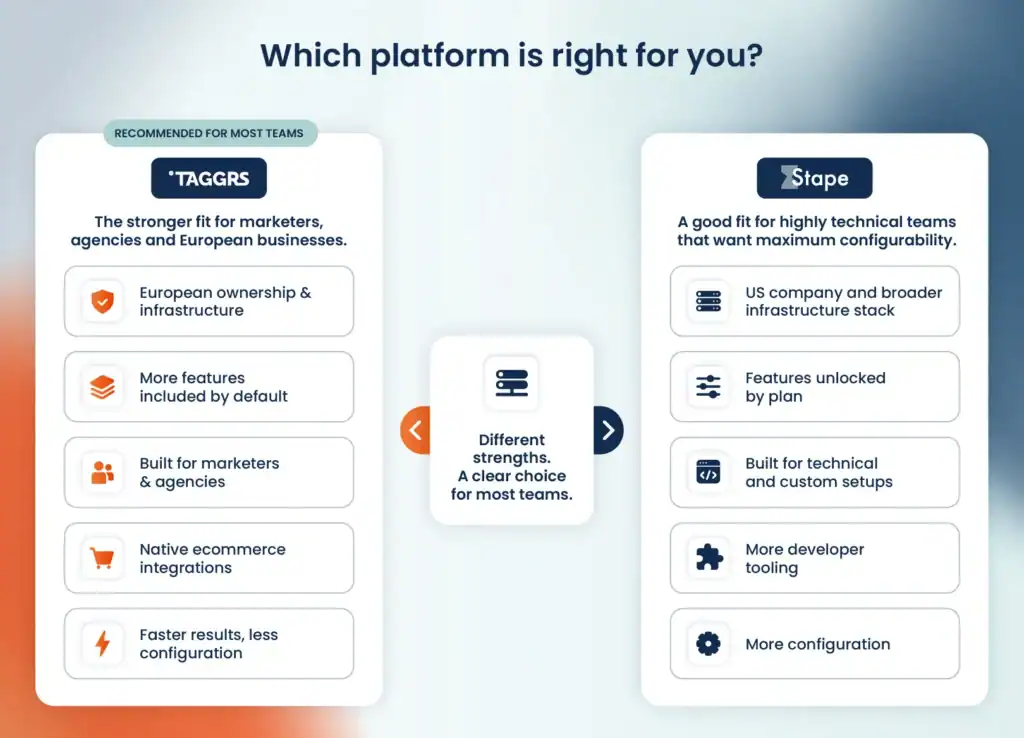
TAGGRS is built for teams that want better data going into their ad platforms, without a developer to set it up and without their data leaving European control.
This matters most for:
- Agencies managing a full client portfolio. Every client runs the same feature set at their own volume, from the smallest account to the largest.
- Ecommerce, where improved data collection has the most direct effect on revenue. Native apps for Shopify, WooCommerce, Magento, PrestaShop, Shopware and Lightspeed.
- Lead generation, where long decision cycles make cookie lifetime and attribution accuracy decisive.
- Enterprise teams that need to follow privacy regulations and document their data processing chain for a DPO, a regulator, a public-sector client or procurement. With TAGGRS, they get a Dutch entity, hosting on European infrastructure and a data chain that begins and ends in the EU.
- Marketers who need to prove the value of Server-side Tracking internally. The analytics dashboard reports what your missing data is worth, not just how much was recovered.
Why choose TAGGRS
TAGGRS is the strongest fit for European businesses and agencies that need tracking to perform well and hold up under review, from single-site ecommerce to enterprise portfolios.
Infrastructure ownership is fixed the day you sign up. TAGGRS runs on European-owned providers under a Dutch entity, so the chain of control ends in the EU. Plan structure decides what you pay, and every TAGGRS tier carries the same tracking capabilities, so your plan follows your request volume.
Setup is designed for marketers rather than developers. The ecommerce apps and template gallery cover the standard destinations out of the box, support reaches a person who works with Server-side Tracking daily, and the analytics reports what your tracking is worth rather than only what it recovered.
The free plan is the quickest way to check it against your own numbers, with 10,000 requests a month and no credit card required. If you'd rather go through your requirements with someone first, book a session with a TAGGRS specialist.
FAQ
Is Server-side Tracking GDPR-compliant on its own?
No. Server-side Tracking gives you the means to be compliant, and your configuration decides whether you are. Routing events through a server you control lets you strip IP addresses and other identifiers before anything reaches Google or Meta, apply consent rules in a single place, and choose exactly which fields each destination receives. Each of those is a setting you configure, whether in the sGTM container, consent platform or your tags. Your hosting choice does settle where the processing happens and which country's courts can reach the company doing it.
Does managed hosting mean the tracking configures itself?
Both platforms host the container. You are still responsible for creating tags, variables and triggers, and maintaining them as ad platforms change their requirements. For more complex setups, TAGGRS offers implementation support.
Can I test TAGGRS alongside my current setup?
Yes. Run a TAGGRS container on a separate hostname, point a test configuration at it, and compare event volumes against your existing setup before committing to anything. The free plan covers 10,000 requests a month, which is enough to validate a standard configuration end to end.
Do I need a plan per website?
Yes, on both platforms. One container equals one site. Multiple domains inside one container is a separate feature included in the Pro plan for TAGGRS and Business for Stape.
What happens if I exceed my request limit?
Forwarding pauses until you upgrade. Enable automatic upgrades and it stays continuous. Confirm the equivalent policy on any Stape plan you're considering.
Can I try TAGGRS before paying?
Yes. The free plan covers 10,000 requests per month and renews monthly, requires no card, and includes the full feature set apart from Consent Approval Graph, multi-domain, account manager and SSO. The free tier is how we handle trials, so validate everything on it before you upgrade.
Disclaimer: This comparison is based on publicly available information from both providers as of September 2026. Pricing and features change over time, so verify current details and terms before making a decision. Additional sources: Stape pricing, Stape European hosting.