Google Tag Gateway vs Server-side GTM: Which one do you need?

 Mariusz Brucki | 13 May 2026 | Last updated:
 Google launched this as first-party mode in 2024, renamed it Google Tag Gateway for advertisers in 2025, and has been expanding it steadily since. It split opinions immediately. Some teams treated it as the end of the Server-side Tracking conversation. Others dismissed it as a lightweight workaround.
Neither of those is actually accurate.
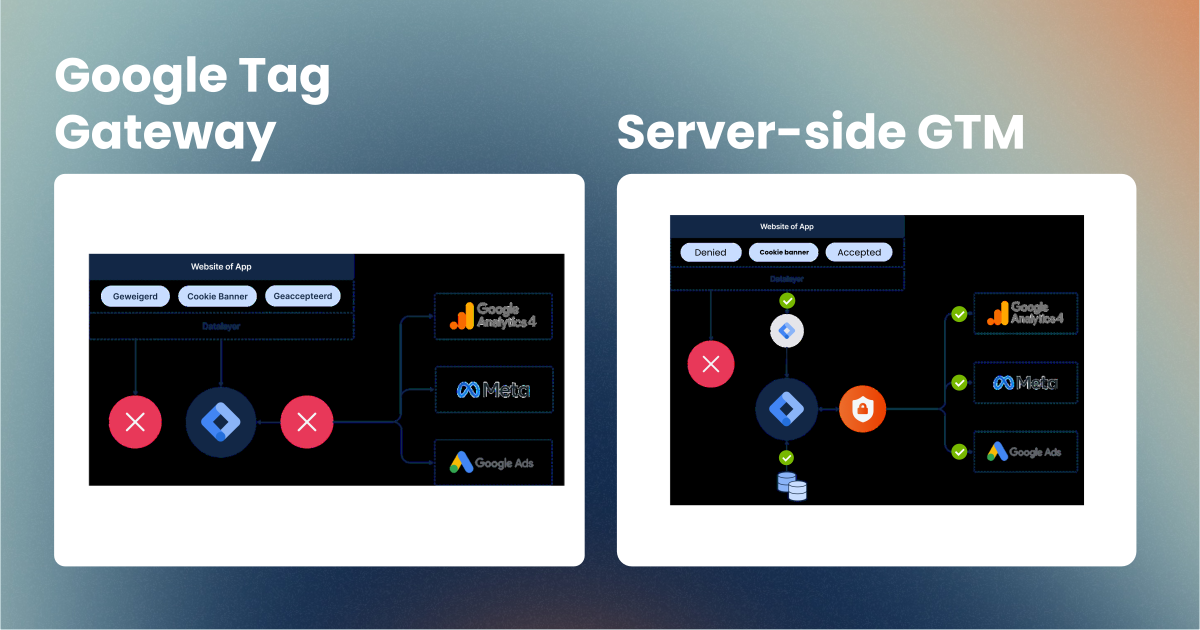
Reality is: the 2 tools address different problems at different layers of your setup. GTG changes where scripts load from. Server-side GTM changes where data gets processed and where cookies get written. Those are not the same thing, and confusing them leads to setups that look complete on paper but leave real tracking gaps open.
In this article, you will discover what Google Tag Gateway changes in your setup and what it leaves untouched, how server-side GTM handles event processing, cookie lifetime, and cross-platform coverage differently, a direct comparison of both tools across 7 dimensions, and a clear framework to decide which setup (or which combination) fits your tracking stack.
In short:
- Google Tag Gateway changes where your Google scripts load from. It's a CDN configuration change that recovers data lost to hostname-based blocking, covers Google products only, and does nothing for Safari's 7-day cookie cap.
- Server-side GTM changes where events get processed and where cookies get written. It moves the event pipeline off the browser entirely, writes cookies via HTTP headers so ITP doesn't apply, and works with any platform that has a server-side API.
If your stack is Google-only and your conversion cycle is short, GTG is a reasonable low-effort win. If either of those isn't true, it won't address your issues.
What is Google Tag Gateway?
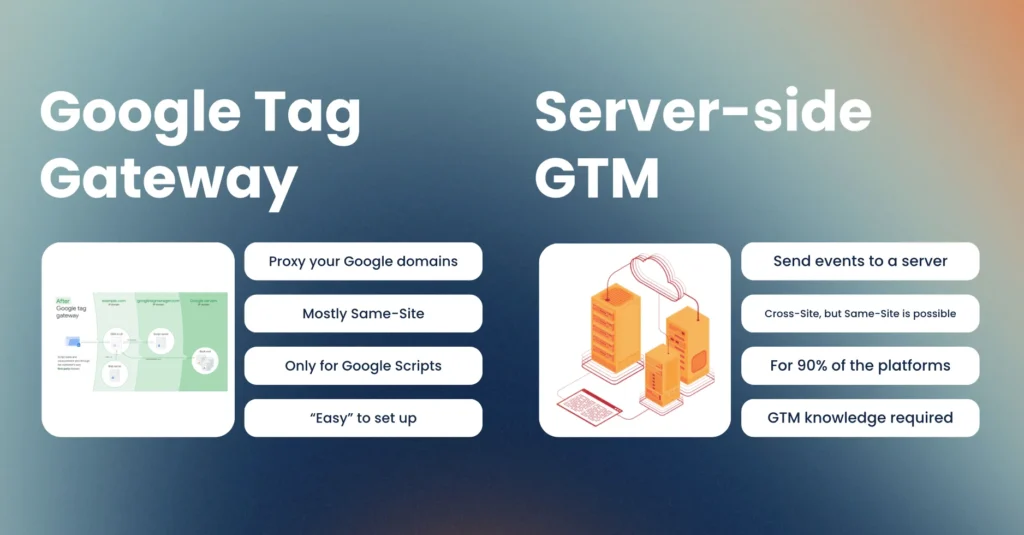
Google Tag Gateway is a Google-managed proxy for your Google tags. Instead of loading from googletagmanager.com, your Google scripts load from a path on your own domain, something like yoursite.com/metrics. GA4 data collection shifts from Google's collection endpoint to that same path.
The domain is yours. Google manages the infrastructure behind it. Your CDN or load balancer forwards that path to Google. Cloudflare came first, followed by Akamai and Fastly, then Google Cloud Platform, which reached general availability on 1 June 2026 using GCP's global external Application Load Balancer. Amazon CloudFront support arrived after that, configured through Tag Assistant. Setup is mostly a CDN configuration change and a container update.
There is also a second way to run GTG: enabling it inside an existing server-side GTM container. In that case GTG runs wherever your container runs, usually a subdomain like data.yoursite.com.
One hard constraint worth naming upfront: GTG covers Google products only. So GA4, Google Ads, Floodlight, and Google Tag are included. If you run Meta, TikTok, Klaviyo, or anything outside that ecosystem, GTG doesn't touch those events.
What does GTG fix?
Most ad blockers work by blocking requests to known third-party hostnames. googletagmanager.com is on every major block list. GTG sidesteps that by routing those requests through your domain, which isn't on any list.
That's a real improvement. Real-world aggregated data puts the uplift at around 4-6% for Google data that would otherwise get dropped at the script level. For more details, see the comparison data by Niek Schlepers.
Google's own launch figure was higher, at around 11% signal uplift. The gap between that and independent measurements isn't necessarily either side being wrong. Google's number reflects setups where the gateway was configured well on sites that previously had no first-party routing at all. Independent tests tend to measure incremental gain on sites that already had some protection in place. Where your site lands depends on how much of your traffic runs blockers that match on hostname only, which is the specific loss GTG addresses.
Two things GTG doesn’t fix
1. The path problem
First, GTG doesn't solve the path problem. GTG changes the domain and lets you pick a custom path prefix, but the known endpoint patterns stay in the URL. A GA4 data collection request still hits /g/collect behind your prefix, something like yoursite.com/metrics/g/collect?v=2&tid=G-12345678. Ad blockers like Ghostery and uBlock Origin don't only match on hostnames. They also filter on known path signatures, and /g/collect is a well-documented pattern in most major block lists, regardless of which domain serves it. Sophisticated blockers still catch these requests, which limits how much GTG can actually recover.
2. Cookie lifetime
Cookies are still set by JavaScript running in the browser. When your GTM container fires client-side, it writes cookies via document.cookie. Safari's Intelligent Tracking Prevention caps those cookies at 7 days. Doesn't matter which domain served the script. The cookie origin is the browser's JavaScript environment. GTG doesn't change that layer.
For any attribution journey longer than a week, or for any visitor coming back to convert after 7 days in Safari, the 7-day cap still applies. Same as before. The script loading improved; the cookie problem didn't move.
Safari has kept tightening this. Safari 27, which shipped in September 2026, added blocking at the network transport layer - it now checks the destination IP of outbound connections, not just the domain a script came from. That's worth reading if you're considering GTG specifically, because it's the clearest example of a browser-level change that a first-party domain doesn't solve.
What changed in GTM in August 2026
Google has been merging Google Tag and Google Tag Manager into a single system. The GTM interface now has a redesigned Overview page, container configuration has moved into a Settings section, and triggers, variables, templates and folders sit under a collapsible Advanced section. Google also added visual tagging, which lets you configure some events by selecting elements directly on the page.
The part relevant here is the architecture. Google says the update allows Tag Manager containers to send data directly to Google destinations. That tightens the integration between GTM, the Google tag and the gateway, and it makes the Google-only path smoother than it was when this comparison was first written.
It doesn't change the two limits above. Cookies are still written by JavaScript, so ITP still applies, and the coverage is still Google products only. But if you're weighing effort as part of the decision, the Google-only route got easier in August.
What is Server-side GTM?
Server-side GTM takes event processing off the browser entirely and puts it on a server you control.
Your browser sends one event to your server. The server receives it, processes it, and forwards it to each platform via server-to-server API calls. If you use the Enhanced Tracking Script along with your server container, the ad blockers have no visibility into those calls. There's nothing running in the browser to block.
How does Server-side GTM work differently?
The cookie situation changes significantly. Your server writes cookies using HTTP Set-Cookie response headers. ITP's 7-day cap targets cookies written by JavaScript. Cookies set via headers from a first-party origin sit outside that restriction. A correctly configured server-side setup can write first-party cookies that last 365 days or longer.
For sites where customers take weeks to decide, that difference in cookie lifetime is the difference between accurate attribution and attribution that's incomplete by design.
Coverage is another gap server-side GTM fills. The same container can route events to GA4, Google Ads Enhanced Conversions, Meta Conversions API, TikTok Events API, and most other platforms that offer a server-side API. If cross-channel campaigns are losing signal and it's starting to show up in your retargeting performance, one event pipeline to all platforms is where the structural fix sits.
The tradeoff? GTM needs hosting, configuration, and GTM knowledge to run well. It's not a quick toggle.
Google Tag Gateway vs Server-Side GTM: A direct comparison
| Google Tag Gateway | Server-Side GTM | |
| What changes | Where scripts load from | Where event processing happens |
| Cookie setting | JavaScript (browser) | HTTP headers (server) |
| ITP impact | No change | Cookies can last 365+ days (with a proper sst setup) |
| Ad blocker bypass | Hostname-level only (known paths like /g/collect stay exposed) | Full server-to-server calls |
| Platform coverage | Google products only | Any platform with a server API |
| Setup complexity | Low | Medium to High |
| Typical data uplift | 4-6%* | 14-20%* |
* Check the data and comparison in GTG or server-side GTM? The server-side dilemma by Niek Schlepers
Those uplift percentages are averages, so it's good to see your own numbers to get a better idea of what to expect. This calculator estimates what a server-side setup would recover for your specific traffic based on your platform mix and browser split.
There's also a technical distinction worth understanding if you care about same-site vs same-origin behavior. GTG's CDN setup requires a path on your root domain (yoursite.com/metrics), which is same-origin with your site. A typical sGTM deployment runs on a subdomain like data.yoursite.com. That's same-site, but not same-origin. You can also deploy sGTM behind a root-domain path, but that requires a reverse proxy in front of your container. Some browsers and some blockers treat subdomains and root-domain paths differently, so where your endpoints live is an architectural choice, not a cosmetic one.
Learn more about same-origin tracking and how it can restore cookie lifetime.
Which setup is right for your use case?
GTG is the right choice if:
- Your stack is Google products only (GA4, Google Ads, Floodlight)
- Most of your users are on Chrome
- Conversion cycles are shorter than 7 days
- You want a low-overhead improvement with minimal configuration
sGTM is the right choice if:
- You track across multiple platforms (Meta, TikTok, Klaviyo, Google)
- Your customers take more than 7 days to convert
- You need cookies that persist beyond Safari's ITP limit
- You want server-side consent enforcement and PII control before data leaves your infrastructure
- You want to understand the full scope of what server-side tracking recovers
Some sectors hit these limits sooner than others. iGaming and health and wellness brands both run into the cookie lifetime and consent constraints early, because their conversion cycles are long and their ad platforms restrict what can be tracked client-side. If you're on WooCommerce or Shopify, the platform-specific setup guides cover the ecommerce event mapping in more detail.
Here’s an example.
You track across platforms. A Meta server-side setup depends on sGTM, not GTG. TikTok, Klaviyo, and everything else outside Google's ecosystem does too.
Your customers take time to convert. Multi-week journeys in Safari need cookies that survive past day 7. GTG doesn't provide that.
You want to see what you're actually losing. The full picture of what server-side tracking recovers is hard to appreciate until you run both setups and compare.
You need data control beyond data recovery. sGTM lets you decide what gets forwarded to each platform, apply consent logic server-side, and strip PII before data leaves your infrastructure.
Most teams that take conversion tracking seriously reach server-side GTM eventually. GTG can be a useful first step. It just doesn't close the infrastructure question.
Can GTG and Server-side GTM work together?
Technically, Google Tag Gateway and server-side GTM operate at different layers, so they don't always conflict. However, we generally don't recommend running both together. In practice, combining GTG with your server-side setup can interfere with your existing server configuration. And since the risk isn't always predictable, our advice is to choose one approach rather than layer them on top of each other.
If you're already using server-side GTM with TAGGRS, you don't need GTG for script delivery. The Enhanced Tracking Script already handles that job, serving Google tag scripts from your own domain and managing cookie persistence server-side. GTG would be solving a problem you've already solved, with added complexity and potential conflicts along the way.
Not sure which side of that line your setup falls on? This guide walks through how resilient your current tracking setup is and what it's likely losing to blocking, cookie limits, and consent gaps.
GTG and sGTM: Where does TAGGRS fit?
Server-side GTM needs a server to run on. For most teams, the actual requirement isn't infrastructure management. It's performance, reliability, and proper consent configuration without dedicated DevOps time.
TAGGRS provides hosted sGTM infrastructure with built-in connectors for major ad platforms, consent mode integration, and privacy controls. Are you ready to move past the GTG layer and want to understand what the data recovery looks like for your specific setup?
Most teams that take conversion tracking seriously reach server-side eventually. The question is usually when, not whether.
Create a free TAGGRS account to run a server container without managing the infrastructure, or run a free audit first to see what your current setup is losing.
FAQ
Do I need Google Tag Gateway?
If you run GA4 and Google Ads without any server-side tracking, GTG is a practical improvement worth setting up. It recovers data lost to hostname-based blocking with very little implementation overhead. If you're already running sGTM, the incremental gain from GTG is smaller. Your events are already moving server-to-server. GTG mainly helps the script loading layer, which your sGTM setup may already handle depending on how your container is configured.
Does Google Tag Gateway fix Safari ITP?
No. GTG does not change how cookies are written. ITP applies to cookies written by JavaScript, regardless of which domain served the script.
What is the difference between Google Tag Gateway and server-side tagging?
Google Tag Gateway changes where your Google scripts load from. Your own domain instead of Google's domain. The scripts still run in the browser, cookies are still written by JavaScript, and ITP still applies. Sophisticated ad blockers that match on path patterns rather than just hostnames can still detect and block the requests.
Server-side tagging moves event processing from the browser to a server. Cookies get written via HTTP headers, which puts them outside ITP's reach. Events reach platforms via server-to-server API calls that ad blockers can't touch. And unlike GTG, sGTM works across every platform with a server-side API, not just Google's.
They operate at different layers. GTG improves script delivery for Google tags; sGTM handles the event pipeline, cookie lifetime, and multi-platform signal routing. In principle they're compatible, but running both can interfere with an existing server-side configuration in ways that aren't always predictable, so we'd suggest choosing one rather than layering them.
Do I need server-side GTM if I already use Google Tag Gateway?
GTG improves script delivery for Google tags. If you run non-Google platforms, need cookies that last beyond 7 days, or want full ad blocker bypass for all platforms, sGTM addresses those gaps.
Does Google Tag Gateway help with modeled conversions?
Indirectly. Conversion modeling fills gaps where observed data is missing, so anything that increases observed conversions reduces how much the platform has to estimate. GTG recovers some of that at the script level. A server-side setup recovers more of it, and also gives you first-party cookies that survive past Safari's 7-day cap, which is where a lot of the modeled share comes from in the first place.
Which CDNs support Google Tag Gateway?
Cloudflare, Akamai, Fastly, Google Cloud Platform and Amazon CloudFront. The GCP integration reached general availability on 1 June 2026 using the global external Application Load Balancer, and CloudFront is configured through Tag Assistant. You can also run the gateway inside an existing server-side GTM container rather than through a CDN.
Does Google Tag Gateway work with Meta or TikTok?
No. GTG covers Google products only - GA4, Google Ads, Floodlight and the Google tag. Events going to Meta, TikTok, Klaviyo or any other platform are unaffected by it. Routing those server-side requires a server container and the relevant platform API, such as Meta Conversions API or TikTok Events API.