Why Server-side Tracking can still lose data to ad blockers (and how to close the gap)

 Mariusz Brucki | 7 May 2026 | Last updated:
 Key takeaways
- Server-side Tracking alone does not protect against ad blockers that intercept the browser-to-server request before it reaches your server container.
- Standard tracking scripts in the market don't solve the data gap at the script layer.
- TAGGRS Enhanced Tracking Script encrypts the full event request (not just the GTM script URL) making it unrecognisable to any blocking filter.
- On high-blocker audiences (developers, marketers, analytics professionals) the uplift generated by the TAGGRS script reaches close to 30% more measured requests.
Server-side Tracking solves a real measurement problem. It moves data collection away from the browser and gives your setup a first-party server endpoint. For many teams, that is the biggest step toward better attribution.
But there is one layer that often gets missed.
Before an event reaches your server container, the browser still has to load the tracking script and send the event request. If either part is blocked, your server-side setup never gets the chance to do its job.
The dashboard may still look healthy. Events still arrive. Your server container is running. But a part of the data can leak before the first server-side request is even made.
For agencies and tracking specialists, that gap matters. You can build the right server-side architecture and still lose data at the script layer.
The TAGGRS Enhanced Tracking Script closes that gap. It replaces your standard GTM snippet with a script that encrypts the full browser-to-server request, making it unrecognisable to blocking filters. This article explains where the data gap starts, why encryption outperforms encoding at the script layer, and what measurable uplift agencies can expect.
Server-side Tracking does not start at the server
Most teams think of Server-side Tracking as a server container problem. They check whether the tagging server is live, whether GA4 receives events, and whether the conversion tags fire.
Those checks are useful, but they start too late.
A typical setup still depends on a browser-side tracking script — usually Google Tag Manager. GTM loads in the browser, starts the container, and sends requests to the server-side endpoint. For most setups, the script load is already solved. The GTM script is masked, so it loads without issue.
The weak point comes next.
How the GTM script creates a blind spot
After the script loads, it still has to send events to the server-side container. Even when those requests go to a first-party domain, the request path can still contain recognizable markers like /collect, /g/collect, or other analytics patterns. Ad blockers can detect those patterns and block the event before it reaches the server container.
That creates a failure mode that is hard to spot:
- the GTM script loads
- the server-side endpoint is first-party
- the request path still reveals what the request is
- GA4 and ad platforms receive fewer events
- campaign reports keep updating, but with less data than they should have
Nothing looks fully broken. You see data, just not all of it.
The result is a measurement blind spot. Server-side Tracking improves the path after the request reaches the tagging server, but it cannot process an event that was blocked in the browser because the request still looked like tracking.
That is where the uplift becomes visible. If the script layer and request path become harder to recognize, more events reach the server container.
The proof: 0.8% to 9.1% more measured page views
TAGGRS built the Enhanced Tracking Script to remove the weakest visible layer in modern tracking: the request that still looks like analytics before it reaches the server-side container.
The goal is simple. If a user gives consent and an event is supposed to be measured, that data should be able to flow to the server-side container instead of being stopped by a recognisable script or request path.
In practice, that makes the Enhanced Tracking Script one of the most resilient tracking scripts on the market. TAGGRS tested it with 30 first-mover partners and on the website you are reading right now. The difference was clear.
The TAGGRS Enhanced Tracking Script uplift benchmark
| Setup | Uplift in measured page views |
| Standard client-side tracking | Baseline |
| GTM script masking + first-party domain | +0.8% |
| TAGGRS Enhanced Tracking Script | +9.1% |
| High-blocker audiences (developers, marketers) | Up to ~30% |
With standard gtm.js masking and a first-party domain, TAGGRS measured a 0.8% uplift in page views compared with typical client-side tracking. That setup already solved part of the problem: the GTM script could load from a less recognizable path.
After implementing the new Enhanced Tracking Script, the uplift grew to 9.1% measured page views. The difference came from masking the whole request, not only the GTM script load. Instead of sending events through recognizable paths, the script made the full browser-to-server request harder for blockers to identify.
Across first-mover partners, the effect was the same. In stronger cases, the uplift reached close to 30% more measured events.
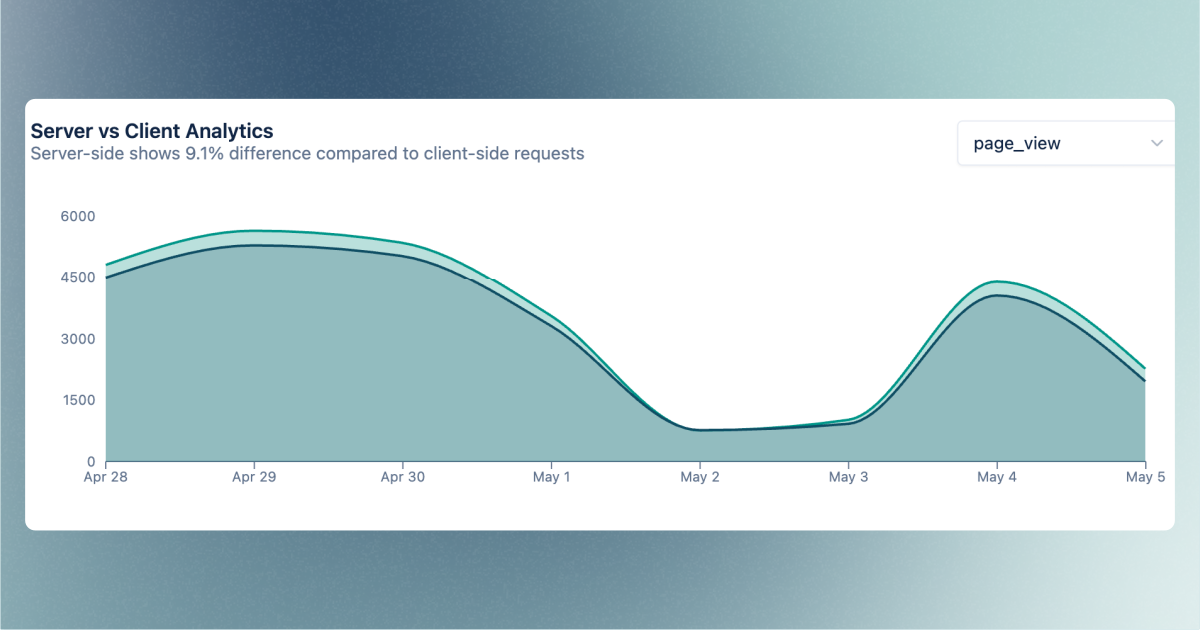
A 9.1% uplift is not a cosmetic reporting improvement. On a high-spend account, it can change the quality of the signal going back to Google Ads, Meta, GA4, or other platforms.
Better signal does not only improve reporting. It also gives ad algorithms more complete feedback. Campaigns are optimised on the events that survive the tracking chain. If part of that chain is blocked at the script level, the algorithm learns from an incomplete picture.
Why audience profile matters
Audience profile has a strong effect on the size of the uplift:
- Consumer-facing websites may see a modest uplift.
- Products used by developers, marketers, analytics teams, or tech buyers tend to see a higher percentage. These visitors are more likely to run ad blockers or stricter browser settings.
For agencies running tracking setups for performance-focused clients, the effect is consistently strong.
Why standard tracking paths are easy to detect
Ad blockers do not need to understand your full tracking setup. They look for patterns.
Those patterns can be domains, paths, file names, request shapes, or known analytics endpoints. A standard tracking request gives blockers a lot to work with. The path is familiar. The query structure is familiar. The network behavior is familiar.
Server-side Tracking changes the destination of many requests, but the path can still reveal what is happening. A request to a first-party domain can still contain a tracking-shaped path.
That is the weak point.
Think of it like clean code versus brittle code. Brittle code works as long as the environment is friendly. Change one assumption, and it breaks. Clean code is built with fewer fragile patterns, so it holds up better when the environment changes.
Tracking has the same problem. A setup can work perfectly in a clean browser test and still lose data when a visitor uses uBlock Origin, Ghostery, a strict privacy browser, or a filter list that targets common paths like /collect.
Resilience is not about hiding shady behavior. It is about making consented measurement less fragile.
Why others have not solved the script layer
Many tracking setups stop at server-side routing. They move GA4 or ad platform requests to a first-party endpoint, then assume the problem is solved.
That helps, but it does not fully protect the request after the script has loaded.
Some Server-side Tracking tools already recognize this problem. Their documentation explains that GA4 requests use recognizable patterns like /g/collect, and ad blockers can block matching requests even when the setup uses Server-side Tracking. The usual answer is to encode requests before they reach the server-side GTM container, then decode them before preview/debugging.
That is the right problem to solve. But in our earlier tests, the masking looked weak because the request structure could still be decoded and understood too easily. If the protection is mostly a readable encoding layer, such as base64-style masking, it is harder to treat it as long-term resilience. Filter lists can adapt once the pattern is known.
The stronger approach is not just to hide the word collect. The browser-side request should avoid stable patterns that ad blockers can match again next month.
Learn more about how to maintain accurate measurement and attribution despite ad blockers.
What the TAGGRS Enhanced Tracking Script changes
The Enhanced Tracking Script takes the stronger approach: it encrypts the request instead of only encoding it.
That difference matters. Encoding is like translating a sentence from English to Spanish. The sentence looks different, but anyone who knows the method can translate it back. It is still the same message in a different format.
Encryption works differently. The request is transformed with a key, so the browser-side path no longer exposes readable tracking markers like /collect or /g/collect. Before the request reaches the server-side container, TAGGRS can decrypt it and route it correctly.
The Enhanced Tracking Script is still a drop-in replacement for the standard Google Tag Manager script. Instead of placing the normal GTM snippet on the website, you add the Enhanced Tracking Script from your TAGGRS dashboard. It still works with your GTM web container, but the request flow changes.
At a high level, the script does 4 things:
- replaces the standard GTM loading pattern with a more resilient one.
- encrypts the full browser-to-server request, not only the script URL.
- decrypts and routes the request before it reaches the server-side container.
- helps keep more events available for GA4 and ad platforms when blockers or browser restrictions are active.
The key point is where it acts. It does not replace Server-side Tracking. It protects the step before Server-side Tracking receives the event, where many setups still expose recognizable analytics paths.
Wondering how to set the script up?
Is this legal and ethical?
Yes, if it is used for the right purpose and with the right privacy controls.
The intent is to fix measurement gaps, not to secretly track users against their wishes. Analytics teams should still be transparent in their privacy policy, respect consent choices, and give users control over data collection as required by law.
The same applies to data quality. More data is only useful if it is collected responsibly. Tracking specialists should still apply anonymization techniques, avoid sending PII, and check that requests from users with ad blockers do not contain personal data markers that should not be there.
The Enhanced Tracking Script is a tool. It makes the tracking path more resilient, but it does not remove the responsibility to use proper consent handling, privacy controls, and clean data governance.
There is also a second consent-related problem that deserves its own article. Some ad blockers can block or break consent banners themselves. With the right server-side container setup, the Enhanced Tracking Script can help make the consent flow more resilient too. That topic needs a deeper explanation, but the principle is the same: measurement should be reliable without removing user choice.
See the uplift in your own dashboard
The best part of this feature is that the impact is visible.
In the TAGGRS Analytics dashboard, the Requests graph can show request categories. One of those categories is Enhanced Tracking Script. It shows requests triggered by the script, so you can see whether the new script is active and how much traffic it handles.
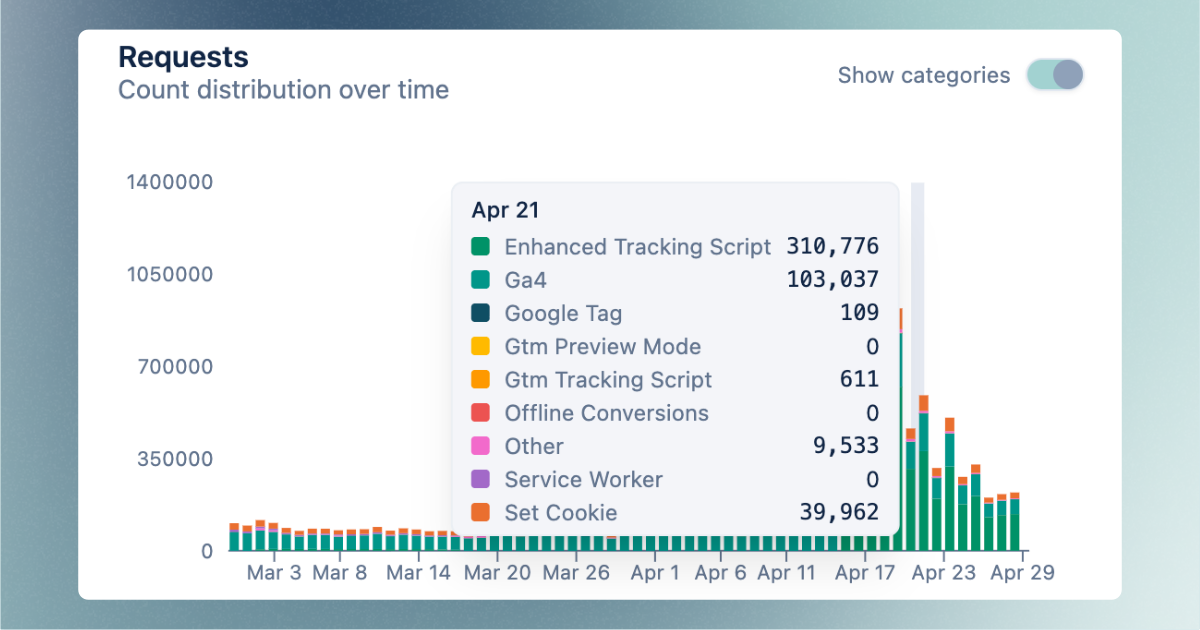
That matters for trust.
Most tracking improvements are hard to prove. A specialist changes the setup, data looks a bit better, and everyone has to infer what happened. The Enhanced Tracking Script gives agencies a clearer proof point. You can show the account what changed and where the extra measured activity appears.
The dashboard also helps with validation after rollout:
- Use the Last 24 hours view to check the effect shortly after implementation.
- Use request categories to confirm that Enhanced Tracking Script requests are coming in.
- Compare server-side and client-side data to see how much extra data your server-side setup captures.
- Watch for unusual drops after CMS changes, GTM edits, or ad blocker filter updates.
For agencies, this is useful in client conversations. Instead of saying "we made the setup more robust," you can show the category in the dashboard and explain the recovered layer.
The dashboard setup is explained in the TAGGRS Server-side Tracking dashboard documentation.
One switch, not another infrastructure project
Most agencies already know how heavy tracking projects can become.
There is usually a website developer, a GTM specialist, a server-side tagging specialist, a CMS limitation, and a client who wants the result yesterday. Even small tracking changes can turn into a long implementation thread.
The Enhanced Tracking Script is built to avoid that.
Inside the TAGGRS dashboard, you configure the feature under Features → Optimize → Enhanced tracking script. Add the GTM web container ID, switch on Maximize your performance, save the settings, and replace the old GTM snippet with the generated code.
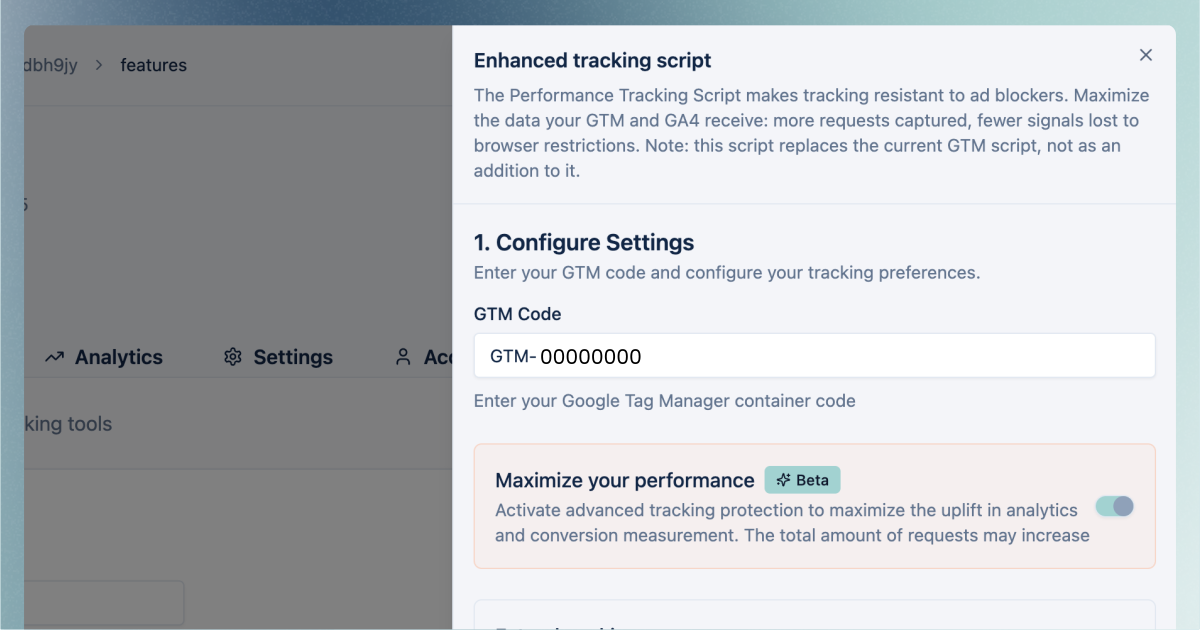
That is the practical value. No new tagging server. No custom proxy project. No separate infrastructure work for the agency.
You still need access to the website code or CMS, because the script has to replace the existing GTM snippet. But for most teams, that is a smaller change than rebuilding the tracking setup.
For agencies managing many accounts, the difference is even bigger. A feature that can be switched on and validated in the dashboard is easier to sell, easier to deploy, and easier to explain.
Ready to recover the data lost to ad blockers? Create a free TAGGRS account or request a demo so we can walk you through it.
Where this fits in a resilient tracking setup
The Enhanced Tracking Script is not a replacement for a proper tracking strategy.
You still need good consent handling. You still need a working server container. You still need clean event names, deduplication, correct conversion mapping, and reliable platform integrations.
But the script solves a specific weak point that many teams miss: the first load of the tracking layer.
A resilient setup has several layers:
- The website script loads reliably.
- Events are sent to a first-party server endpoint.
- The server container enriches, controls, and forwards the data.
- Cookies and identifiers are handled in a privacy-aware way.
- The dashboard shows whether the setup is actually producing more usable data.
If the first layer breaks, the rest of the setup cannot help. The Enhanced Tracking Script strengthens that first layer.
For a broader diagnostic, download the guide How resilient is your tracking setup? to find where signal loss happens and what to fix first.
FAQ
Is the Enhanced Tracking Script the same as Server-side Tracking?
No. Server-side Tracking moves data processing to a server container. The Enhanced Tracking Script improves the browser-side script that starts the tracking flow.
They work together. Server-side Tracking handles the server path. The Enhanced Tracking Script helps more requests reach that path.
Does this replace my current Google Tag Manager script?
Yes. The Enhanced Tracking Script is designed as a replacement for the standard GTM script. Do not run both at the same time. Duplicate scripts can create duplicate events and inaccurate reports.
Will this fix every tracking gap?
No. It solves one important gap: script-level loss before the server container receives the request.
Other issues can still affect data quality, including consent settings, broken tags, duplicate events, missing server container clients, bad event mapping, and platform-side attribution limits.
Why does a website tracking script matter if I already use Server-side Tracking?
Because the first request still starts in the browser. If the website tracking script is blocked, the server container may never receive the event.
Server-side Tracking improves what happens after the request is made. The Enhanced Tracking Script improves the chance that the request gets made in the first place.
Can I see the impact inside TAGGRS?
Yes. The Analytics dashboard includes request categories, including Enhanced Tracking Script. That lets you validate whether the script is active and see how it contributes to request volume.
For deeper analysis, compare server-side and client-side data in the dashboard over a consistent date range.
Does this make ads visible to users with ad blockers?
No. The Enhanced Tracking Script does not unblock ads, banners, pop-ups, or ad placements on your website.
It is focused on measurement. If a user with an ad blocker visits your site and gives consent, the script helps the tracking request reach your server-side container. It does not change what the visitor sees on the page.
So users who block ads will still block ads. The difference is that consented analytics and conversion signals have a better chance of reaching your measurement setup.