The impact of AI Browsers on user tracking and attribution

 Mariusz Brucki | 8 December 2025 | Last updated:
 AI-powered browsers such as ChatGPT Atlas (OpenAI) and Perplexity Comet are redefining how people search, browse and interact with the web. These “agentic” browsers blur the line between search engines and browsers. Atlas turns the browser into an action-taking assistant, while Comet focuses on deep research and contextual knowledge. Both launched in 2025 and saw rapid adoption. According to Cyberhaven, in late 2025:
- 27.7% of enterprises saw at least one employee install Atlas within the first weeks
- Some companies reported 10% of staff using it
- Atlas reached 60x more downloads than Comet, quickly outpacing the competitor released a few months earlier
- Atlas’s launch even caused a 6x increase in Comet downloads.
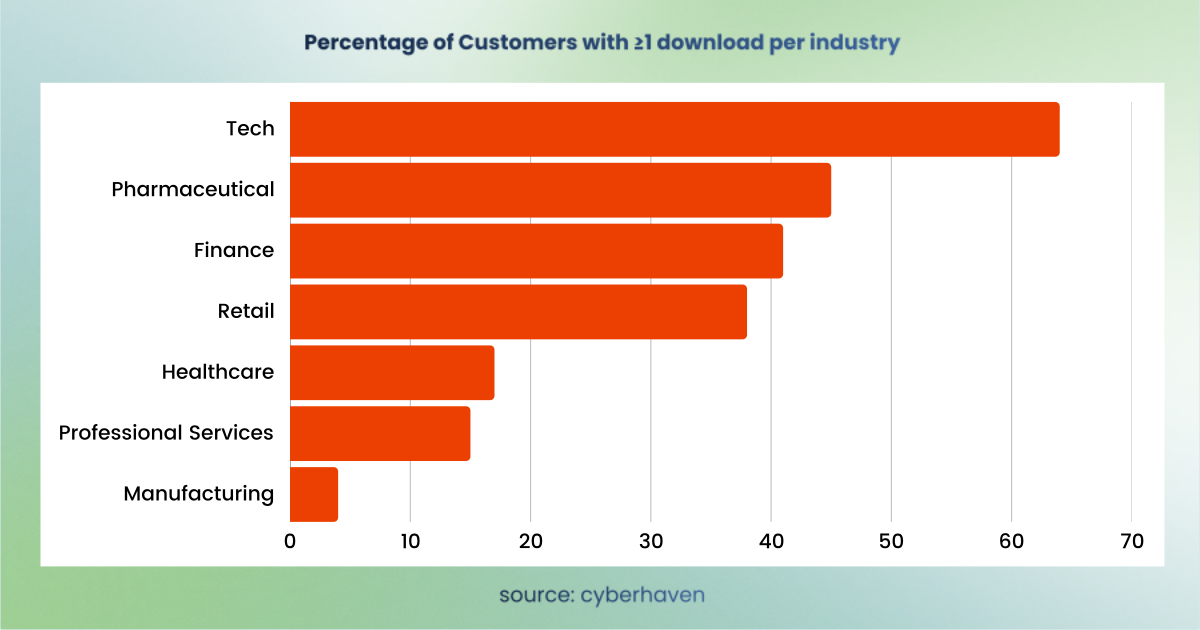
This surge of AI browser usage is exciting, but it comes with a catch for digital analytics. Traditional marketing attribution models and data accuracy are being disrupted. Why? Atlas and Comet fundamentally change how user data (like browser identity, cookies, and referrers) is handled, often blocking or bypassing the very tracking mechanisms that analytics rely on. Marketers and analysts are reporting odd trends like spikes in new “users”, more direct/unassigned traffic, invisible traffic, and broken attribution chains.
Below, we explore how these AI browsers mask user identity and affect tracking, the attribution challenges they create, and what analytics teams can do to adapt.
How AI browsers shape user identification and tracking
AI-enabled browsers like Atlas and Comet introduce new behaviours that obscure user identity for web analytics systems.
User-agent camouflage
ChatGPT Atlas does not announce itself as a new browser, but it impersonates Chrome. In tests, Atlas’s user agent string was identical to a standard Chrome on Mac:
Mozilla/5.0 (Macintosh; Intel Mac OS X 10_15_7) AppleWebKit/537.36 (KHTML, like Gecko) Chrome/142.0.0.0 Safari/537.36
Comet behaves similarly; its user agent also mirrors Chrome with no obvious mention of “Comet”. In fact, Comet’s UA string is essentially the same as Atlas’s (and Chrome’s) example above. This means websites and analytics tools see Atlas/Comet users as if they were on Google Chrome. While this ensures compatibility, it masks the browser’s true identity, making it hard to segment or filter these users based on user agent.
Ad blocking that hides analytics
Another major difference is how these browsers handle tracking scripts and cookies. Often, they simply don’t! Comet, in particular, includes a built-in ad blocker that’s enabled by default. This isn’t just for blocking ads; it also blocks common analytics and tracking scripts (like Google Tag Manager or GA4) by default. As a result, when a user visits your site via Comet, you might actually see… nothing at all in your analytics! No pageview or events because Comet prevented any tracking requests from firing. It looks like the logic that prevents tracking scripts from loading is provided by uBlock Origin, which is one of the most aggressive ad blockers on the market.
In our tests, not a single tracking request was sent from Comet, meaning those visits were effectively invisible in Google Analytics.
Auto-rejected cookies
Atlas hasn’t gone the route of an ad blocker (so far), but it introduces its own tracking disruption: cookie consent automation. Atlas often opens pages via an internal AI assistant or sandboxed view, and when it encounters a cookie consent banner, it will automatically click “Reject all.” This privacy-by-default behaviour means no analytics or advertising cookies are allowed to load, effectively blocking those scripts from collecting data in Atlas sessions. A privacy expert, Thomas Adhumeau, concluded that
Atlas is, in essence, nothing more than a cookie blocker.
In other words, unless a user explicitly overrides it, Atlas will not grant consent for tracking – cutting off analytics in most cases, just like an aggressive ad blocker would. Learn how ad blockers drain the accuracy of your analytics.
Isolated contexts and lost cookie persistence
AI browsers sometimes open pages inside AI chat windows, in temporary “task contexts”, or in isolated or sandboxed tabs. In this scenario, cookies often don’t carry over. The result? Returning visitors appear as brand new users and the attribution chains break.
Stripped or missing referrers
Beyond blocking scripts and cookies, Atlas and Comet also handle page navigation in ways that confound referrer data. ChatGPT Atlas opens shared links in an internal sandbox or webview, which strips the referrer header entirely. In that case, GA4 logs the session as ‘Direct’ (or (not set)) in your reports.
Comet’s behaviour is a bit different. Traffic from Comet typically passes a normal referrer.
All these factors mean marketing analytics tools get less information about who the user is, how they arrived on your site and what they are doing there. In summary, Atlas and Comet introduce identity masking and data gaps by design. They aim to protect user privacy and operate seamlessly, but this confounds traditional tracking methods that rely on consistent IDs and referrer flows.
So to wrap it up, the key impacts include:
| Behavior | Agentic browser | Explanation |
| User agent camouflage | Atlas + Comet | The AI browser identifies as Chrome, making it impossible by default to distinguish AI browser users via user agent strings. |
| AdBlocker by default | Comet | If a visitor uses Comet, your analytics might record nothing at all. Comet’s default ad blocker prevents tracking scripts (GTM, GA4, etc.) from loading, so those users are effectively invisible in your data. |
| Auto-rejected cookies | Atlas | Atlas’s AI assistant auto-denies cookie consent banners, meaning analytics/marketing cookies are refused by default. In practice, that session will send no tracking hits or severely limited data (since no consent was given to run trackers). |
| Limited persistence | Atlas + Comet | AI-driven tasks may run in isolated browser contexts that don’t share cookies with the main session, disrupting session continuity and returning-visitor recognition. |
| Stripped Referrers | Atlas | Atlas’s AI integrations often omit referrer data on outbound clicks, so visits that did originate from a referral or search might register as direct traffic. |
In sum, Atlas and Comet are designed with privacy and AI functionality in mind, which inadvertently break many standard technologies of web analytics.
Attribution challenges caused by AI browsers
Because of these quirks, marketers are encountering significant attribution challenges whenever users touch an AI browser during their journey. In some cases, the visits may not be recorded at all (e.g. if an AI browser blocks the analytics script entirely or rejects tracking cookies), but even when they are recorded, the data may not be fully accurate. Two immediate effects are a distortion in new vs. returning user metrics and channel attribution and traffic source accuracy.
New vs. returning user metrics
Sites have reported sudden increases in “New Users” counts in GA4 after Atlas launched. Not necessarily because a flood of genuinely new people arrived, but because many returning visitors were now coming through Atlas and getting misclassified.
Concurrently, "Returning User" metrics can decrease in the short term. Essentially, if a portion of your audience tries the shiny new AI browser, GA4 will treat them as brand new, unique visitors (since their old analytics cookies/IDs aren’t recognised or allowed).
From an analytics perspective, it’s as if you acquired a bunch of first-time visitors out of nowhere. If your site users are tech-savvy users, you might see Atlas adoption show up in your data and skew these metrics, whereas sites with more general audiences will see minimal impact.
Channel attribution and traffic source accuracy
AI browsers can disturb the usual source/medium info that marketers rely on. As noted, Atlas often strips referral data, meaning traffic that actually came from an AI-powered search or recommendation appears as Direct or “(not set)” in analytics.
Marketers have observed rising volumes of Direct/Unassigned traffic that don’t align with their campaigns. Some of this “mystery traffic” may actually be coming from ChatGPT or Atlas referrals that have no UTM parameters or referrer. (If you want to learn more about investigating unassigned traffic deep deeper here!)
For example, if a user asks Atlas’s chatbot for “best CRM software” and then clicks through to a website, that visit might show up with no source attribution (neither organic search nor referral), essentially falling into GA4’s Unassigned bucket. Over time, this could inflate your Direct traffic figures and mask the true origin.
Additionally, standard multi-touch attribution models (even GA4’s data-driven attribution) struggle if the user journey is split across these browsers. Imagine a customer originally finds your site via Google Search on Chrome (so the Organic Search channel gets credit for that touch), but later they revisit via Atlas (which now looks like a Direct visit by a “new” user) and make a purchase. GA4 might mis-attribute the sale to Direct (or count it as a completely new conversion path) because it doesn’t see it as the same person who came via Google earlier. This fragmentation leads to more conversions attributed to the wrong channel or labelled “unassigned.”
In summary, AI browsers’ default behaviours can break the attribution chain, causing several analytics headaches:
- No traffic recorded at all: Comet uses an aggressive adblocker, and Atlas rejects cookies by default.
- Over-counting of New Users: Returning visitors appear as “new” in analytics due to reset or blocked cookies.
- Under-counting of Returning Users: Your loyal visitors who switch to Atlas or Comet may temporarily drop out of your returning-user metrics.
- Spike in Direct/Unassigned Traffic: Loss of referrer and campaign parameters means more sessions are bucketed as Direct or Unassigned, obscuring their true source.
- Misallocated Conversions: Multi-touch attribution is confused, with AI browser touches not properly linked to earlier marketing touches, potentially overstating Direct traffic’s role and undervaluing the original referral or organic channels that started the journey.
For marketers, these issues disrupt the performance data. You might see a campaign’s true impact diluted, or panic at an uptick in “Direct” traffic that isn’t backed by any intentional direct visit increase. Meanwhile, a portion of your audience could be browsing via these AI tools completely under the radar of your analytics. The overall accuracy of funnels and user journey analysis diminishes. Recognizing that Atlas and Comet are introducing these anomalies is the first step. Next, analytics teams need to respond proactively.
Five actionable steps for analytics teams
How should analytics and marketing teams adjust to this new reality? Here are some practical steps to maintain reliable data and attribution in the age of AI browsers:
1. Monitor key metrics for anomalies
Set up alerts or regular reviews for sudden changes in New User counts, Direct/Unassigned traffic, or other core metrics. If you notice an unexplained jump or drop around late 2025, consider the Atlas/Comet effect. For instance, compare the ratio of new vs. returning users before and after October 2025. An unusual surge in new users without a corresponding campaign could signal that a portion of your audience switched to AI browsers. Likewise, monitor overall session counts; if some tech-savvy segment goes dark (due to Comet blocking tracking), you might see a slight traffic decrease or a gap between site server logs and GA4 data.
2. Inspect technology and referral reports
Dig into GA4’s Browser details report and look at the browser version trends. Currently, Atlas reports itself as Chrome version “141.x” or “142.0.0.0” (as of late 2025), but they may introduce a unique stamp in their user-agent any time soon. Likewise, check the Acquisition report for any appearance of “perplexity.ai / referral” - that indicates visitors coming via Comet’s recommendations. Ensure that GA4 is classifying “perplexity.ai” as a Referral channel (it should by default), and consider creating a custom channel grouping for “AI Browser” traffic if you want to track these separately. Also, keep an eye on the (direct) / (none) traffic. If direct traffic is climbing disproportionately, drill down into landing pages and timing. You might find patterns (e.g. specific pages getting hits that correspond to AI-generated link referrals with missing attribution).
3. Use first-party data to bridge user identities
Since cookies may not persist across Atlas/Comet (or may be blocked entirely), consider leveraging login-based tracking or User ID in GA4. If your site has an authentication system, implementing GA4’s User-ID feature can help stitch together visits by the same person across different browsers or devices, as long as they log in. This can override the reliance on cookies alone. For instance, if a known user switches to Atlas and signs into their account on your site, GA4 can merge their Atlas session with their previous profile, preserving the attribution history (even if the Atlas session had a new client ID).
4. Implement Server-side Tagging
Using tools like Google Tag Manager Server-Side or other proxy endpoints can mitigate data loss. While it can’t magically restore a missing referrer, it gives you more control over how cookies and user identifiers are set and it can bypass some front-end restrictions. For example, a server-side setup could set a first-party analytics cookie with a longer lifespan or share it across subdomains, making it more likely to persist when a user navigates via AI browsers or privacy modes. More importantly, Server-side Tracking can bypass ad blockers or script restrictions that might be present in AI browsers. In other words, even if Atlas/Comet block a client-side GA script or prevent a consented cookie from being set, your server-side endpoint can still collect a page view or click event (since it looks like a first-party request). Of course, if there’s truly no consent (Atlas auto-refused), you must respect that in how you use the data, but server-side approaches at least allow capturing that a visit occurred.
5. Annotate and educate
It’s a good idea to annotate your analytics timeline for the launch of major AI browsers (e.g., “Atlas launched Oct 21, 2025”) so future analyses take that context into account. Share these findings with your marketing team. Explain that a rise in Direct traffic or New Users in late 2025 could be due to these tools, not necessarily a campaign or SEO change. Educating stakeholders will prevent misinterpretation of the reports. Internally, consider creating a simple dashboard or segment that tracks “AI Browser Traffic” using a combination of known signals. Even if imperfect, it can illuminate trends and reassure the team that anomalies are understood.
FAQ
How do AI browsers affect new vs. returning user metrics?
They tend to inflate your “New User” count in analytics because a returning visitor who switches to an AI browser is tracked as a brand new user (their old cookies or client IDs aren’t carried over or allowed). At the same time, your Returning User count may temporarily drop. In short, some genuine returning visitors get mislabeled as new. The effect is most noticeable if a large portion of your audience tries the new browser around the same time.
Can marketers reliably segment or identify visitors using Atlas or Comet?
Not easily, at least not yet. Atlas and Comet masquerade as Chrome, so the usual browser identification in analytics won’t clearly separate them. Comet’s referrals can sometimes be spotted by source/medium (you’ll see perplexity.ai / referral if the traffic isn’t blocked), but Atlas traffic often looks like generic direct or organic traffic with no special markers. In fact, if Comet’s default ad blocker is active, those users might not even show up in your GA data at all, making segmentation impossible on that front. For now, segmentation requires some educated guesswork and combing through tech details. Analytics vendors may eventually update their systems to detect these AI browsers explicitly (or provide filters for “AI-assisted” sessions), but currently we have to use indirect clues to segment them.
Is Server-side Tracking a solution for the attribution gaps created by AI browsers?
Partially, yes. Server-side Tracking can help preserve data that client-side tracking might lose. For example, it allows you to set more persistent first-party cookies and can transmit events even when browser scripts are blocked or limited. However, it’s not a silver bullet. If an AI browser isn’t sending a referrer or has outright prevented any tracking, server-side collection will also lack that referrer (you can’t magically recover what isn’t there). And if a user explicitly refused cookies (via Atlas’s auto “reject all”), you should respect that decision in your server-side logic as well. That said, server-side implementations improve overall data quality and resilience against browser changes. They allow you to use your own domain for data collection and other masking techniques, which can slip past ad blockers.
How can TAGGRS help future-proof analytics against these AI browser disruptions?
At the core of our product is a server-side GTM container that we configure with advanced masking and routing techniques. These techniques make data collection more resilient against default ad blockers. Even aggressive ones like Comet’s built-in uBlock-like technology. Because tracking requests are routed through your own infrastructure, not Google domains or known vendor endpoints, TAGGRS implementations can continue collecting essential analytics signals even when most third-party scripts are blocked.