How to maintain accurate measurement and attribution despite ad blockers
 Mariusz Brucki | 9 October 2025 | Last updated:
 The hidden cost of ad blockers on marketing data
Ad blockers are silently draining the accuracy of your campaigns and data reports.
When a significant share of your audience blocks ads and tracking scripts, your analytics will undercount visits and conversions, making campaigns seem less effective than they truly are. For example, if ad blockers prevent half of the visits from being tracked, your CPC might appear double what it actually is, and many conversions won’t be recorded. In other words, ad blockers hide part of your campaign results, leading you to misjudge performance. This incomplete data isn’t just a nuisance. It can cost agencies real money in misallocated budgets and poor strategic decisions.
The scale of the issue is too big to ignore. Today, roughly one-third of internet users worldwide use ad blockers on at least some of their devices, according to Backlinko's research Ad Blocker Usage and Demographic Statistics. In the United States, about 32% of internet users block ads in their browsing, and nearly 38.8% of Americans have used an ad blocker. Globally, over 900 million devices now actively filter out ads and tracking scripts.
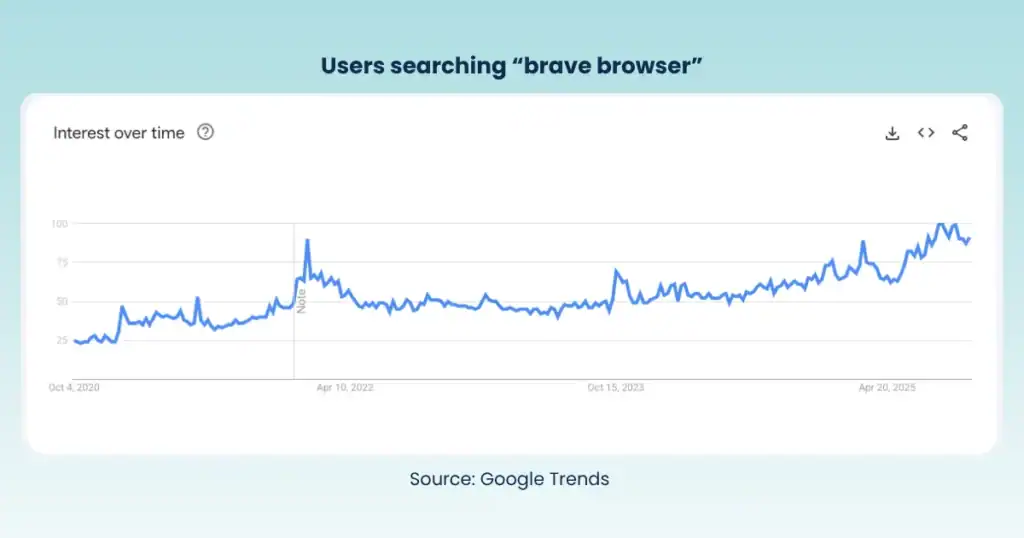
Adblockers are not the only problem for your data accuracy. Many popular browsers, like Safari or Brave, also block your tracking scripts by default. Users do not have to even install any addons.
This trend is growing, with ad block usage rebounding to levels not seen since 2018. The business impact is massive: publishers were forecasted to lose $54 billion in ad revenue in 2024 due to ad blockers (about 8% of total digital ad spend). For marketing agencies, this translates into unseen impressions, uncounted clicks, and impaired attribution for your campaigns.
What ad blockers are (and how they block GTM & GA4)
Ad blockers are browser extensions or built-in features in browsers that filter out content identified as advertising or tracking. They work based on community-maintained filter lists (like EasyList and EasyPrivacy), which specify patterns or URLs to block.
Originally, ad blockers focused on obvious ads (banner images, pop-ups, intrusive scripts). Now, they also block analytics and marketing data flows by default. This means tools like Google Tag Manager (GTM) and Google Analytics 4 (GA4) are 100% blocked from collecting data.
Here’s how the blocking works with client-side tracking:
- Blocking Tag Manager: If an ad blocker sees a request to Google’s Tag Manager domain or a script named gtm.js, it may stop it from loading. A blocked GTM container means none of your tags fire: not your GA4 tracking, not your conversion pixels, not even non-tracking scripts you might run through GTM. Some marketers use GTM for things like chat widgets or A/B testing snippets; those could break as well if GTM is suppressed. In short, a user with an aggressive ad blocker might be invisible in your GA4, Google Ads, Meta Ads, reports and even miss out on site features like a cookie banner.
- Blocking analytics requests: Ad blockers also target known tracking endpoints. For instance, GA4 normally sends data to Google’s domains (google-analytics.com or analytics.google.com). Popular blockers often include these in their filters, so any network call to send an event or pageview gets blocked outright. The result: your GA4 dashboard fails to count that user’s session and actions.
- Other marketing tags: It’s not just Google. Facebook Pixel, Google Ads conversion tags or LinkedIn Insights. Any third-party script that matches a blocker’s list will be stopped. Modern ad-blocking and privacy tools (including browser features like Safari’s ITP or the Brave browser) are broadening what they filter, often treating tracking scripts similarly to ads.
Crucially, ad blockers operate at the browser level. They prevent certain JavaScript from executing or certain requests from being sent by the browser. If your measurement and attribution systems rely solely on client-side scripts, then a portion of your audience (potentially a large portion in some demographics) is effectively invisible to your analytics and pixels.
The symptoms show up as discrepancies: campaigns that you know drove conversions might show fewer in Google Ads or Analytics, or traffic from certain channels appears lower than expected. These are red flags that a significant number of users are “dark” to your tracking because of content blocking.
Ad blocker usage is high and it’s hurting your marketing decisions
We’ve touched on how widespread ad blocking has become, but it’s worth reiterating with current stats and what they mean for your marketing effectiveness:
- Hundreds of millions block trackers: As of 2023, an estimated 912 million users worldwide actively use ad blockers on desktop or mobile. That’s roughly one in three internet users globally. Even if we look at daily active usage, GlobalWebIndex found that about 32.5% of internet users use ad-blocking tools regularly. This isn’t a nerdy behaviour, it’s becoming mainstream. Your mum and uncle may use AdBlockers!
- Demographics: Ad blocking is more popular in certain groups (e.g. younger users and technically savvy audiences). For instance, in the U.S., about 37% of desktop users install ad blockers, and usage is higher among men (49% of men vs 33% of women in the U.S. have an ad blocker). However, even older and traditionally less techy segments are catching up. Nearly one-third of Boomers (ages 55+) now use ad blockers, according to Cropink's usage statistics.
- Why they block: Understanding why people block can help frame your response. The top reasons are user experience and privacy. Globally, excessive or annoying ads are the #1 complaint (over 60% of users cite this), and privacy concerns are also significant (around 40% say they block to stop tracking).
- Business impact in numbers: The direct revenue loss from ad blocking tends to concern publishers (e.g. media sites losing ad impressions). By 2024, that loss was valued at $54 billion globally. But for agencies and advertisers, the hidden cost is in inefficient spending. You might be miscalculating the budget for campaigns and channels that may actually work better than your data shows. For example, if 32% of your target audience is untrackable, your reported conversion cost could be off by that margin or more. One report noted that advertisers worldwide lost $22 billion in 2015 due to ad-blocker-induced misreporting, as stated by RECAST, and the number has only grown. If marketers can’t trust the data on campaign performance, they might cut spend on perfectly viable channels or double down on wrong tactics, simply because the metrics are misleading.
In summary, ad blockers are not just an IT issue. They are a marketing performance issue. They disrupt analytics, which can lead to bad decisions like pausing a campaign that’s actually delivering ROI or misallocating budget away from an audience segment that you thought wasn’t working. The challenge for agencies is finding a way to maintain accurate measurement and attribution in spite of this widespread filtering, without trampling on user privacy (which is often the reason users employ blockers in the first place).
Server-Side Tracking: a modern, privacy-first solution
The good news is that there’s a way to reclaim your data from the clutches of ad blockers, and do it in a privacy-compliant manner. Enter Server-side Tracking. This is not a hack or a shady workaround. It’s a modern tracking architecture increasingly adopted by data-conscious organisations. In essence, Server-side Tracking means moving the tracking point from the user’s browser to your server (or a cloud endpoint you control).
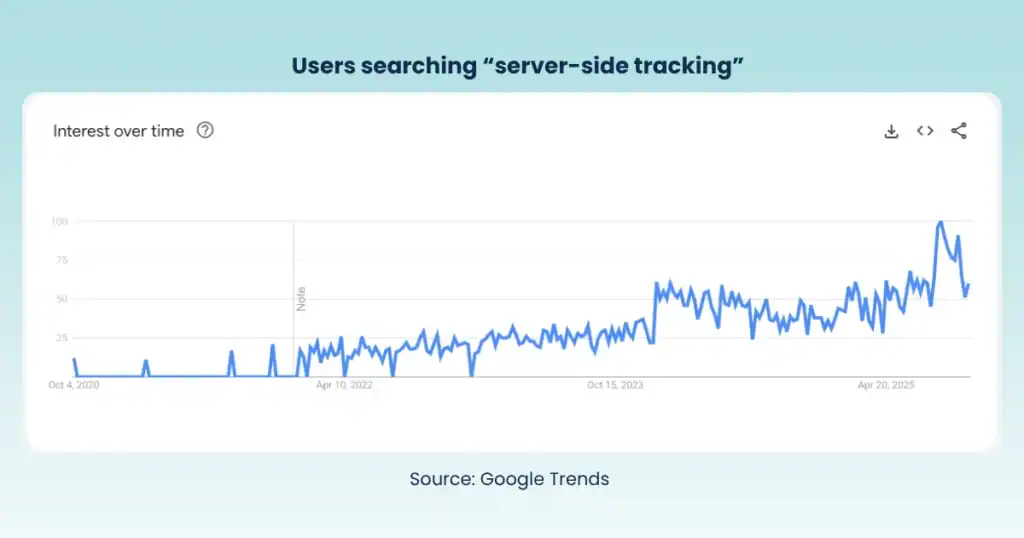
Instead of the user’s browser directly pinging Google Analytics or Facebook, the browser sends data to your domain’s server, and that server (which you configure) then relays the necessary info to Google, Facebook, etc. Because the data is collected and processed on your server first (often using a cloud-based server container like Google Tag Manager’s server-side container), the browser is no longer running third-party tracking scripts that ad blockers can target.
Why is this approach considered a privacy-first defence? A few key reasons:
- Nothing “sneaky” on the front-end: With Server-side Tracking, the user’s browser isn’t loading external tracking JavaScript from ad-tech vendors. It typically loads a small script from your own domain (which can be as simple as a pixel or a first-party cookie script). To the user and their AdBlocker, your site looks clean.
- Respects user consent and privacy settings: A well-implemented server-side setup still honours privacy choices. Users who opt out via your consent banner can be respected. Your server can omit or anonymise its data. The difference is that, for users who have given consent, you now have a reliable channel to collect their events without third-party interference. And for users who decline tracking, server-side architecture can ensure no personal data is sent out, thereby staying compliant. (We’ll cover how consent is managed in server-side setups shortly.)
- Greater data control and security: Because data passes through a server you control, you can filter and preprocess what’s sent to platforms. This opens up privacy-protective measures that are harder to enforce in the browser. For example, you can strip out personal identifiers or IP addresses before forwarding an event to Google Analytics. You can enforce that no data goes to external vendors until the user’s consent is confirmed (using mechanisms like Google’s Consent Mode on the server side). Essentially, Server-side Tracking allows you to collect the same insights with less personal data, aligning with GDPR principles.
- Endorsed by the industry: Major players are supporting this model. Google Tag Manager offers a server-side container, and Google Analytics 4 is designed to work with it. Facebook’s Conversion API similarly allows server-to-server event sharing. This isn’t a new idea; it’s becoming the best practice for robust measurement in an era of user privacy. Think of it as updating your tracking infrastructure just as we moved from HTTP to HTTPS for security, we’re now moving from client-side to server-side for both data accuracy and privacy.
In practical terms, implementing Server-side Tracking might mean using a cloud service or SaaS that sets up the server environment for you (to avoid heavy devops). We’ll discuss implementation next, but one thing to highlight: this approach has proven effective. Companies using server-side GTM report significantly improved data accuracy because they recover much of the conversions that were previously “missing” due to blockers. And they do so while staying within the lines of regulations, because no one is secretly fingerprinting users or violating consent. Everything is simply being collected in a way that avoids the front-end blockers.
TAGGRS: a trusted, EU-based approach to server-side
When adopting Server-side Tracking, the how matters almost as much as the what. You’ll want a solution that not only plugs the data leaks but also ensures compliance with regulations like GDPR and can be trusted with your clients’ data. TAGGRS is one example of a platform addressing this need for agencies. (Disclosure: TAGGRS is an EU-based Server-side Tracking solution purpose-built for privacy compliance.)
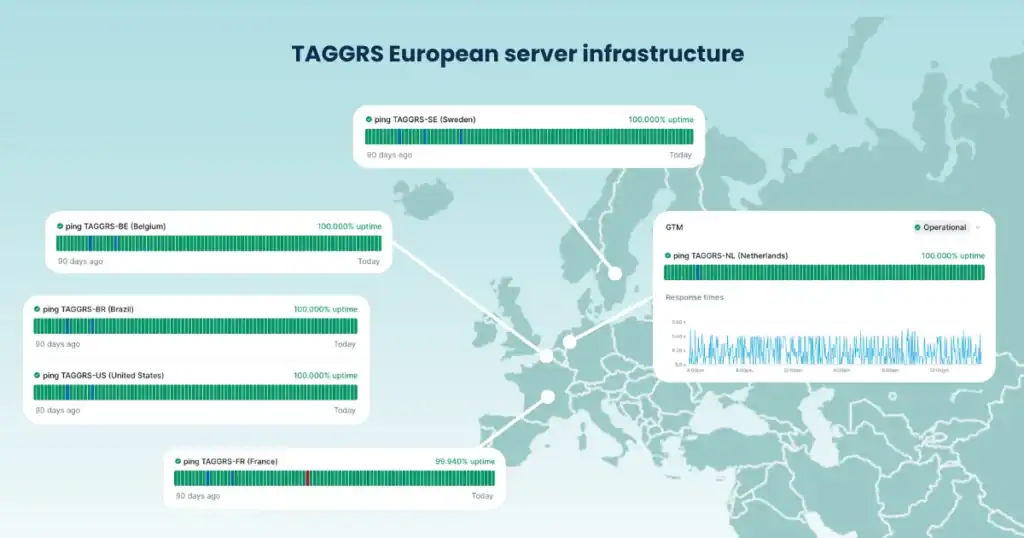
What makes TAGGRS stand out as a strategic choice for agencies?
- Privacy-first design: TAGGRS was built in the wake of GDPR. They emphasise hosting your tracking on EU servers (or in any region you require) to keep data local and under EU privacy standards. You can dive deep into our independent server infrastructure. If you have European clients or global clients worried about Schrems II and data transfers, this is crucial. TAGGRS lets you route analytics hits through servers in your own backyard, ensuring no personal data goes to Google or Facebook without passing GDPR checks.
- Accurate reporting restored: By hosting the Google Tag Manager server container with TAGGRS, agencies have seen a big uplift in data. Check our agency case studies. Tracking that was previously blocked gets captured server-side, improving campaign attribution. This setup improves data accuracy by reducing loss from browsers and ad blockers, while supporting privacy compliance. In other words, you recover the hidden conversions and clicks that ad blockers were eating up, yet you’re not doing it in a way that violates user trust.
- Fully compliant and transparent: TAGGRS is positioned as a compliant alternative to pure Google Cloud server-side tagging. Since they manage their own infrastructure, they aren’t beholden to U.S. cloud providers for data processing, which helps with GDPR compliance. They also provide tools like a Consent Mode integration and a Consent Management module to make sure that if a user opts out, that choice is respected in the data flow. (We’ll link to Consent Mode best practices in the next section.) The key point is that using TAGGRS isn’t about evading privacy rules, it’s about embracing privacy requirements while still getting your marketing data. An EU agency can confidently tell clients that their analytics setup is both accurate and lawful.
- Ease for agencies: From a practical standpoint, TAGGRS offers a user-friendly onboarding (including a free tier). You don’t need to be a cloud engineer to get started. They provide templates and guides specifically for common platforms (Google Analytics 4, Google Ads, Facebook Conversions API, etc.) to run through their server. For instance, setting up server-side GA4 with TAGGRS can be done via a guided wizard or manual steps if you prefer. It’s far simpler than rolling your own server on GCP. This matters to agency owners: you want a solution that your team can implement quickly and reliably, without weeks of custom dev work. You can start right away.
In summary, while there are multiple ways to implement Server-side Tracking, TAGGRS is a strong option, especially for those who prioritise GDPR compliance and European data sovereignty. It’s a managed service that takes care of the heavy lifting (hosting, maintenance, security) and lets you focus on the measurement insights. The tone here isn’t meant to be salesy; rather, the takeaway is that solutions exist to fix your data shortfall. You don’t have to build it from scratch. TAGGRS is one such solution that strategically aligns with the needs of modern agencies: accurate data, happy clients, and no legal headaches.
(Subtle note: TAGGRS is EU-based, which can be a reassuring detail when you’re explaining to a CMO or client’s legal team how your tracking is configured. Knowing that the data stays under EU jurisdiction or that the vendor is attuned to European privacy norms can shorten a lot of conversations.)
Best practices for privacy-compliant tracking
When pivoting to Server-side Tracking, it’s important to uphold best practices that keep you on the right side of privacy laws and maintain user trust. Here are some best-practice tips for agencies and marketers implementing these solutions:
- Honour consent with consent mode: We’ve mentioned it, but it bears repeating: always respect user consent signals. Google’s Consent Mode is a useful framework: if a user opts out of analytics cookies, Consent Mode can still allow GA4 to record an anonymous hit (for aggregated modelling) without identifying data. Configure this in your server-side GTM container to ensure no disallowed data sneaks through. In practice, this means setting up your server container to listen for consent parameters (e.g., npa=1 for non-personalised ads) and adjusting tracking accordingly. The benefit is twofold: you remain compliant, and you still get some level of measurement for users who opt out, which GA4 can use in its conversion modelling. For a how-to, refer to TAGGRS’s guide on enabling Consent Mode in Server-side Tracking.
- Anonymise and minimise data: Only collect what you need for campaign reporting. A big advantage of server-side processing is that you can adjust data before it leaves your server. Use this to your advantage. For instance, remove IP addresses or replace them with an approximate geolocation if all you need is region-level analysis. If you’re tracking user IDs or emails (for logged-in user analytics), hash or pseudonymize them on the server side.
- Choose EU or localised data centres: If you have the option, host your Server-side Tracking on infrastructure located in regions that align with your compliance needs. For European user data, that usually means using EU-based servers. TAGGRS, for example, allows you to select your server location (they operate across many regions) when setting up a project. Keeping EU data within EU borders helps address concerns about international data transfers. It’s an extra safeguard that many privacy officers appreciate.
- Maintain transparency in user communications: Being privacy-compliant isn’t just about technical configurations; it’s also about clear communication. Update your site’s privacy policy to reflect the use of Server-side Tracking and list the data collected and processed. Since this approach often reduces reliance on third-party cookies, you can highlight that as a positive: e.g., “We have implemented a privacy-friendly analytics system that uses first-party data collection.
- Leverage analytics from server-side data: Finally, make use of the richer dataset you now have. With Server-side Tracking, you might notice improved attribution in platforms like Google Ads or better match rates in Facebook. You may also get insights into the percentage of users who have been invisible until now. Use these to demonstrate to stakeholders the value of the investment. For example, if you can show that Server-side Tracking recovered 20% more conversions for a campaign, that’s a compelling story for continuing to invest in robust measurement.
By following these best practices, you ensure that your move to Server-side Tracking is not only effective in data terms but also ethically and legally sound. The goal is to have accurate analytics with zero backlash. Regulators, clients, and the end-consumers should all be comfortable with how data is handled. When done right, Server-side Tracking can actually enhance user trust because it often means fewer third-party scripts and a leaner, more privacy-focused approach to measurement.
FAQ: Ad blockers and Server-side Tracking
Can ad blockers block Server-side Tracking?
In general, no: ad blockers cannot easily block Server-side Tracking when it’s implemented correctly. The reason is that Server-side Tracking calls are made to your own domain (first-party), and they don’t rely on loading known “ad” scripts in the user’s browser. For example, if your site sends data to metrics.youragency.com (which then relays it to GA4 from the server), an ad blocker just sees a request to youragency.com and has no filter rule to block that. However, it’s worth noting one caveat: If an ad blocker is configured to be extremely strict, then tracking of any kind might be affected by checking not only the hostname but also the path of the request. But TAGGRS is intensively working on addressing those cases as well - the first beta release should be by the end of 2025.
How does TAGGRS ensure compliance?
TAGGRS takes a multi-faceted approach to ensure GDPR and general privacy compliance. First, TAGGRS is based in the EU (Netherlands) and offers data residency options, meaning you can choose to keep all tracking data within European servers. This helps address GDPR requirements and concerns around US-EU data transfers. Second, TAGGRS’s server-side architecture is certified to meet the requirements of the ISO/IEC 27001:2022 standard and built to strip out personal data and protect user info by default. For example, when using TAGGRS to forward Google Analytics data, the system can exclude things like IP addresses or precise location info before that data ever goes to Google. This way, you can use GA4 in a manner that aligns with GDPR (since the personal identifiers never leave your controlled environment). TAGGRS also includes a Consent Approval Graph that integrates with your consent management platform. This ensures that each user’s consent choices are respected. The server will not process or anonymise data for users who have not consented to tracking.