Beyond the banner: How Server-side Tracking keeps first-party data clean and usable
 Małgorzata Poddębniak | 26 August 2026 | Last updated:
 The consent banner has become the face of online privacy, with teams putting a lot of thought into how it looks, what it says, and whether visitors click "Accept". Far less goes into what happens next, once tracking begins and their data starts flowing to your analytics and advertising tools.
Between consent and the numbers showing up in your reports, requests get delayed, blocked, or dropped, and most of it happens inside the visitor's browser, an environment you have little control over and even less visibility into. As a result, the data that reaches your tools is incomplete, with missing conversions and incomplete audiences.
This is where Server-side Tracking comes in. Rather than letting each tag fire from the visitor's browser, Server-side Tracking collects the data once, sends it to a server you control, and forwards it to your tools. That extra layer addresses browser limitations, helping turn captured consent into clean, complete, usable first-party data.
Seen this way, consent capture and data collection are two parts of the same process. Making sure the banner is shown, understood, and respected is one half. This is the work a consent management platform (CMP) does, and it's where Axeptio focuses: a banner designed to fit your brand and be clear enough that visitors feel comfortable opting in, which lifts consent rates and, in turn, the volume of data you are allowed to collect. Server-side Tracking is the other half, taking over once consent is given and making sure it results in access to accurate, valuable data.
In this article, our focus will be on that second half. If you're a marketer trying to trust your attribution, an analyst tired of reconciling mismatched numbers, or part of a business running a complex tracking and marketing stack, it's worth understanding this part of the journey in as much detail as the banner itself.
What happens after consent
In a typical client-side setup, the flow looks straightforward on paper. Consent is granted, and then a series of tags fire directly in the browser: GA4, Google Ads, Meta, your CRM, and often a dozen more. Each one collects what it needs and sends it off to its own destination.
However, each of those tags is a separate request, made from the visitor's browser, which can slow it down, block it, or drop it entirely. The more tools you add, the more fragile the whole arrangement gets. You end up depending on things going right in an environment outside of anyone’s control.
With Server-side Tracking, the data is collected once and sent to a server you control. That server then passes it on to each of your tools. Because the collection happens in one place rather than across many browser requests, less depends on the browser cooperating, and the data arrives more consistently.
First-party vs third-party collection
The reason this matters more every year comes down to how browsers treat third-party requests. Browser privacy features, Intelligent Tracking Prevention (ITP), Enhanced Tracking Protection (ETP), and ad blockers are all getting more aggressive about dropping requests to third-party domains. Each dropped request is data that never reaches your downstream tools. ITP caps the lifespan of many cookies at seven days, and when a visitor lands on a URL carrying UTM parameters, the cookie written in the browser at that moment can be capped at just 24 hours. Even the events that do get recorded often expire before a slower conversion, like a considered purchase, can be completed.
The results are lost events, conversions counted incorrectly, and datasets with gaps that are hard to explain. The missing data adds up quickly. On average, moving collection server-side recovers 10 to 30% more data and conversions, with the biggest gains on sites that have high Safari usage or are heavily impacted by ad blockers. This shows that the leak is real and measurable, and decisions that are made on top of this data inherit its gaps, from budget allocation down to which audiences you target.
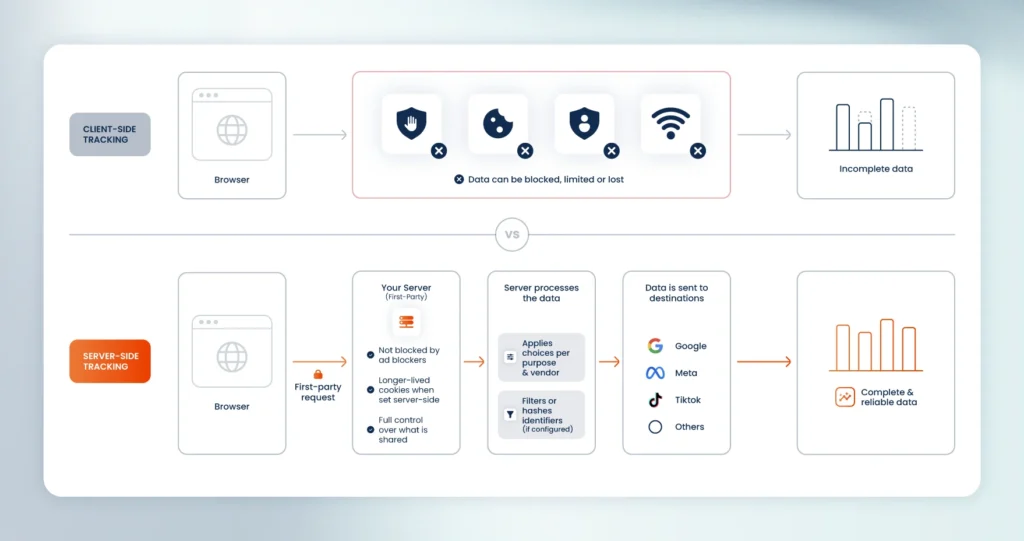
Routing collection through your own domain changes the equation, though it matters how it's done. A subdomain alone isn't enough – ad blockers can still detect a proxied endpoint when it keeps a recognizable URL pattern. For instance, sending traffic to a path like /g/collect gives it away. Safari's ITP compares IP addresses, so simply pointing a subdomain at an external service doesn't extend cookie lifetime. What actually holds up is proper alignment between your domain and its IP, combined with cookies written server-side through the Set-Cookie header rather than in the browser. Set up this way, collection is far more resilient to blocking, and first-party cookies persist long enough to keep attribution intact for conversions that take days or weeks. It also holds up better each time browsers tighten their rules further.
Data quality and governance
This is where Server-side Tracking earns its place in the stack, because it is the biggest differentiator over a purely client-side approach.
Collecting data server-side gives you one place to define and standardize events before they move further down the stack. Instead of each tag interpreting events in its own way, you set a consistent structure once. Deduplication and data validation happen server-side too, so duplicate hits and malformed events get caught before they reach your marketing tools instead of skewing your reports after the fact.
Just as importantly, you decide what leaves your infrastructure and where it goes. Data can be filtered, anonymized, or enriched on its way through, and specific fields can be sent to some destinations while being held back from others. Because the server can act as an endpoint for other sources, you can combine conversion data with information from your CRM before forwarding it, which is what ad platforms now ask for through features like Google's Enhanced Conversions.
This becomes crucial when you have to answer important questions, like which vendors received specific data fields or whether sensitive user information left your servers. With one point of control, you can answer it directly without needing to trace the path across every separate tag.
There is an important privacy compliance dimension here too. A CMP like Axeptio records consent at a granular level, per purpose and per vendor, and enforcing those choices at the server means they are applied before any data leaves your stack. You don’t need to trust each individual tag to honor them.
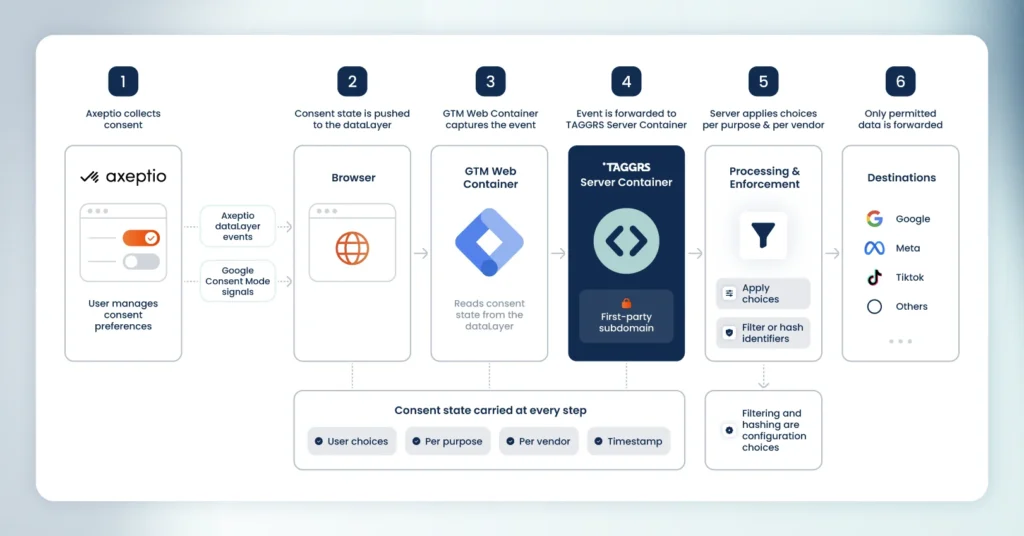
When data is collected and processed on your own EU-hosted infrastructure, you choose what to forward to third parties like Google or Meta. You can strip or hash identifiers, drop fields you have no basis to share, and apply consent decisions before anything leaves your stack. This control is directly connected to GDPR principles like data minimization and purpose limitation, while keeping processing in-house reduces your exposure and gives you control over exactly what leaves your infrastructure, which is the heart of the concerns regulators have repeatedly raised about client-side Google Analytics 4.
Web performance and SEO
Moving tags off the browser carries a side benefit that shows up in performance. Fewer client-side tags means less code loading on each page, which means lighter pages and faster loads, an effect that's especially noticeable on mobile, where processing power and network conditions are less forgiving.
That speed carries a potential SEO upside as well, since page experience signals like Core Web Vitals feed into how pages are ranked in organic search. Beyond any ranking benefit, a faster site is simply a better experience for the people using it.
Better data in, better marketing out
Better data in means better results out, which show in concrete ways across the tools you already use:
- Google Ads (Smart Bidding): With server-side purchase and lead data, the algorithm sees conversions it used to miss, so it bids toward the campaigns and keywords that drive sales.
- Meta (CAPI): Sending conversions through the Conversions API rebuilds retargeting and lookalike audiences from real buyers, and widens the pool you can re-engage rather than letting it shrink as cookies expire.
- GA4: More complete event data means attribution reflects the full customer journey, so you can trust which channels get credit before you make budget decisions.
- Google Consent Mode v2: Consented signals reach the platforms reliably, so modelling fills fewer gaps and reported conversions stay closer to reality.
As a result, the quality of your data collection shapes the quality of every marketing decision built on top of it.
Conclusion
A good consent banner lets you begin data collection, and Server-side Tracking is what helps make sure that data reaches your tools and can be used in your marketing strategy. As browser restrictions and privacy rules keep tightening, that second step is becoming a requirement.
This is why the two halves work best together. Axeptio handles the first part, designing the consent step so it earns visitors’ trust in your brand, while Server-side Tracking handles what follows, making sure the data that consent unlocks stays complete and usable all the way to your tools. At TAGGRS, this is the part we focus on. If you want to know how much data your current setup is losing before you change anything, our free website tracking checker is a good place to start.
Check out this guide to configure TAGGRS with Axeptio CMP using Google Tag Manager.