Safari 26 tracking changes: What’s new and how to adapt

 Mariusz Brucki | 19 September 2025 | Last updated:
 (Updated January 2026 with a Safari 26 Tracking Validity Check — jump to that update here.)
Safari 26 is finally here! In September 2025, Apple not only introduced stronger privacy features that affect online tracking but also gave a clear signal of where the market is going.
This is important for advertisers, marketers, and adtech vendors who rely on tracking user behavior (like ad clicks and conversions). There was some confusion due to early announcements, but now that Safari 26 has been released1, we know exactly what changes have been made.
In this article, we explain the new Advanced Fingerprinting Protection (AFP), clarify what stayed the same, and discuss how these changes impact conversion tracking and analytics. Finally, we explore why Server-side Tracking is becoming a resilient alternative and how tools like TAGGRS can help adapt to Safari’s privacy moves.
What’s new in Safari 26?
Advanced Fingerprinting Protection (AFP) is the key change in Safari 26’s privacy arsenal. Apple enabled AFP by default for all browsing modes. This means every Safari 26 user now has an extra layer of anti-tracking active without changing any settings. AFP is designed to block “fingerprinting” scripts that advertisers or analysts might use to identify a device.
In practice, AFP does a few important things:
- Blocks high-entropy device APIs: Known fingerprinting scripts can no longer reliably access certain web APIs that reveal detailed device info (for example, screen size, hardware details, canvas or audio data that could be unique to your device). By reducing this data precision or adding noise, Safari makes device fingerprinting much less effective
- Limits long-term storage: These scripts are prevented from setting long-lived data in the browser. In other words, they can’t drop cookies or use local storage to store identifiers that last for weeks or months. This stops trackers from creating a persistent ID to follow the user over time.
- Restricts reading URL and referrer data: Safari 26 also stops known tracking scripts from reading certain information that could identify a user’s journey. Specifically, those scripts can’t easily read URL query parameters (the bits after a ? in a link) or the document.referrer (which tells a site where the visitor came from). These are often used to track ad click IDs or campaign info.
In short, AFP blocks known fingerprinting scripts and disables their functionality. Apple has not shared which scripts are on the list. We only know that this is not the same as ATFP, which uses DuckDuckGo and EasyPrivacy rules. As a result, many hidden tracking methods are weaker in Safari 26. For users, this means more privacy. For trackers, it means less reliable data.
What remains unchanged?
While AFP by default is new, some rumored changes did not happen (at least, not yet) in the Safari 26 release. Notably, Link Tracking Protection (LTP) remains as it was in previous Safari versions:
- LTP is still not enabled by default in regular browsing: This means when users browse in normal (non-private) mode, Safari is not automatically stripping out tracking parameters from URLs. Your campaign tags and click identifiers (like utm_source, utm_medium, or ad click IDs such as gclid from Google Ads or fbclid from Facebook) will continue to be passed to your site as usual during standard browsing. For marketers, that means your Google Analytics or ad platforms still receive their URL parameters for now.
- LTP is active in Private Browsing and certain apps: LTP works in Private Browsing and some Apple apps. In Safari’s Private mode, ATFP is on by default. This means Safari strips known tracking IDs from links, such as
gclidor fbclid. The same happens with links opened in Mail and Messages. For example, a Google ad click in Private mode will lose its gclid before the page loads, so neither the site nor Google can see it. To handle this, Google introduced gbraid and wbraid in March 2021. These carry campaign-level data without linking to a single user. ROI can still be measured, but remarketing and audience features are less precise. Learn more about all the updates to iOS 14 campaign measurement. - UTM parameters and campaign data are safe: Apple has clarified that generic campaign parameters like utm_campaign, utm_source, etc., are considered okay and are not removed by Link Tracking Protection. This was true in Safari 17 and remains true now. So, your marketing campaign tracking via UTMs should continue working normally in both private and regular browsing. LTP mainly targets more personalized tracking IDs that pinpoint a user or click, rather than broad campaign info.
Earlier this year, many believed Safari 26 would automatically enable LTP for all browsing (meaning even in regular mode, it would start stripping trackers from URLs). Apple’s documentation around WWDC caused confusion by talking about “advanced fingerprinting protection by default,” which some interpreted as ATFP/LTP being on for everyone.
From tests on the final release of Safari 26, all usual URL parameters still come through in normal mode. This is good news for advertisers - nothing new broke in the default settings after all. However, Apple is clearly experimenting with LTP in regular browsing. In Safari’s Technology Preview (a testing version of the browser), there were instances where click IDs like gclid did get stripped even in normal mode. This suggests that Apple may roll out full Link Tracking Protection for all browsing in a future Safari update (perhaps Safari 26.x or Safari 27). They even mentioned support for this in some beta release notes. So, while nothing changed on that front today, we could see Safari tighten link tracking in the near future. It’s a warning sign for things to come.
Server-Side Tracking: a resilient alternative
With Safari (and browsers like Firefox or Brave) continually strengthening privacy, Server-side Tracking is emerging as a more robust solution for conversion tracking and analytics. In Server-side Tracking, you move the data collection and processing from the user’s browser to your own server or cloud infrastructure.
Here’s why server-side methods can withstand Safari’s changes better:
- Less reliant on the browser environment: When tracking happens on the server, Safari’s client-side restrictions (like blocking scripts or stripping data) have less effect. For example, instead of JavaScript on the page reading gclid and sending it to Google Analytics, you could have your server capture that gclid when the user lands (from the HTTP request) and then send it to Google’s servers from the backend. In that scenario, even if Safari tries to hide the gclid from scripts, as long as it’s still present in the URL request your server receives, you’ve got it. (If Safari eventually removes it before the request, then you might need a different approach – but server-side setups are flexible to accommodate changes, as we’ll note).
- Not easily identified or blocked by Safari: Browser-based trackers often involve including a known script (like https://tracker.example.com/script.js) that Safari might label as a tracker. With Server-side Tracking, the data is collected through your own domain and sent out from your server. Safari doesn’t see a third-party tracker script running in the user’s browser, because there isn’t one in the traditional sense. In practice, browsers and adblockers are becoming more sophisticated and first-party context might not be enough to ensure the uninterrupted data stream.
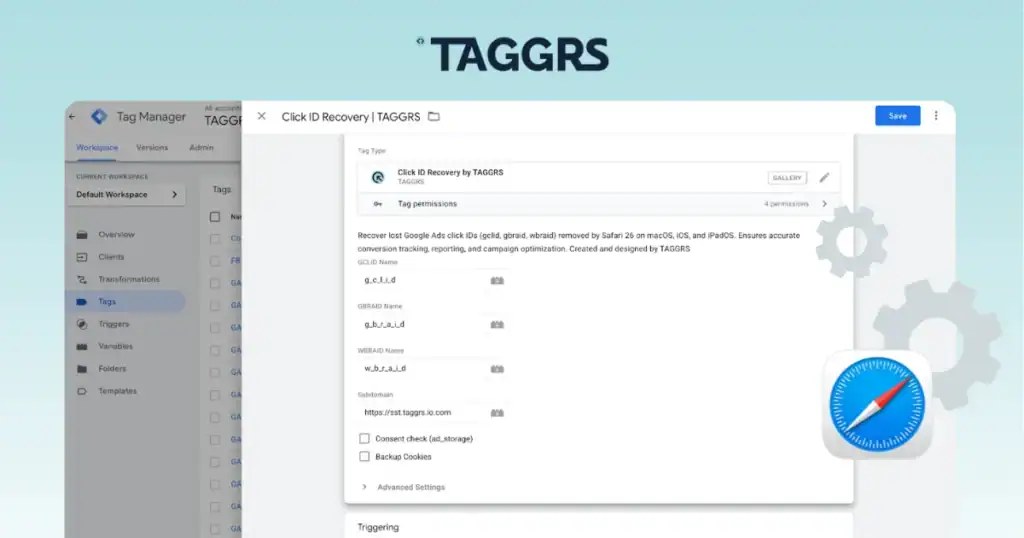
- Ability to adapt quickly: If Apple introduces a new rule (say, tomorrow they start stripping all fbclid parameters in every mode), a server-side approach can adjust by changing how data is captured or passed. For instance, you can start using the TAGGRs Click ID Recovery Tag, which allows for using GCLID and other Google’s parameters despite Apple’s stripping techniques.
- Longer data retention and merging capability: On the server, you can decide how long to keep tracking identifiers. Even if Safari deletes a user’s cookies after 7 days, you could maintain a server-side identifier (that you link through some initial data) to recognise a conversion that happens, say, 14 days after the ad click. You might do this by assigning your own first-party cookie or ID during the user’s first visit (which Safari will purge after 7 days of no visit – but if the user returns within 7 days, it keeps extending).
- Better control over data flow: Server-side Tracking allows you to filter, transform, or enrich data before it goes to third-party analytics or advertising platforms. You ensure that only the needed data is shared, and user privacy can be respected by not exposing everything in the browser. It also means that if a browser blocks a certain analytics endpoint, you could route data through your server to that endpoint instead. For example, if Safari blocks direct calls to analytics.example.com, you can send data to mydomain.com/collect (which Safari sees as first-party) and then have your server forward it to analytics.example.com. This kind of proxy approach is a common technique to resist ad blockers or browser restrictions. At the same time, it allows for keeping the user’s privacy by anonymising PII data so you track only actions, not users, if they do not wish so.
Given Safari 26’s changes and Apple’s trajectory, implementing Server-side Tracking is a smart move now. It future-proofs your marketing and analytics stack against sudden browser updates.
However, setting up Server-side Tracking can be complex if you do it from scratch - you need infrastructure to receive events, handle them securely, and integrate with all your tools. This is where solutions like TAGGRS come into play.
FAQ: Safari privacy & tracking changes
What is ITP in Safari? Do ITP, ATFP, and AFP all mean the same thing?
ITP stands for Intelligent Tracking Prevention. It’s a set of Safari features (introduced since 2017) aimed at blocking third-party tracking cookies and limiting other tracking techniques. For example, ITP will automatically delete cookies set by domains that track you across sites, often after 7 days, and it blocks some cross-site script requests.
Now, Safari’s privacy suite has expanded, and there are new acronyms:
AFP = Advanced Fingerprinting Protection, new in Safari 26, is a default feature (always on for everyone) that specifically targets fingerprinting techniques as we described earlier. It’s separate from the user-toggle ATFP setting. Even if ATFP is off, AFP is still working in the background on Safari 26.
ATFP = Advanced Tracking and Fingerprinting Protection. This is a setting Safari introduced (with Safari 17) that bundles several protections. When ATFP is on, Safari activates Link Tracking Protection (stripping tracking IDs from URLs) and also blocks network loads to known tracker domains outright. By default, ATFP is enabled in Private Browsing windows, but not in normal windows unless the user turns it on. Think of ATFP as a mode that supercharges Safari’s privacy by adding those extra blocks.
In summary: ITP is the ongoing intelligent cookie/tracker prevention, AFP is the new default anti-fingerprinting layer, and ATFP is an optional setting that adds even more protections like link stripping and stricter tracking domain blocking. They all aim to protect privacy but operate in slightly different ways.
Are Safari users still going to see ads?
Yes, Safari users will still see ads on websites. Apple’s tracking protections don’t outright block ads from being displayed (except maybe some known trackers, but generally not the content itself). What changes is how personalized or trackable those ads are. For instance, Safari might prevent an ad network from knowing you visited a product page last week, so you might not see that exact product’s ads following you around. Ads will be more generic or contextual because the browser stops the advertiser from building a detailed profile of the user’s browsing behavior. From a user’s perspective, browsing in Safari might feel “calmer” privacy-wise, but they’ll certainly still see ads - just that those ads might be less targeted. And for advertisers, it means the effectiveness of highly targeted remarketing campaigns could drop for Safari users, since the linking of user identity across sites is blocked.
Can Safari 26 still track conversions at all?
Safari 26 can track conversions in the sense that, with user consent and proper methods, you can still measure when someone who clicked an ad later buys something. What’s changing is how you do it. Traditional methods (like third-party cookies or fingerprinting) are either gone or greatly weakened. But there are still ways:
- Server-side & APIs: As discussed, using Server-side Tracking or APIs (like Facebook’s Conversion API, Google’s Enhanced Conversions) can still get conversion info, albeit in aggregate or without relying on the browser’s memory. So yes, conversions can be tracked, but Safari forces them to be tracked in ways that don’t overly invade privacy. If you have been relying on older methods, you may need to update your tracking implementation to ones that Safari is okay with.
- URL-based tracking: As noted, your landing pages still get UTM parameters and other info in normal browsing, so you can use those to attribute conversions to campaigns (especially within the same session or day).
- First-party cookies and login data: If your site has user login or sets a first-party cookie when they arrive (and the user returns within a week), you can link their actions together to count a conversion. Safari doesn’t stop you from tracking within your own site using first-party data that the user has consented to (like an account or an email).
- Privacy-safe conversion measurement: Apple has its own PCM (Private Click Measurement) which is a system for tracking conversions in a privacy-friendly way without giving full identifying data. It’s quite limited and mostly used by ad networks in the background, but it means Safari will allow some level of attribution through approved channels.
Will Safari expand Link Tracking Protection to all browsing modes soon?
It’s very possible. Apple’s wording in beta releases and tests in Safari Technology Preview indicates they are considering making Link Tracking Protection a standard in regular browsing as well. That would mean in a future update, Safari could start removing those gclid/fbclid and similar parameters even outside of Private mode. We don’t have an official date or confirmation, but the evidence suggests Apple is moving in that direction. They might be waiting to see how the current changes (AFP) go, or phasing it in gradually. For now, Safari 26 at release did not enable full LTP outside private windows - but organizations should be prepared that it could happen with little notice. Essentially, expect Safari to keep tightening tracking step by step. We recommend implementing solutions now so that if/when Apple flips that switch, your measurement won’t break overnight.
What should I do to prepare for these changes (and future ones)?
The best preparation is to future-proof your tracking stack:
- Implement Server-side Tracking: Start sending important data through your server and not exclusively via the user’s browser. This could mean setting up a server-side Google Tag Manager container, or using APIs provided by ad platforms to send conversion events from your backend.
- Use first-party domains for trackers: If you have to use client-side scripts, try hosting them on your own domain. For example, load your analytics script from analytics.yoursite.com instead of a third-party URL. Safari is less likely to block or restrict scripts that appear as part of your site’s domain.
- Stay informed on Safari updates: Keep an eye on Apple’s release notes for Safari and WebKit blog posts about privacy. They usually hint at what’s coming. When you know ahead, you can test beta versions and see how your tracking behaves, then adjust in advance. (You can also simply follow our blog and social media to stay up to date).
- Leverage new measurement solutions: Use frameworks like Apple’s Private Click Measurement (if you’re an ad network or working with one) for web-to-web conversion tracking. For app campaigns, use SKAdNetwork, etc. Basically, adopt the privacy-centric measurement tools that are becoming the industry standard. They may not be as granular as the old ways, but they will survive browser changes.
- Get consent and be transparent: This is more about compliance and ethics, but ensuring you have user consent for tracking can also help in using certain tracking methods. With regulations like GDPR, doing the right thing by the user is not just good practice but required legally. Safari’s changes are largely aligned with these privacy principles.
By taking these steps, you won’t be scrambling each time Apple or another browser issues an update. Instead, you’ll have a flexible, controlled system that you can tweak as needed to keep data flowing.
If Safari strips out my ad click IDs (like those fbclid or gclid parameters), is there any workaround?
Yes, there are a couple of workarounds if Safari (in the future) removes your query parameters in links:
- Redirect through your server: One method is to have the user pass through a page or endpoint on your own domain that records the click info. For example, instead of sending an ad click directly to mylandingpage.com/?gclid=ABC123, you send it to track.mycompany.com/click?gclid=ABC123, which does a quick log of that ID server-side, and then redirects the user to the final page (perhaps adding some identifier in a first-party cookie or localStorage at that moment). Even if Safari were to strip gclid on the next hop, you’ve already captured it on your server in the first step. This requires some setup, but can ensure no information is lost.
- Reliance on server-side APIs: As mentioned, using things like conversion APIs (Facebook’s or Google’s) means you send the click data from your server, not from the user’s browser. For these to work, you typically need some piece of information to tie the click to the conversion (like an order ID or a user email hashed, etc.). It’s a bigger shift, but very effective as a long-term solution.
- Emerging tools (like TAGGRS Click ID Recovery Tag): They are specifically built to handle scenarios like this automatically. TAGGRS, for instance, will manage capturing those IDs and ensuring they get to where they need to, even if the browser tries to interfere. By using their enhanced script and backend, you wouldn’t have to engineer the above solutions yourself - it would happen behind the scenes.
In summary, while Safari might try to close the door on easy client-side passing of click IDs, savvy developers and tools can find another window to get that data through in a user-respecting way. It just might not be as straightforward as before, but it’s doable with planning.
Key takeaways
- Safari 26 marks another step in Apple’s journey to strengthen user privacy. The introduction of Advanced Fingerprinting Protection means the browser itself is taking a more active role in neutralising tracking techniques. While this raises challenges for marketers and analysts, it’s also a push towards newer, more robust tracking methods.
- Relying only on client-side tracking is risky today. Safari and other browsers add protections that cut the data flow. Chrome has not added such strict rules yet, but its users often install ad-blockers. This creates the same data loss for marketers and analysts.
- Adapting now by embracing Server-side Tracking and first-party approaches will save a lot of headaches later. It’s clear that privacy measures will only get stricter. But with the right approach, advertisers and organizations can adapt and thrive in this new landscape. Focusing on user consent, first-party data, and flexible tracking systems is the way forward. Safari 26 is not an “end” to tracking; it’s a call to upgrade how we track.
- Now is the time to act. Implementing Server-side Tracking or trying out new tools might sound complex, but the benefit is long-term stability in your analytics and marketing attribution. If you’re unsure where to start, we’re here to help. Get in touch with us to learn more, or try out TAGGRS for your website. With TAGGRS’s upcoming enhanced tracking solution, you can stay one step ahead of browser changes and keep your conversion data flowing accurately.
Safari 26 Tracking validity check (January 2026)
Since Safari 26 rolled out, the practical impact of Apple’s privacy changes has become much clearer. In day-to-day tracking setups, most of the core behaviors described above still hold.
1. UTM parameters remain reliable
UTM parameters continue to work in Safari’s normal browsing mode. Apple has not started stripping utm_source, utm_medium, utm_campaign, or related campaign parameters. Even with Link Tracking Protection in place, UTMs are treated as generic campaign metadata rather than user-level identifiers. As a result, standard campaign attribution based on UTMs remains reliable in Safari, both on desktop and mobile. This was also never affected in Private Browsing, and that has not changed.
2. Click IDs still pass through in regular browsing
Click IDs in regular browsing are still present, for now. Although Apple announced support for filtering tracking query parameters across all browsing modes, Safari 26 has not yet begun removing gclid, fbclid, or similar click identifiers in standard (non-Private) browsing sessions. Early beta tests already showed that these parameters continued to pass through, and the public release confirmed it. If a user arrives on your site via a Google Ads click in Safari 26, the gclid is still included in the landing page URL. This means GA4 auto-tagging and ad platform attribution can still function for Safari users today.
3. Private Browsing continues to strip tracking identifiers
Private Browsing behavior remains unchanged. Safari continues to remove known tracking parameters such as gclid and fbclid in Private Browsing by default, just as it has since Safari 17. Traffic from users browsing privately will therefore still arrive without these identifiers, often appearing as unattributed or “direct” in analytics and ad platforms. This remains a structural limitation and should be expected when analyzing Safari data.
4. AFP effects are limited
Advanced Fingerprinting Protection has not caused widespread analytics breakage. AFP primarily targets scripts that rely on invasive fingerprinting techniques, such as collecting high-entropy device or browser characteristics. Standard analytics tools are not built around fingerprinting and have not been broadly blocked. One important side effect of AFP is that scripts classified as trackers may lose access to certain data, such as the full URL query string or referrer, at the browser level. However, this restriction applies to client-side scripts only. The full request URL still reaches your server. Server-side tracking and first-party data collection are therefore unaffected, and setups using server-side Google Tag Manager can capture parameters like gclid from the incoming request before Safari limits access in the browser. This is exactly why server-side tagging remains a robust long-term strategy under Safari’s evolving privacy model.
- Safari 26.0 was released on September 15th, 2025. Source: Safari Release Notes ↩︎