Google Consent Mode V2: Setup, signals and how to verify it

 Mariusz Brucki | 2 June 2026 | Last updated:
 Google updated its Consent Mode framework in early 2024, adding 2 new consent types and making the whole thing mandatory for anyone using Google Ads in Europe. Most teams updated their CMP tag in GTM and moved on. What many didn't catch is that the Basic vs. Advanced choice, and how consent signals travel through a server container, has a direct impact on how much conversion data reaches your ad platforms.
The framework, the tradeoffs, the server-side nuances, and the setup steps are covered in this article.
What is Google Consent Mode V2?
Consent Mode is a set of signals that your cookie banner sends to Google's tags. When a user accepts or declines cookies, those signals tell Google's products what they're allowed to do: set cookies, collect user data, run personalised ads, or model conversions.
The CMP handles the user interaction, the upstream side. Google's tags then adjust their behaviour based on whatever the user chose. Consent Mode sits between the two and carries the decision from one to the other.
The 4 consent types
V1 used two consent types. V2 added two more:
| Consent Type | Controls | Added in | DMA Required |
| ad_storage | Advertising cookies | V1 | No |
| analytics_storage | Analytics cookies | V1 | No |
| ad_user_data | Sending user data to Google for advertising purposes | V2 | Yes |
| ad_personalization | Personalised ads and remarketing | V2 | Yes |
The last two matter specifically for the EU's Digital Markets Act. Google needs explicit consent not just for storing cookies, but for using your visitors' data inside its ad systems. Without ad_user_data and ad_personalization properly configured, remarketing audiences and conversion tracking are incomplete regardless of what your CMP says.
Consent Mode is not the whole requirement
Consent Mode carries the user's decision to Google's tags but, on its own, it doesn't satisfy Google's policy for advertisers serving the EEA or the UK.
Google separately requires that advertisers running Google Ads, AdSense or AdMob to users in those regions use a Google-certified CMP. Google maintains the list of certified CMPs, and a banner built in-house or with an uncertified tool doesn't qualify no matter how correctly it implements the consent signals.
The two requirements are independent and it's common to meet one without the other. You can fail with broken signal mapping on a certified CMP or a custom banner that maps perfectly but isn't on Google's list. Check both before you consider a consent setup complete.
Basic vs. advanced Consent Mode: which should you use?
There are two ways to implement Consent Mode, and the difference shows up in your advertising performance.
Basic Consent Mode: Tags only fire after the user explicitly consents. Non-consenting visitors generate no data at all.
Advanced Consent Mode: Tags load with default states (denied in the EU). When a non-consenting user visits, the tag still sends cookieless pings to Google, a minimal signal without identifying data. When they accept, full data flows.
Here's how the 3 states compare in practice:
| No Consent Mode | Basic | Advanced | |
| Non-consenting users | Uncontrolled (compliance risk) | No signal sent | Cookieless ping sent |
| Conversion modeling available | No | No | Yes (after threshold) |
| Modeling threshold | - | - | 700 ad clicks / 7 days / country |
| EU site at ~40% consent rate | Compliance risk | 54% of signals gone, no alert | 54% partially recoverable |
Google Ads needs at least 700 ad clicks over 7 days per country before it starts modeling conversions. Under that threshold, even Advanced mode sends cookieless pings from non-consenting users, but the modeling never kicks in.
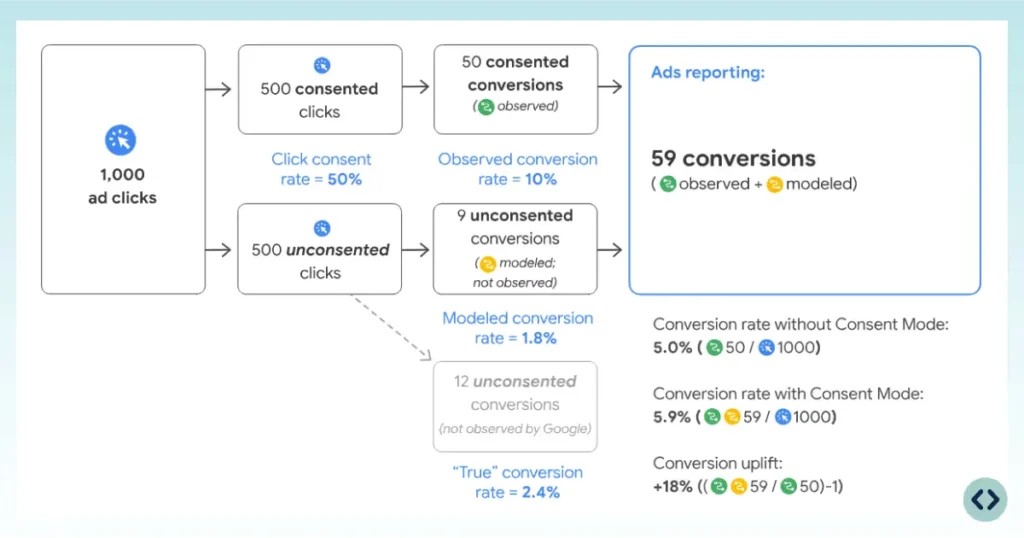
According to SearchLab’s Privacy & GDPR’s Statistics, for EU sites where consent rates typically sit around 46%, Basic mode means 54% of your conversion signal disappears from Google's view. Campaigns keep running, bidding algorithms adjust to whatever's left, and there's no warning that the data is thin.
Advanced is the better choice for most sites. The requirement is that your CMP tag fires before any other tag, during the consent initialisation trigger, so default states are set before any data is collected. If there's a delay, you risk sending data before consent is initialised.
What breaks when Consent Mode V2 isn't configured correctly
The consequences don't appear in an error message, but rather as numbers that slowly get worse and deteriorate your performance:
Remarketing and audience lists stop populating for EEA users. Without granted ad_personalization, a visitor from the EEA isn't added to your remarketing audiences. Existing lists stop growing and then age out as membership durations expire. Campaigns keep serving, reach decreases and it's months before anyone notices what's been happening.
Customer Match uploads lose EEA records. Data collected without ad_user_data consent can't be used for Customer Match, so segments built on European customer data come back smaller than the file you uploaded.
Conversion modeling never activates. Modeling requires advanced Consent Mode and enough volume: 700 ad clicks over 7 days per country and domain. It can't happen at all on basic mode, because non-consenting users send no signal to model from.
Smart Bidding optimizes on a partial picture. This is a particularly expensive result. Bidding algorithms don't know that 54% of your conversion signal is missing. They treat what arrives as the complete truth and adjust accordingly, which means budget moves toward whatever the surviving data happens to favour.
How does Consent Mode V2 work with Server-side Tracking?
Most server-side setups have a gap here: consent states are not forwarded to the server container automatically. What happens instead depends entirely on which tags you're running.
Google products: handled automatically
For GA4 and Google Ads, the web container packages the current consent state into a gcs parameter on every outgoing request. That request hits the server container, and the Google tags there read the parameter and handle consent enforcement on their own. No additional configuration needed in the server container for these tags.
Non-Google tags: you need to pass consent manually
Meta Conversions API, LinkedIn Insight Tag server-side, TikTok Events API, and similar platforms don't read the gcs parameter. They need consent states passed explicitly as event parameters. Without that, the tag has no way to know what the user agreed to.
Setup for non-Google tags
- Download and import the GitHub Consent State Template into your GTM web container
- Create a Consent State variable for each relevant type: ad_storage, analytics_storage, ad_user_data, ad_personalization
- Add all four variables to a Google Tag Event Settings variable as event parameters
- Attach that Event Settings variable to your main Google Tag
- In the server container, create Event Data variables for each consent state, using the consent type name as the Key Path (e.g., ad_personalization)
- Use these variables as trigger conditions to gate non-Google tags, so they only fire when the relevant consent type is granted
Without this, a server-side Meta or TikTok tag fires on every event, regardless of what the user chose.
How to set up Consent Mode V2 in GTM
1. Enable Consent Overview
Go to Admin → Container Settings in your GTM web container. Under Additional Settings, enable Consent Overview and save. This makes consent behaviour visible in Preview mode, which you need for verification.
2. Add your CMP tag
Go to Tags → New and find your CMP in the Community Template Gallery. Set the trigger to Consent Initialisation - All Pages. This fires before everything else on the page and sets the default consent states.
3. Map CMP categories to consent types
Different CMPs use different internal category names. Standard mapping for EU sites:
- Marketing → ad_storage, ad_user_data, ad_personalization
- Statistics → analytics_storage
- Preferences → functionality_storage, personalization_storage
Check your CMP's documentation to confirm its exact category names. Mismatched mapping is one of the more common Consent Mode problems and not obvious to spot from the outside.
4. Set defaults to denied for EU visitors
All four consent types should default to "denied" before any user interaction. Your CMP tag should handle this, but verify it in GTM Preview by checking the Consent tab on a fresh page load before interacting with the banner.
5. Configure the server container for non-Google tags
Follow the steps from the previous section: Consent State Template, Event Settings variable, server-side Event Data variables, consent-based trigger conditions. For GA4 and Google Ads in the server container, nothing extra is needed.
6. Verify with Tag Assistant
Open GTM Preview in a fresh browser session. Load your site and open the Consent tab. All four types should show "denied." Accept the banner and confirm that they update to "granted." Then check the Tags tab to verify tags fire or hold back according to the consent state.
For the full configuration reference, the TAGGRS Consent Mode documentation walks through each step in detail.
CMP-specific notes
Cookieconfirm
Cookieconfirm uses a dedicated tag in the Community Template Gallery. Install it with a Consent Initialisation trigger, and the server container picks up the GCS parameter for all Google tags automatically. For non-Google tags, create custom blocking triggers using the ED | x-ga-gcs Event Data variable. The value gcs=G101 means ad_storage is denied; gcs=G10 at the start indicates ad_storage denial in the GCS string format.
Axeptio
Axeptio works differently. Rather than the standard GCS parameter, Axeptio tracks consent through vendor names stored in axeptio_authorized_vendors and pushes an axeptio_update event to the dataLayer when consent changes. On the server side, create an Event Data variable for axeptio_consent_state and condition each tag on whether the relevant vendor name (e.g., google_analytics) is present in that variable. The category-to-signal mapping for Consent Mode V2 is configured inside the Axeptio platform itself.
How to check whether Consent Mode V2 is working
Three methods are used in combination.
GTM Preview - Consent tab
Open a private browser session, start Preview mode, and load your site. Before touching the banner, open the Consent tab. All four consent types should read "denied." Accept the banner and watch the values update. If they don't change, the CMP tag isn't firing or its categories aren't mapped to the right consent types.
Network tab - gcs parameter
In Chrome DevTools, filter network requests for collect. Each GA4 hit includes a gcs parameter that encodes the current consent state. G111 means all four types are granted. G101 means ad_storage is denied, analytics_storage is granted. The parameter value is what actually got sent to Google, not what the banner claimed to set.
TAGGRS dashboard
In your TAGGRS server container, incoming events carry the consent state parameters passed from the web container. Check an event from a consenting session and confirm that ad_storage, analytics_storage, ad_user_data, and ad_personalization appear as event parameters with the expected values. If they're missing, the Event Settings variable isn't connected, or the Consent State Template wasn't imported.
Where TAGGRS fits
Server-side tracking and Consent Mode V2 work well together, but they need to be wired up correctly for the combination to hold. The automatic GCS handling in Google's tags covers GA4 and Google Ads without extra work on the server side. For everything else, Meta, LinkedIn, TikTok, or any custom server-side integration, consent has to be passed deliberately through the event payload.
TAGGRS provides the server container infrastructure and publishes the Consent State Template that handles how consent parameters travel from the web container to the server. For teams on Axeptio or Cookieconfirm, the CMP-specific guides above cover the exact configuration steps for each platform.
Consent isn't the only signal that can be lost before it reaches your server container - ad blockers can intercept the request itself. Not sure where your setup stands? Run the free website tracking checker to see which pixels, cookies and consent settings are live on your site, or create a free account and start from there.
FAQ
What is the difference between Consent Mode V1 and V2?
V1 used two consent types: ad_storage and analytics_storage. V2 added ad_user_data, which controls whether user data is sent to Google for advertising, and ad_personalization, which controls remarketing and personalised ads. Both new types are required for DMA compliance. Sites still on V1 will see incomplete remarketing audiences and gaps in conversion tracking.
Does Consent Mode V2 replace Server-side Tracking?
No. They serve different purposes. Consent Mode governs what data Google is allowed to process based on user choices. Server-side tracking changes where data collection happens, moving it from the browser to your own server. The two work together: server-side tracking improves first-party cookie lifespans and data quality, but consent decisions still need to travel with the data to stay compliant.
How do I check if Consent Mode V2 is set up correctly?
Three checks: the GTM Preview Consent tab (verify defaults are "denied" before interaction and update after); the gcs parameter on GA4 network requests (G111 = all granted); and your TAGGRS server container dashboard to confirm consent state parameters are arriving on server-side events.
What is the conversion modeling threshold for Consent Mode?
Google Ads needs 700 ad clicks over 7 days per country and domain before conversion modeling activates. Below that, Advanced Consent Mode sends cookieless pings from non-consenting users but Google can't yet model conversions from them. Basic Consent Mode never reaches this threshold for non-consenting users because no signal is sent at all.
Do I need a Google-certified CMP, or is Consent Mode enough?
Both. Consent Mode is the technical layer that carries consent decisions to Google's tags. Google's policy for advertisers serving the EEA and UK separately requires that the consent banner itself comes from a Google-certified CMP. Implementing Consent Mode correctly with an uncertified banner doesn't satisfy the policy requirement, and using a certified CMP with broken signal mapping doesn't satisfy the technical one.
What happens to my remarketing lists if Consent Mode V2 isn't set up?
EEA users who haven't granted ad_personalization don't enter your remarketing audiences. Existing lists don't disappear, they stop growing, and members age out as the membership duration expires. Customer Match uploads lose EEA records for the same reason. Neither shows up as an error, which is why the problem usually gets discovered through shrinking audience sizes rather than through any warning in the interface.