

Server-side Tracking FAQ: 50+ Most Frequently Asked Questions about SST
Getting started with Server-side Tracking can be challenging. The process requires technical knowledge, but it is certainly manageable with the right documentation and guidance. At TAGGRS, our mission is to deliver first-party data you can trust by making Server-side Tracking accessible to every professional and organization. That’s why, on this page, you’ll find 50+ frequently asked questions to address your concerns, help you get your setup up and running, and enhance your data collection for better GDPR compliance, improved conversion performance, and a stronger user experience.
All questions in this SST FAQ are divided into categories, which will hopefully make finding your question a little easier.
General questions
Since we understand that Server-side Tracking can be a difficult process, we first start with the general questions about Server-side Tracking. In it, we will try to paint a complete picture of what Server-side Tracking is all about and answer the questions it may raise.
1. What is Server-side Tracking?
Server-side Tracking is a new way of data collection where you set up your own server that collects data from your website. This makes you the owner of the collected data. Through this server, Google Tag Manager is then invoked. This method of data collection is called Server-side Tracking. For more information read our full manual about Server-side Tracking.
2. What's the purpose of Server-side Tracking?
The primary purpose of Server-side Tracking is to provide a more efficient, secure and reliable way to collect and process data from websites.
3. How does Server-side Tracking work?
Server-side Tracking deals with the flow of information that takes place from the website. When data flows through the Server Side it means that the collected information is forwarded to its own server. From this server, the data is then shared with the desired analysis platforms. Much of this is done through Google Tag Manager.

4. What is the difference between Server-side Tagging and Server-side Tracking?
Server-side Tagging and tracking are related concepts, but serve different purposes. While server-side tracking focuses on collecting data about user interactions with a Web site directly through the server, server-side tagging refers to implementing and managing tracking tags (which serve a similar purpose as analytics or advertising tools) on a dedicated tag manager server.
5. What is Client-side Tracking?
Client-side Tracking is the current data collection method where tags, or small pieces of code, are executed directly in the user's browser to monitor and record interactions and behavior on a website, resulting in direct data processing and transmission to various analytics platforms. Due to legislation and tracking prevention, this method of data collection is working less and less well.
6. What is the difference between Server-side Tracking and Client-side Tracking?
Client-side Tracking is the current method of data collection. Server-side Tracking is the new method. Server Side Tracking involves an additional link: the server.
| Advantage | Client-side Tracking | Server-side Tracking |
|---|---|---|
| Page speed | Slow | Quick |
| Data Protection | Low | High |
| Data check | Low | High |
| Resistance to Adblockers | Low | High |
| Cost | Free | Paid |
| Setting | Simple | Trickier |
| Functionality | High | Emerging |
7. What can I do with Server-side Tracking?
Server-side Tracking offers a wide range of options for collecting and processing website data, allowing organizations to gain advanced insights about user behavior, exercise better control over data, and better ensure user privacy.
8. Who should use Server-side Tracking?
Server-side Tracking is of interest to several types of organizations. First, high-traffic websites benefit because they can gain more detailed insights into their visitors' behavior through more efficient data collection. Companies that rely heavily on online marketing, such as e-commerce platforms, find in Server-side Tracking a valuable tool for accurate conversion tracking. In addition, it is an important technology for organizations seeking to comply with privacy laws, such as the AVG, because it provides greater control over the data collected and its processing. Server Side Tagging is also useful for companies that want to improve their website's performance and user experience, as it can reduce load time by moving data processing to the server.
9. Do clients with small ad budgets also needed server-side tracking?
Server-side Tracking is essential for anyone collecting data online. The value of server-side tracking increases as more data is collected. As third-party cookies are phased out, it will become necessary for anyone who wants to continue collecting data to eventually switch to server-side tracking.
10. Is Server-side Tracking the future?
Server-side Tracking is increasingly seen as an important development in the world of digital data collection and analysis. Although no one can see into the future, there are strong indications that it will play an important role in the future.
11. Do you need consent for Server-side Tracking?
You don't need permission to send data server side. Are you currently using Consent Mode V2 in GTM? Then you need to set this up server side. Check our guide for a future-proof implementation.
12. Do you need a cookie banner with Server-side Tracking?
Many people think that Server-side Tracking means you no longer need a cookie banner. This is incorrect: you still need a cookie banner to comply with privacy regulations!
13. Does Server-side Tracking work with cookies?
Server-side Tracking uses First-party Cookies instead of Third-party Cookies, which ensures that the data remains the property of the user. This approach ensures control over the data, as First-party Cookies are directly connected to the user's own domain, unlike Third-party Cookies that come from external sources.
14. Why isn't everyone using Server-side Tracking yet?
Complexity comes into play. Setting up tags, triggers and variables for SST is less well documented than for traditional methods, making the process more complicated. There is also the cost. SST via Google Tag Manager requires server space, which incurs a cost. This while the current method is free.
15. Is there a roadmap to get started with Server-side Tracking?
At TAGGRS, we help you get started with Server-side Tracking with a comprehensive checklist.
16. Do you need a lot of technical knowledge to set up Server-side Tracking?
Despite being technical, we believe that anyone can install Server-side Tracking. We have written a blog for each implementation process that explains step by step how to set up server side.
17. Are there any case studies available on successful implementations of Server-side Tracking?
There are many case studies available showing successful implementations of Server-side Tracking. For more details, check out our case studies.
18. What are browser tracking prevention mechanisms?
Browser tracking prevention mechanisms are designed to limit or prevent tracking of user activity across multiple sites. These features protect users' privacy by minimizing the amount of data that trackers can collect. Google introduced the "Tracking Protection" feature in Chrome on Jan. 4, which blocks third-party cookies for a select group of users. This is a test within the Privacy Sandbox, aimed at reducing third-party cookie use. The short-term impact is limited, but the test provides insight into the future impact on Web sites and marketers that rely on these cookies.
19. Does Google Tag Manager Server Container store data about visitors?
Google Tag Manager does not function as a store for visitor information, but rather facilitates the transfer of data to external tools (third party). One possible approach for data storage would be to deliberately create Regex or Lookup tables that link user IDs to specific user data. However, this would mean storing sensitive, personally identifiable information within GTM, which goes against Google's terms of service. So if you go this route, with or without regard to the GDPR, you will run into problems.
Benefits of Server-side Tracking - FAQs
These questions and answers are intended to provide a good understanding of the many benefits of Server-side Tracking.
20. What are the benefits of Server-side Tracking?
Server Side Tagging offers benefits such as more data collected, improved data quality and support for GDPR compliance. Read about all the benefits of Server-side Tracking to learn more.
21. Does Server-side Tracking help against the disappearance of Third-party Cookies?
Yes, due to the Chrome Third Party Cookie phase-out, Server-side Tracking provides a solution by using first-party data. This reduces reliance on Third-party Cookies and aligns with new browser restrictions and regulations, making it a reliable and privacy-friendly method of data collection.
22. Does Server-side Tracking have a positive impact on page speed?
Server-side Tracking improves page speed by loading fewer scripts, which speeds up website load time. We tested the difference between Client- and Server-side pagespeed for several clients.
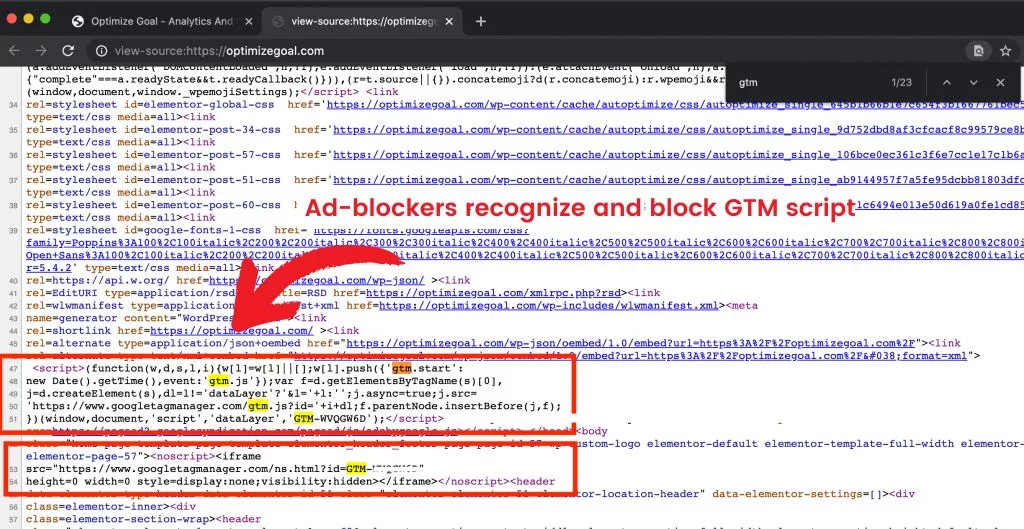
23. Does Server-side Tracking help against ad blockers?
Server-side Tracking is effective against adblockers by moving data collection from the browser to the server, making it less detectable. Essential ad data can thus continue to be collected and transmitted. The TAGGRS Enhanced Tracking Script further optimizes this by making the standard Google Tag Manager script less recognizable to adblockers.
24. Do you extend cookie duration by using Server-side Tracking?
TAGGRS Cookie Recovery, designed specifically for iOS 16.4 or newer, allows you to extend the life of cookies. This feature stores a unique user ID as an ITP-compliant first-party cookie. With each visit, this cookie is checked and, if necessary, marketing cookies are restored. This extends the effective lifetime of cookies, which is crucial for accurate tracking and attribution in marketing campaigns.
25. Does Server-side Tracking have a positive impact on a website's SEO score?
Server-side Tracking can indeed have a positive impact on SEO. This method speeds up your website by reducing the amount of code on the client side, resulting in faster load times and better user experiences, both crucial for SEO. In addition, it helps resist ad blockers, preserving the integrity of your data for more effective SEO strategies. With the accurate data that Server-side Tracking provides, you can fine-tune your SEO strategy, leading to better rankings and optimization of your website performance. This approach allows you to make more informed decisions, maximizing the efficiency of your SEO efforts.
26. Does Server-side Tracking help ensure that all orders from my webshop match the number of orders in GA4?
Server-side Tracking helps minimize the discrepancies between your e-commerce orders and the ones tracked in GA4, because it increases the amount of measurable GA4 data.
This is made possible by 2 key features the first is resisting ad blockers: Many users install ad blockers that block tracking mechanisms such as GA4, META and Google Ads cookies. Server-side Tracking helps resists these blockers, making more data available for analysis. The second reason is navigating past Browser Tracking Prevention: Browsers such as Safari, Firefox, Edge and Brave have tracking prevention mechanisms that try to limit tracking of user activity across sites. Server-side Tracking makes it possible to overcome these restrictions as well, because the data stream sent to the server is not affected by these browser features.
27. Are you getting more conversions by Server-side Tracking?
Server-side Tracking leads to more reported conversions. While not directly increasing conversions, adblockers, Safari's ITP and iOS's ATT reduce the effectiveness of traditional tracking methods. Server-side Tracking can get around these limitations, resulting in higher reporting of conversions at data endpoints.
28. How does Server-side Tracking improve data quality?
Server-side Tracking gives you the ability to filter and process data before it is sent. This results in cleaner data by eliminating unwanted sources, making for more accurate analysis and better insights.
29. What does Server-side Tracking do to address Web bot traffic and how does it recognize it?
In the enrichment phase of TAGGRS is a feature that can identify webbot traffic. This feature identifies and filters webbot traffic so that the data remains clean and reliable.
30. Does server-side tracking help ensure data residency and regional compliance?
Yes. With TAGGRS GTM hosting, you have the flexibility to specify where your tracking server is hosted because we own an independent worldwide server infrastructure. This lets you keep user data within particular jurisdictions (e.g. within the European Union). Such control aids regional compliance with laws like GDPR, as sensitive information never leaves the required territory.
31. Is Server-side Tracking relevant and beneficial to every party?
Server-side Tracking is of interest to various types of anyone doing detailed data collection and needing to meet privacy requirements such as Consent Mode, which you can activate on the server side by following our guide. For companies without strict privacy requirements or no need for detailed data collection, Server-side Tracking may be less relevant.
32. What is the benefit of setting up server-side tags via GTM if sending data to the server still relies on a client-side script?
All data is sent and retrieved through your own first-party subdomain instead of third-party domains, which are often blocked. Your subdomain(s) will not be blocked or will be blocked to a lesser extent .
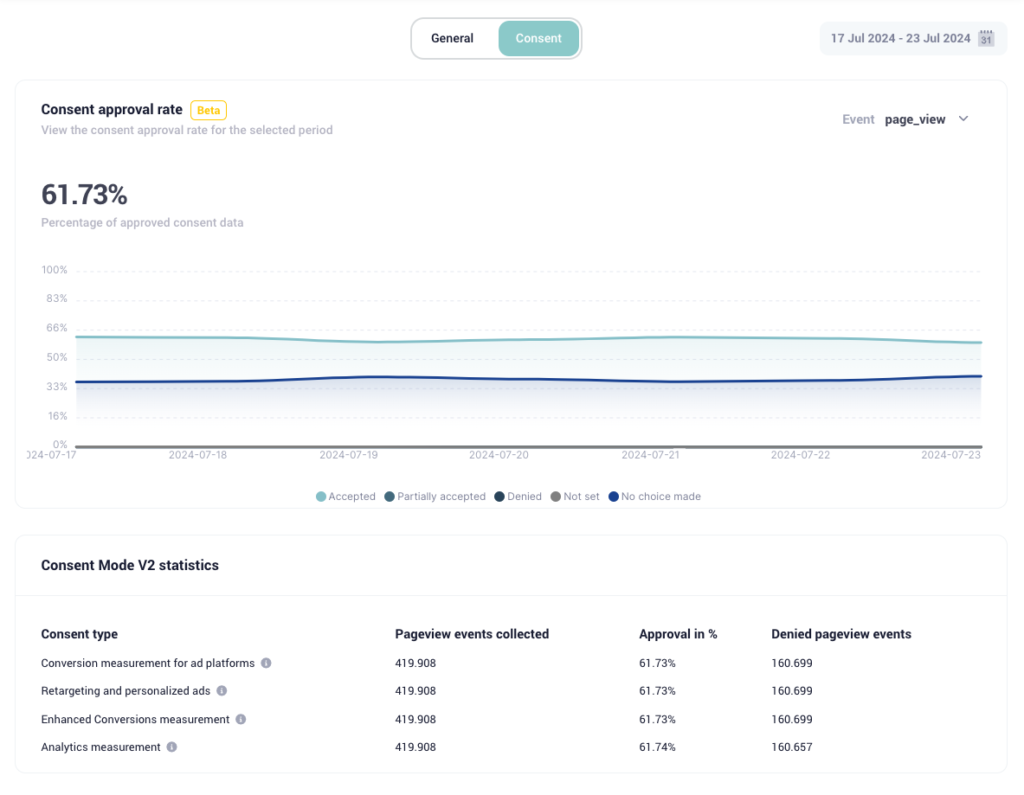
33. Do you get back 100% of the data after setting Consent Mode?
There is a big misconception that you get all the marketing data back with the new Consent Mode V2 after setting up Server Side Tracking. Although you can track much more, some of the data remains inaccessible if users reject cookies. This becomes clear with our Consent Approval Graph.
Costs of Server-side Tracking - FAQs
These questions offer insight into the various cost aspects of Server-side Tracking. In them, we cover topics such as what the costs are and how the costs are calculated. Our goal is to give you a clear and transparent overview of the financial considerations so you can make an informed decision and not run into unexpected costs when implementing Server-side Tracking in your projects.
34. Is Server-side Tracking free?
Server-side Tracking is not free. In many cases you have to pay to collect server side information. TAGGRS is a convenient option since it offers a subscription where you can start up to 10,000 requests for free.
35. How much does Server-side Tracking cost?
The cost of Server-side Tracking is mainly linked to the server acting as a conduit for the flow of data to relevant platforms. This requires hosting server space. TAGGRS offers packages based on the volume of requests, providing a customized solution. Use our calculator to easily find the plan that fits your tracking needs.
36. On what basis are costs calculated?
Costs are determined based on the total number of requests per month. This number is directly tied to the activity on your website, such as pageviews, and the use of data clients within Google Tag Manager (gtm.js, analytics.js, gtag.js, etc.). Learn more about the cost of Server-side Tracking.
Implementation of Server-side Tracking - FAQs
These questions focus on possible situations and challenges you may encounter while installing Server-side Tracking. From basic installation questions to advanced configuration questions.
37. How do you implement Server-side Tracking?
By following the guides written by our experts in the Documentation hub, you can implement Server-side Tracking relatively easily.
38. Can you use Server-side Tracking without Google Tag Manager?
Theoretically yes, but then you have to set up your own tag structure and this is not possible for almost nobody. Suppose you have a few million lying around for your own tag structure then it is possible ;) Check out the easiest way to start with Google Tag Manager.
39. What do you need for Server-side Tracking
A website, Google Tag Manager and a TAGGRS account. Want to know more about what you need for Server-side Tracking or get started right away? Then read our documentation.
40. How can I test if I have Server-side Tracking set up correctly?
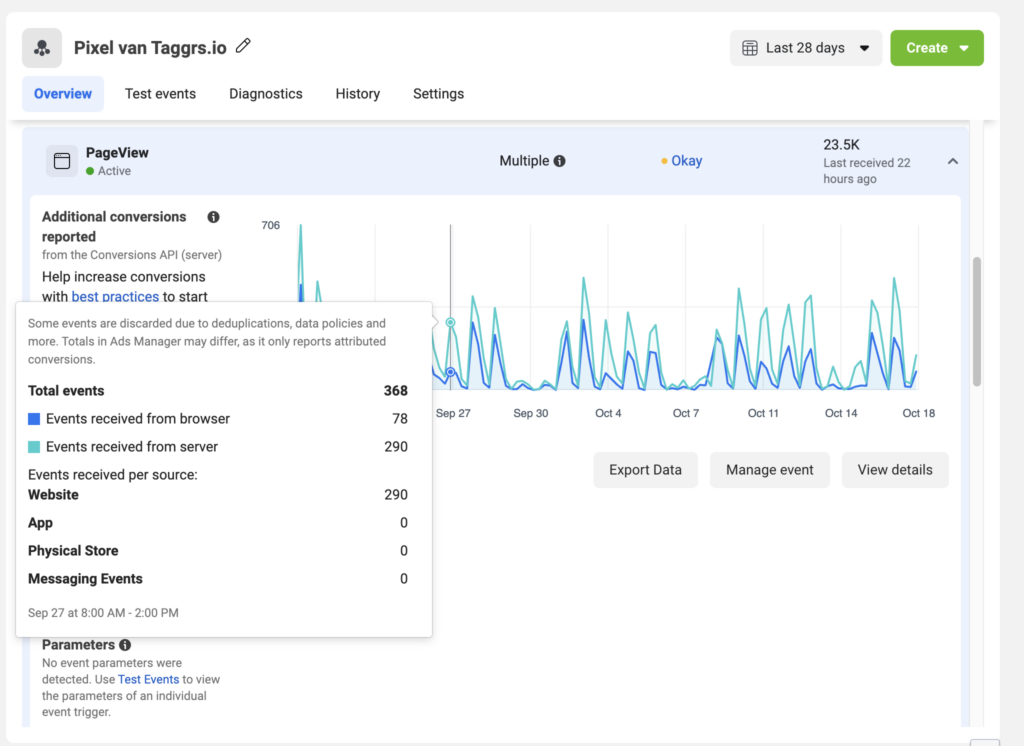
There are several ways to test whether your Server-side Tracking is set up correctly. At Facebook, for example, you can check this in the Business Manager. See our guide on Server-side Tracking testing for more information.
41. How can I tell if a website is using Server-side Tracking?
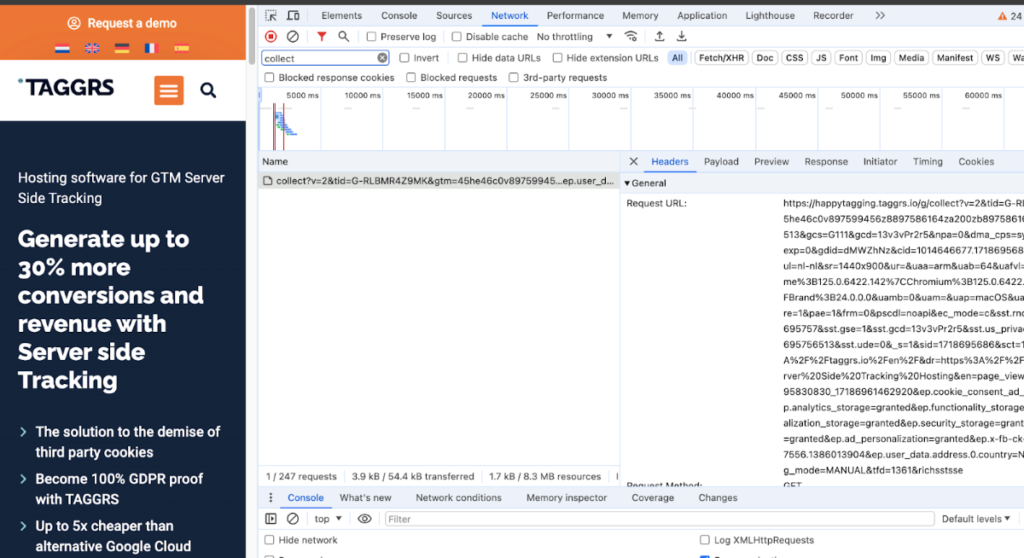
To see if a website is using Server-side Tracking you can go to element inspect → Network tab → Type Collect → Refresh. Then click on the collect and you will see the subdomain at the Request URL if the website is running server side. If you don't see it then it means the website is not running server side.
42. Do I have to reset everything in Google Tag Manager when using Server-side Tracking?
Server-side Tracking comes on top of the existing setup. You can continue with what you've already built with Google Tag Manager. Tags, triggers and variables you've already created can be changed to work for Server Side Tagging.
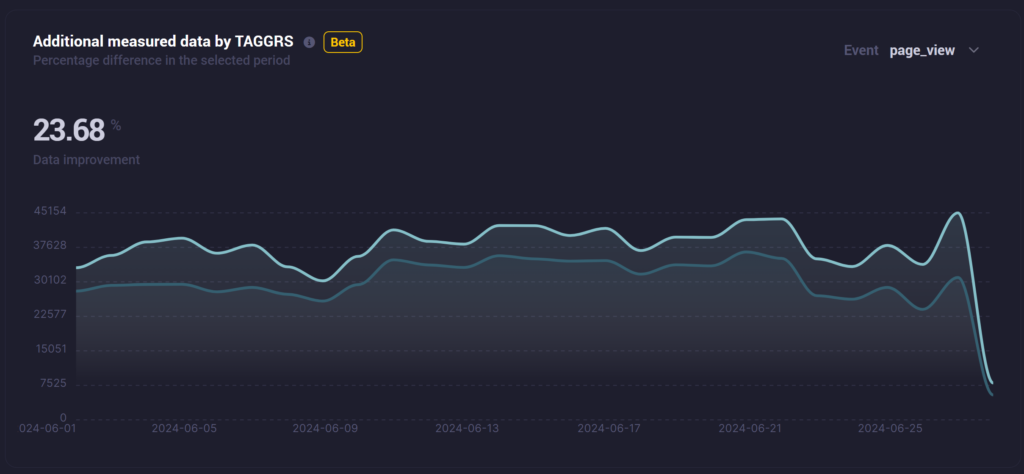
43. How do you find out if Server-side Tracking actually produces more data?
TAGGRS clearly shows the effects of Server-side Tracking in a Server Side Analytics dashboard. This allows you to see exactly how much additional data you receive from Server Side Tagging and determine if it's right for you.
44. Does Server-side Tracking setup take a lot of time?
This of course depends on experience, and the number of things that need to be measured. With little experience, this can be a time-consuming process. With more experience, this generally goes fairly smoothly. TAGGRS also has blogs and instructional videos on how to implement Server-side Tracking. Should you want to outsource it, there is our implementation service available for you.
45. Is Server-side Tracking setup difficult?
Setting up Server-side Tracking can be considered difficult. For this reason, we have extensive blogs and videos on our website and take you all the way through the setup process. We also have GTM templates designed by our developers that you can easily copy to reduce the chance of mistakes and get your tracking up and running with little to no code.
46. What are the most common integration errors when setting up Server-side Tracking?
The most common mistakes in setting up Server-side Tracking are discussed in detail in the TAGGRS Debug Series. This series covers typical pitfalls such as configuration errors, improper use of variables and inadequate testing of tags.
47. Where is the data "stored" when you use Server-side Tracking?
When you use Server-side Tracking you are with a hosting provider that acts as a conduit for the data flow towards the relevant platforms. This provider does not initially store the data.
48. Are all tools compatible with Server-side Tracking?
Not all tools are compatible with Server-side Tracking. Some tools require their code to reside directly on the user's page. For example, heatmapping tools such as Hotjar must be present on-page to function and cannot retrieve and send all user activity through the server.
49. Can you also run only Server Side?
Yes, basically you can only implement server-side. For example, with Facebook, it is possible to do server-side measurements only. However, for the most accurate and complete data, we currently recommend a combination of both client-side and server-side measurements.
Server Side in fact comes on top of your existing setup (client side). It is likely that this form of data collection (server-side) will eventually become the standard with the phasing out of third-party cookies.
50. Are there any case studies available on successful implementations of Server-side Tracking?
There are many case studies available showing successful implementations of Server-side Tracking. For more details, check out our case study page.
51. Does Google Tag Manager Server Container store data about visitors?
Google Tag Manager does not function as a store for visitor information, but rather facilitates the transfer of data to external tools (third party). One possible approach for data storage would be to deliberately create Regex or Lookup tables that link user IDs to specific user data. However, this would mean storing sensitive, personally identifiable information within GTM, which goes against Google's terms of service. So if you go this route, with or without regard to the GDPR, you will run into problems. Find out how to get your Server-side Tracking GDPR-compliant.
Conclusion
The Server Side Tracking FAQ is designed for the beginners just taking their first steps into the Server Side world.
This list is far from complete, but we hope most frequently asked questions have been answered. TAGGRS looks forward to all feedback. Do you still have a question? Then send it in through our support and we'll try to help you the best we can.