Easy fix to increase your Meta Event Match Quality score

 Ate Keurentjes | 28 May 2026 | Last updated:
 Meta Event Match Quality (EMQ) measures how accurately Meta/Facebook matches your conversion events to user profiles. A low score means fewer attributed conversions, weaker bidding signals, and underperforming campaigns, even when your Conversions API is already set up.
In this article, you will learn what drives your EMQ score down, why a perfectly set-up CAPI is not enough, and how server-side enrichment adds the missing parameters automatically without touching your existing implementation.
What is Event Match Quality?
EMQ measures the parameter coverage of every conversion event you send to Meta. The more customer information parameters an event includes and the higher their quality, the higher the score.
Meta uses those parameters to match each event to a user account in its system. A matched event becomes an attributed conversion; an unmatched event disappears from your reporting and is invisible to the bidding algorithm.
The score runs from 0 to 10. For example: a score of 7 or higher is the target for high-value events like Purchase and Lead. For top-of-funnel events like PageView and Add to Cart, scores between 4 and 6 are structurally normal, not a configuration error. Here is an overview:
| Event Type | Realistic EMQ Range | Target |
| PageView / ViewContent | 3 – 5 | 5+ |
| Add to cart | 4 – 6 | 6+ |
| Add payment Info / Purchase | 6 – 9.3 | 7.5+ |
The equivalent in Google Ads is Enhanced Conversions match rate. Both measure the same underlying problem: how well your conversion data maps to identifiable users.
How to check your EMQ score in Events Manager?
Your EMQ score is in Meta Events Manager under Data Sources → your pixel → Events.
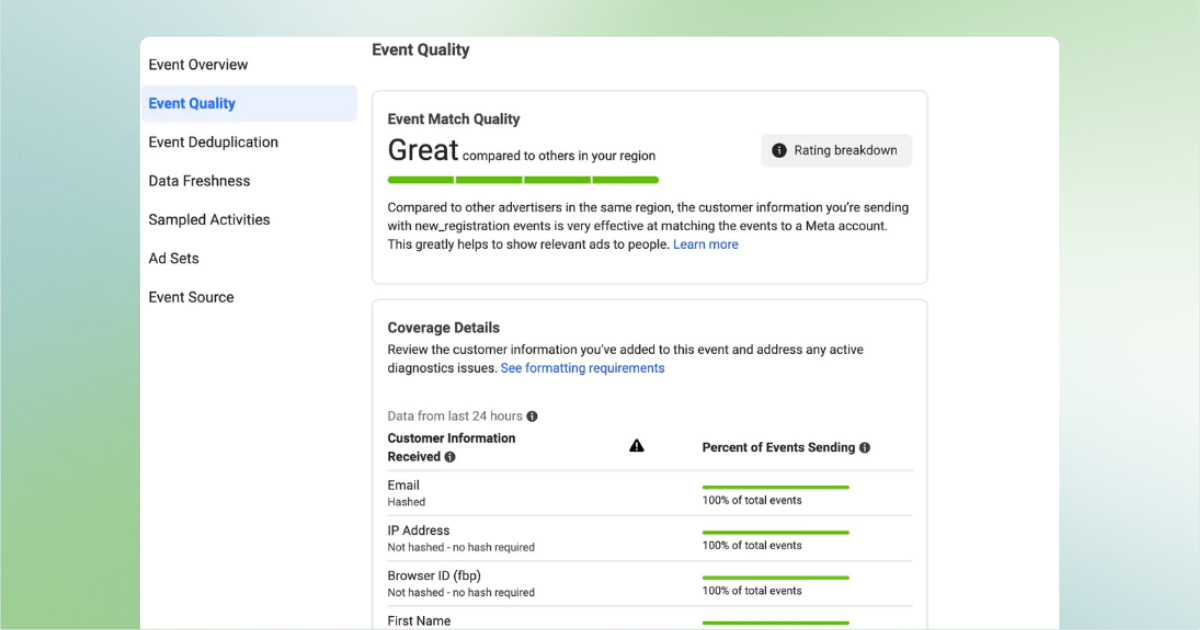
Steps:
- Open Meta Events Manager.
- Select your pixel under Data Sources.
- Click Events.
- Review the Event Match Quality column for each event type.
Events Manager shows you which parameters each event is currently sending. It does not help you send more parameters, that requires changes to the event payload itself, either in your CAPI implementation or through server-side enrichment.
Also check the Deduplication tab in Events Manager. Deduplication shows whether your browser pixel events and CAPI events are being matched correctly using event identifiers. A deduplication problem is a separate issue from low EMQ, and both can suppress attribution simultaneously.
Why your EMQ score is low, even with CAPI running
Setting up the Conversions API does not automatically improve your EMQ. Most CAPI implementations send the minimum required parameters (e.g. email and phone) without the full set Meta uses for matching.
This is the most common situation: developers configure CAPI correctly, the events fire, but EMQ stays stuck at 5 or 6 because the payload is incomplete.
You can verify this in Meta Events Manager. Under Data Sources → your pixel → Events, you can see exactly which parameters each event type is sending. Look for these fields:
- email (em)
- phone (ph)
- external_id
- client_ip_address
- client_user_agent
- fbc (Facebook Click ID)
- fbp (Browser ID)
- country, city, state, zip
If most of these are absent, incomplete parameter coverage is the reason your score is low.
And mind that the Events Manager doesn’t help you send more. That requires changes to the event payload itself, either in your CAPI implementation or through server-side enrichment. Want a full walkthrough of GTM variable setup, data layer configuration, and CAPI tag mapping?
Which parameters determine your EMQ score
Meta scores each event based on the number and priority of customer information parameters in the payload. High-priority parameters carry the most weight. Low-priority parameters improve the score incrementally.
| Parameter | Priority | SHA-256 Hashing Required | Available without form submission |
| Email (em) | High | Yes | No, requires user input |
| Facebook Click ID (fbc / fbclid) | High | No | Yes, from URL parameter on ad click |
| Browser ID (fbp) | Medium | No | Yes, set by Meta Pixel cookie |
| Phone number (ph) | Medium | Yes | No, requires user input |
| External ID | Medium | Yes | Depends on CRM integration |
| IP address (client_ip_address) | Medium | No | Yes, available server-side |
| City (ct) | Low | Yes | Yes, inferable from IP server-side |
| Postal code (zp) | Low | Yes | Yes, inferable from IP server-side |
| Country (country) | Low | Yes | Yes, inferable from IP server-side |
| First name (fn) | Low | Yes | No, requires user input |
| Last name (ln) | Low | Yes | No, requires user input |
The parameters in the Available without form submission column are the ones you can add to every event, including PageView and Add to Cart, without waiting for user input. These are the parameters server-side enrichment addresses directly.
Why does EMQ score never reach 10?
No standard website reaches a perfect EMQ score, because several high-priority parameters are only available in specific conditions. Two examples that affect every property:
- Facebook Click ID (fbc) is only present when a visitor arrives via a Meta ad click. Organic visitors, direct traffic, and users from other channels do not carry this parameter. If 40% of your traffic comes from paid Meta ads, fbc will only be present on 40% of events at most.
- Email address (em) is only available after a user submits a form. On a purchase confirmation page, email is present. On a PageView or Add to Cart event, it is not, because the user has not yet typed it anywhere.
This is why PageView and Add to Cart events structurally score lower than Purchase events. For e-commerce properties, add-to-cart and view-content events typically represent 60-90% of total event volume, and the majority carry minimal parameter data by design.
Instead of getting to 10, the real goal is the highest achievable score for each event type, given the parameters realistically available at the moment each event fires.
How Server-Side enrichment fixes low EMQ without code changes
Server-side enrichment appends parameters that are available in the server request to every event payload automatically, before the event is sent to Meta.
When a request reaches your server, the following data is present regardless of whether the user has submitted a form:
- IP address
- City (inferable from IP)
- Postal code (inferable from IP)
- Region (inferable from IP)
These four parameters map directly to medium and low-priority EMQ fields. Adding them to every event increases parameter coverage across the entire funnel, including the high-volume, low-parameter events like PageView and Add to Cart.
A button click event that previously sent 2 parameters (fbc, fbp) now sends 6 parameters (fbc, fbp, IP, city, postal code, region). The EMQ score increases. More events are matched. The algorithm has more signal to optimize from.
TAGGRS Data Enricher: one toggle, 4 parameters
TAGGRS Data Enricher appends four geo-location parameters to every server-side event using one toggle in the product interface.
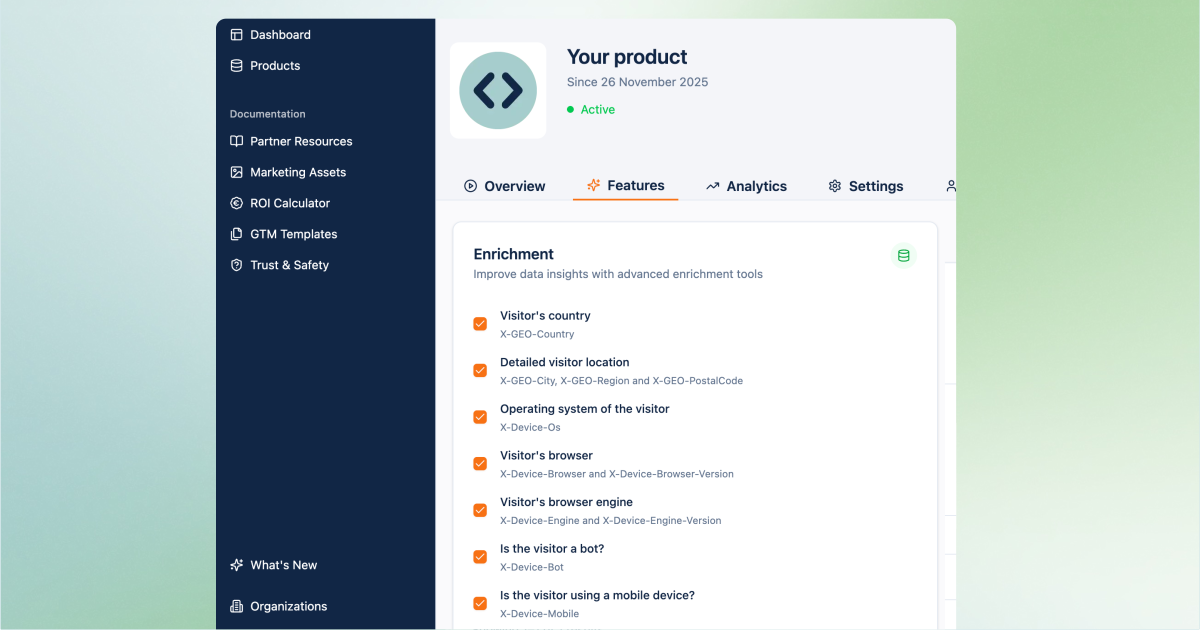
The parameters appended are:
- X-GEO-City
- X-GEO-PostalCode
- X-GEO-Region
- X-GEO-Ipaddress
No front-end code changes. No developer involvement. The enrichment runs server-side from the request context on every event your TAGGRS container processes.
You can find the TAGGRS Data Enricher going to Product → Features → Enrichment → Detailed visitor location
Does sending geo data require user consent under GDPR?
TAGGRS processes IP-derived geo data on European infrastructure before it leaves the server. The raw IP address is not forwarded to Meta.
Three facts apply:
- TAGGRS uses a fully European infrastructure. Data does not transit US infrastructure.
- The IP address itself is not sent to Meta. Only the derived city, postal code, and region values are sent, hashed with SHA-256.
- Sending hashed, derived location data via CAPI is consistent with Meta's Conversions API parameter specification.
Under GDPR, IP addresses are classified as personal data. Because TAGGRS infers and hashes geo attributes server-side and does not forward the raw IP to Meta, the data leaving the server is derived and anonymised before transmission.
Results: same event, more parameters
| Parameter | Without Data Enrichment | With Data Enricher |
| Facebook Click ID (fbc) | ✓ | ✓ |
| Browser ID (fbp) | ✓ | ✓ |
| IP address | — | ✓ |
| City | — | ✓ |
| Postal code | — | ✓ |
| Region | — | ✓ |
| Total parameters | 2 | 6 |
| Estimated EMQ impact | Low (0–4) | Moderate–High (5–8) |
For agencies running multiple client accounts, the Data Enricher applies this improvement across every property automatically, without touching each individual CAPI implementation.
FAQ
What is a good EMQ score on Meta?
7 or higher is the target for Purchase and Lead events. For PageView and Add to Cart, a score of 4–6 is structurally normal because those events fire before users submit any identifying information.
My CAPI is already set up. Why is my EMQ still low?
Most CAPI implementations send only the minimum required parameters. Check Events Manager to see which parameters each event is actually sending. If city, postal code, IP address, and region are absent, adding server-side geo enrichment is the fastest fix.
Can I improve EMQ without touching my CAPI code?
Absolutely! Server-side geo enrichment appends city, postal code, region, and IP-derived data to every event using information already available in the server request. TAGGRS Data Enricher does this with one toggle, without requiring changes to your existing CAPI implementation.
What is the difference between EMQ and match rate?
EMQ is Meta's per-event score (0–10). Match rate is the percentage of events successfully matched to a user profile. A higher EMQ score correlates with a higher match rate. Both metrics are visible in Events Manager.