Bot traffic: How it skews your marketing data and how to block it

 Mariusz Brucki | 11 December 2025 | Last updated:
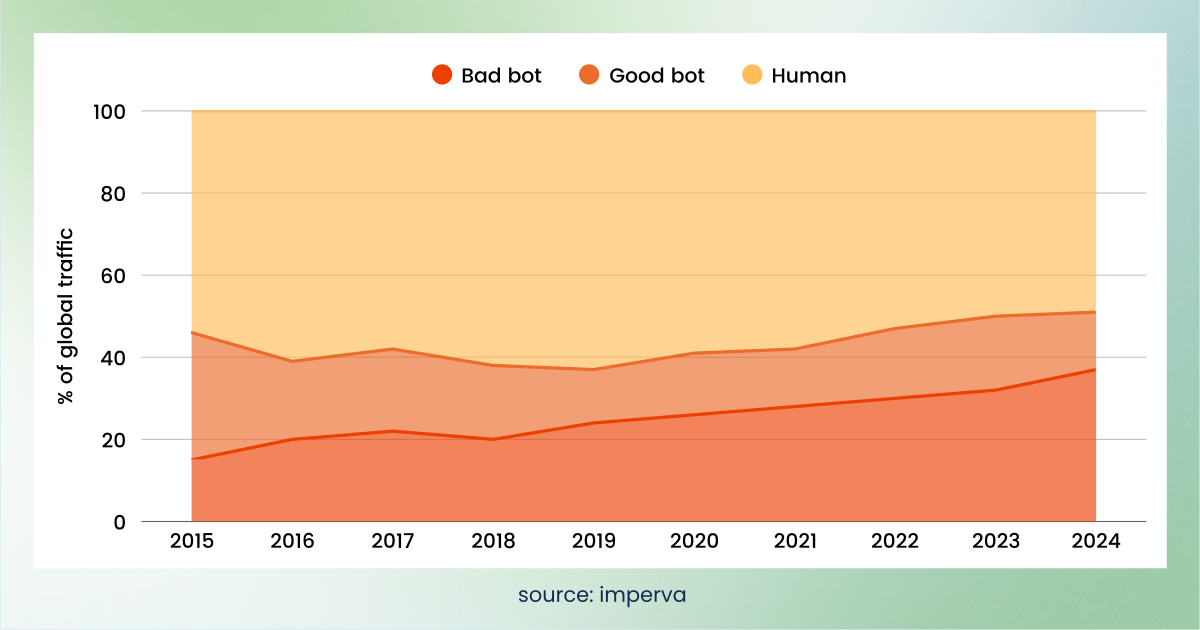
 More than half of all web traffic today isn’t coming from real people. According to Imperva's 2026 Bad Bot Report, automated bots made up more than 53% of global web traffic in 2025, up from 51% the year before. Bad bots alone accounted for 40% of all traffic, while human activity fell to 47%. For marketing agencies and data-driven teams managing large budgets, this spike of bot traffic isn’t just a technical nuisance. It’s a direct threat to your data accuracy, ad spend, and business decisions.
In this article, we’ll break down what bot traffic is, 5 red flags to spot it, and how to filter it out (in Google Analytics 4, via robots.txt, and with advanced tools). We’ll also highlight the real-world impact on ROI and answer the most common questions marketers ask when trying to handle bot traffic and clean up their analytics.
What is bot traffic?
Bot traffic refers to web traffic generated by automated programs (commonly called bots) rather than real human users. These bots are essentially scripts or software agents that crawl or scan or interact with websites on their own.
The term “bot” often comes with a negative vibe, but not all bots are bad. It really depends on their purpose and whether they obey rules set by site owners. In fact, some bots are essential to how the internet works. Just think of search engine crawlers, like Googlebot and Bing’s spider! They regularly scan your site so your pages can appear in search results. Other bots include uptime monitoring tools and social media preview bots that fetch metadata when some users share a link.
Things get tricky with malicious or unwanted bots. These “bad bots” are designed to take actions that harm your business or distort your analytics. They might scrape your content or pricing, spam your forms, overload your server, probe for security weaknesses, or generate fake clicks to drain your PPC budget.
Examples include:
- Scraper bots that steal your content or product data
- Spam bots that submit fake form entries
- Credential-stuffing bots that test stolen passwords
- Click-fraud bots that repeatedly click paid ads
- DDoS bots that overwhelm your site with requests
Not all bots are bad, and not all bad traffic is bot traffic. But an alarming amount of your traffic these days could be non-human. Recent trends show a steady rise in bot activity online. Automated traffic has now surpassed human traffic overall, and malicious bot volume has been climbing for years.
How to identify bot traffic: 5 red flags
How can you tell if your website’s traffic is bots? While bots are becoming more sophisticated at mimicking humans, there are at least 5 red flags you can watch for in your analytics and user behaviour data.
- Unnatural on-site behaviour. Bots don’t behave like normal users. For example, you might see no mouse movement or click activity during sessions that supposedly lasted several minutes. Some bots load pages but never scroll or move the cursor. In other cases, the cursor might move in a perfectly straight line or with robotic precision.
- Sudden traffic spikes or drops. A classic sign of bot interference is a massive spike in traffic that isn’t tied to any campaign or viral content. For example, if overnight your pageviews double without a clear reason, it could be a botnet hitting your site. Conversely, some bot filters or blocks might cause a sudden drop in recorded traffic.
- Strange geography or sources. Look closely at where your visitors are coming from. Traffic from unexpected locations is a warning sign. For example, a local marketing agency might normally get 95% of its hits from domestic users, so if next week you see thousands of hits from overseas regions where they have no clients, it’s likely fake… Sounds simple but it's worth mentioning! Same goes for referral sources. If you spot referrers with weird names or known “spam” domains, those sessions are probably bots.
- Unrealistic engagement metrics. Bots tend to fake engagement. You might notice sessions with near-zero time spent on page, or the opposite: a bot might load a page and not trigger any further events, causing an idle session. Bounce rate extremes are another clue. A bot might bounce 100% of the time (if it just hits one page and leaves), or if it systematically follows every link, you could see an unusually low bounce rate. Any analytics anomaly, extremely high bounce rate, wildly high or low session durations, abnormally repetitive page views, could be bot traffic.
- Technical oddities. Sometimes the hardware/software signatures give bots away. If you dig into your GA4 Tech reports or server logs, you might see many hits from outdated browser versions, weird screen resolutions, or data centre IP ranges. For example, if a single browser version from a cloud hosting provider accounts for a big chunk of traffic, that’s suspicious. Many bad bots operate from known hosting IPs rather than consumer ISPs. Keep in mind that a small amount of bot traffic like search engine crawlers is normal and expected. But if you notice multiple red flags, for example, a big traffic spike and most of those users having 0-second sessions, you likely have a bot problem. Combining these clues gives the best results. For instance, one real-world case found a 30% spike in sign-ups that were all from a few data-centre IPs; none of those “users” ever logged in again. Patterns like that reveal non-human interactions. The sooner you spot it, the sooner you can adjust your reports and marketing tactics.
A quick bot traffic check you can run now
If you want a quick read on whether bot traffic is affecting your reporting, open GA4 and look at three things.
First, go to Reports, expand the User collection, then click Tech and Tech details. Look at browser versions. A large share of traffic from a single outdated browser version is a common bot signature.
Second, open Reports, then Acquisition, then Traffic acquisition, and sort by engagement rate. Any channel or source with a large session count and near-zero engagement is worth investigating.
Third, compare your GA4 conversion count against actual orders or qualified leads in your CRM for the same period. A gap you can't explain through normal tracking discrepancies often points to events being triggered by something that isn't a customer.
On their own, these won't confirm bot traffic, but if you look at them together, they will tell you quickly whether it's worth investigating further.
How bot traffic affects your marketing data and ad spend
Bad bot traffic isn’t just an inconvenience: it can quietly break your marketing strategy, distort your reporting, and drain your budget. Here are the 5 biggest ways malicious or invalid bot activity impacts your marketing and data.
Skewed analytics and reporting
Bots inflate metrics and disrupt your data. They can generate fake
- Pageviews
- Sessions
- Events and scrolls
- Form submissions
- Conversions
This makes your campaigns look more successful than they really are. For example, a bot might trigger hundreds of goal events or form submissions that never lead to any actual customer activity.
The result are misleading KPIs. You might report record-high website traffic or conversions one month, not realising a chunk of that wasn’t real. As a result, you could wrongly credit a marketing channel or ad for “conversions” that were actually bots.
Wasted ad spend and lower ROAS
One of the most painful hits from bad bots is wasted advertising budget. If you run online ads, bots might be clicking them or generating impressions, costing you money. In programmatic advertising, this is often called ad fraud or invalid traffic (IVT). It’s a massive problem in the industry. According to Anura, advertisers lost approximately $165 billion to ad fraud in 2025, up from $140 billion the year before. Fraud rates stayed between 25% and 28% through much of 2025, but by June 2026 invalid traffic had risen to 40%, which is close to a 50% increase in six months, driven largely by AI-assisted fraud. On a campaign level, bots can:
- Drain your Google Ads budget early in the day
- Inflate CPCs and CPMs
- Lower your ROAS
- Disrupt bidding algorithms
When a large chunk of your paid traffic isn’t human, your ad spend becomes less efficient and significantly harder to optimise.
Importantly, Google does detect some invalid clicks and credits them back automatically. You can see this in Google Ads by adding the "Invalid clicks" and "Invalid click rate" columns to your campaign reporting. If that rate looks unusually high, it's a signal worth acting on, though the credited amount only covers what Google catches. Anything its filters miss stays on your invoice, which is why an independent filtering layer is still worth having.
Damage to attribution and optimisation
Bots don’t just waste money, they also mess up the feedback loops marketers rely on. For instance, attribution models might give credit to the wrong channels when bot traffic is involved. You could see an attribution gap where conversions appear in analytics but can’t be tied to legitimate user journeys because bots triggered them. This is one cause of that dreaded unassigned traffic in GA4. Bots can:
- Trigger conversions without a real session
- Skip identifiable channels
- Inflate direct or referral data
- Distort user journeys and path reports
Even worse, when bots trigger conversions in your Google Ads or Meta Pixel, your ad platforms start optimizing based on bot behavior patterns. That means the algorithms may push your ads toward low-quality placements or audiences that generate more invalid traffic.
Fake leads and polluted CRM data
Bad bots don’t only inflate traffic. They also submit contact and lead forms, creating fake sign-ups that pollute your CRM. These bots can generate hundreds of form fills with fake names, disposable emails, or scraped company data. As a result, your sales team wastes time on leads that don’t exist, your automations trigger useless sequences, and your attribution models give credit to campaigns that converted only because a bot hit the form. It also creates a hidden cost: fake leads distort funnel metrics like CPL, MQL rate, and qualification rate. In extreme cases, bots can overload forms so heavily that real prospects struggle to submit theirs.
In summary, bad bot traffic undermines the accuracy of your data, the effectiveness of your spend, and the integrity of your website. Decisions based on skewed data can lead to real financial losses and missed opportunities. The good news is that once you recognise the problem, there are ways to filter and mitigate bot traffic so you can restore clean data and focus your budget on reaching actual humans.
How to filter bot traffic in GA4
Google Analytics 4 (GA4) is often the first place you’ll notice bot traffic issues, and it provides some tools to help mitigate them. As mentioned in Monitor and filter bot traffic, GA4 does automatically filter known bots/spiders using Google’s internal list (largely based on the IAB known bots list), so the most obvious crawlers might already be excluded from standard reports.
However, this filtering only catches the obvious crawlers. Many modern bots, especially malicious or newly created ones, still slip through. Below are 4 ways to further filter bot traffic in GA4 and improve the quality of your analytics data.
1. Use GA4 Data Filters or segments for suspicious traffic
Unlike Universal Analytics, GA4 doesn’t let you create view-level filters to permanently exclude traffic by pattern (aside from internal traffic filters). Instead, you can leverage data filters and segments. One approach is to set up a Data Filter in GA4’s Admin. There you can define rules to exclude certain events, e.g. if you can identify a characteristic of the bot hits (a specific campaign parameter, or a hostname that isn’t your site), you could filter those out. A simpler approach is to create segments in Explorations to exclude likely bot traffic when analysing data.
One important limitation to plan around is that GA4 data filters only apply to data collected after the filter is active. They don't clean up historical data. If bot traffic has already polluted the past few months of reporting, filtering won't retroactively fix those numbers, and you'll need to work around them using segments in Explorations instead. This is a good reason to set filters up early rather than after a problem becomes obvious.
2. Add custom definitions to flag bots
If you’re using Google Tag Manager or Server-side Tracking, you can set up rules to flag bot hits. One powerful method is using the traffic_type parameter in GA4. You can configure your tracking so that if a request is identified as a bot (say, by a server-side check or a known pattern like a specific User-Agent), it sends traffic_type = "bot" along with the event. Then you can use it for instance, in the mentioned segments.
3. Analyse and refine
Periodically review GA4 reports (especially Tech → Device/Platform and Acquisition → Traffic source) for anomalies. If you notice a spike in Direct traffic with 0 engagement, you might respond by setting up a rule to exclude hits with no referrer and under 1 second duration (but be careful, that could also drop some real users who bounce quickly). If a particular spammy referrer keeps showing up, add it to GA4’s Referral Exclusion List so it doesn’t appear as a referral in reports. GA4’s flexibility means you might often address bot traffic in the analysis phase (using Explorations) rather than outright filtering everything at collection.
4. Consider server-side filtering for GA4
An even more robust solution is to filter bot traffic before it ever hits GA4. Tools like TAGGRS enable a server-side Google Tag Manager implementation where you can inspect incoming events. For example, TAGGRS can work with a parameter like X-Device-Bot to label or block bot events on the server. By the time data gets to GA4, those events are already filtered out or flagged.
In short, GA4 offers basic bot filtering, and with some creativity you can add custom rules to catch more. But every method has the same limitation: you need a reliable signal that identifies suspicious traffic in the first place. Only then can you use custom dimensions or segments to exclude it. That’s why server-side parameters like X-Device-Bot from TAGGRS are so valuable. They give you a consistent, accurate bot signal without the manual guesswork.
How to filter bot traffic with robots.txt
A simple yet effective tool for guiding bots away from sensitive areas is your site's robots.txt file, placed at the root like yourdomain.com/robots.txt. This plain text file sets polite rules on crawlable pages or sections, helping cooperative bots skip admin areas, staging folders, or low-value content to optimise SEO crawl budgets and reduce server noise.
Keep it straightforward with broad rules like User-agent: * followed by targeted Disallow directives, allowing most content by default. While it won't stop malicious bots, a clean setup directs search engines efficiently and cuts analytics clutter—pair it with GA4 filters or TAGGRS server-side tracking for stronger defenses.
Basic setup and examples
Start with a User-agent line to target bots (use * for all), followed by Disallow for blocked paths. For instance, block the admin section across all bots:
User-agent: *
Disallow: /admin/
This means “for any bot, do not crawl any URLs that start with /admin/”. You can list multiple disallow rules and also target specific bots by name if needed (e.g. User-agent: Googlebot). Typically, you’d allow everything by default and disallow only specific sensitive or irrelevant sections (like staging folders or login pages).
One line worth adding regardless of your blocking rules is the location of your sitemap:
Sitemap: https://yourdomain.com/sitemap.xmlThis doesn't affect bot filtering, but it helps search engines find your pages efficiently, which is part of the same crawl-management job robots.txt is doing.
What it does
When a well-behaved bot visits your site, it’s supposed to first check for robots.txt and follow the instructions. For example, Google’s crawler will not crawl pages you’ve disallowed.
Limitations
Robots.txt is an honour system, not a security barrier. Good bots like search engines will comply, but malicious bots often ignore robots.txt entirely. In fact, they might read your robots.txt just to find the sections you don’t want crawled (since you listed them) and then target those. So, while you should maintain a proper robots.txt for SEO and basic bot management, don’t rely on it to stop bad bots. Think of it as a first courteous request: “Please don’t go here.” The nasty bots won’t listen.
AI crawlers: A newer category of bot traffic
AI crawlers should be understood separately, because they don't fit neatly into either the "good bot" or "bad bot" category.
There are two broad types. Training crawlers collect content to train large language models. Retrieval bots fetch your pages in real time when someone asks an AI assistant a question your content might answer. The first takes your content and gives nothing back directly. The second can lead to your brand being cited in AI answers, and sometimes to referral visits from people following those citations.
Most AI crawlers don't appear in GA4 at all, because they don't execute JavaScript. They show up in your server logs and CDN analytics instead. They are easy to overlook because your reporting looks clean while a meaningful share of your actual server load is automated.
You can control training crawlers through robots.txt, because the major AI companies publish their user-agent names and honour the file. The important detail is that each company runs several, and blocking one doesn't block the others. Each needs its own directive.
OpenAI uses GPTBot for model training, and OAI-SearchBot and ChatGPT-User for retrieval. Anthropic uses ClaudeBot for training, and Claude-SearchBot and Claude-User for retrieval. Perplexity uses PerplexityBot and Perplexity-User.
Google works differently. Google-Extended isn't a crawler at all and never appears in your logs. It's a robots.txt token that tells Google not to use content Googlebot already fetched for training or grounding Gemini. Blocking it doesn't reduce crawl load, doesn't affect your Search rankings, and doesn't remove you from AI Overviews, since those run on ordinary Googlebot.
Blocking a training crawler looks like any other robots.txt rule:
User-agent: GPTBot
Disallow: /
Whether you should block them is a business decision, not a technical one. Because training and retrieval use separate tokens, you can decline to have your content used for training while still allowing AI assistants to fetch and cite your pages when answering questions. Blocking retrieval bots does remove you from those answers.
As with any robots.txt rule, this only works for bots that choose to comply. Bytespider and some of Perplexity's crawlers have been documented ignoring robots.txt, and Perplexity has argued that Perplexity-User is an agent rather than a bot and therefore isn't required to honour it. For those, robots.txt won't help, and you're back to filtering at the server or firewall level.
What matters for data quality is simpler: AI crawler traffic should not be counted as human traffic in your reports, and it should never reach your ad platforms as a conversion signal. Server-side filtering handles this the same way it handles any other bot.
Five advanced bot detection methods
Basic filtering can cut out a lot of obvious bot traffic, but what about the more sneaky bots? For sophisticated or high-impact bot issues, you’ll want to implement advanced detection and mitigation strategies. These often involve specialised tools and a multi-layered approach. Let’s explore 5 advanced tactics:
1. Server-side bot detection (TAGGRS X-Device-Bot)
TAGGRS X-Device-Bot is one of the most effective ways to deal with bots at the server level, as early in the request pipeline as possible. TAGGRS, for example, offers an X-Device-Bot feature in its Server-side Tracking platform. This feature uses a detection service to analyse each incoming request and determine whether it’s from a bot. It adds special indicators to the request headers: an X-Device-Bot flag (true/false). With these in place, your server-side Google Tag Manager container (or any server logic) can decide to block or tag the request before it triggers analytics or ad tracking.
For example, you could configure your server container to drop any GA4 event where X-Device-Bot = true, thereby filtering out bots in real time. The big advantages are accuracy and control.
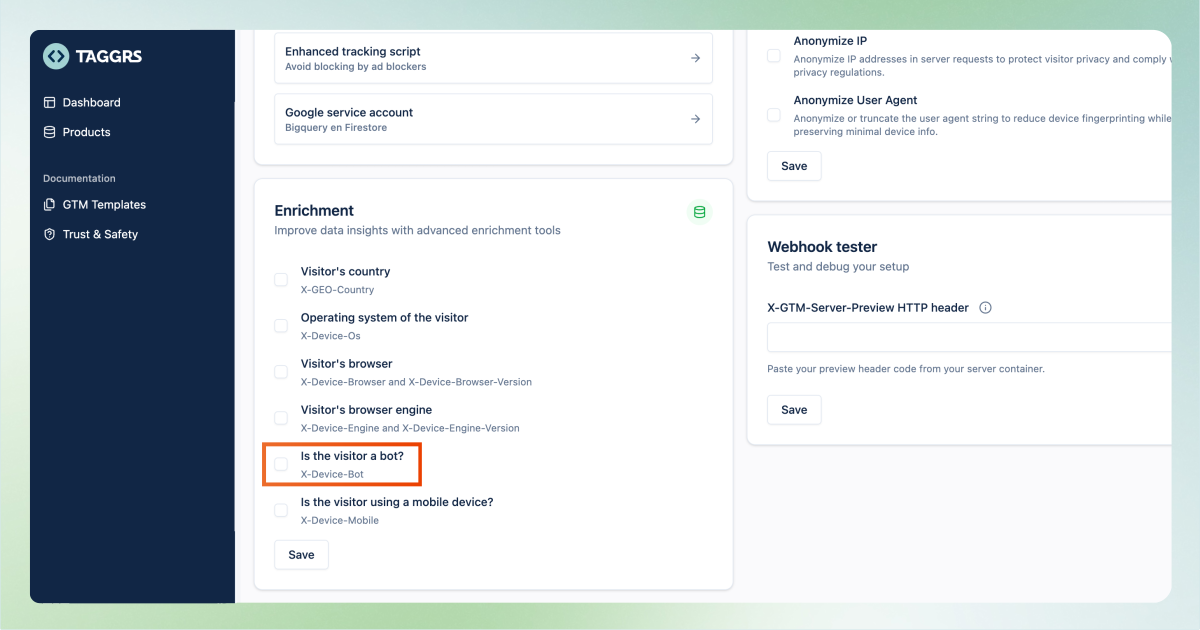
X-Device-Bot uses device fingerprinting and threat intelligence to catch bots that slip past simple rules, and since it operates server-side, it’s not visible or bypassable by the client. It also means no extra load on the user’s browser. By deploying something like X-Device-Bot, agencies may have a multi-layer bot defence baked into their infrastructure. Sign up for a free trial to see how server-side bot filtering can boost your ROI and clarity.
2. Real-time behavioural analysis
Advanced bot managers often incorporate behavioural analytics. This means observing how a visitor interacts in real time and comparing it to the average behaviour of humans. Modern systems can monitor events like rapid-fire page navigation, lack of mouse movement, or perfectly timed intervals between actions. Non-human patterns (like superhuman clicking speed, or never pausing to read) can trigger an automated bot flag. Some solutions run JavaScript in the browser that secretly sets up traps (like invisible captcha challenges or monitors response timing to certain tasks). The goal is to silently differentiate bots from humans by their behavior footprints. This approach, while effective, is complex to DIY – it’s usually done by specialised security services or integrated tools like Cloudflare Bot Management or HUMAN’s bot detection suite.
3. Device fingerprinting and AI
Bots often try to evade detection by faking different identities. Device fingerprinting is an advanced technique that compiles dozens of data points (browser version, OS, screen size, time zone, IP, fonts, etc.) to create a unique “fingerprint” of a device. While a human user’s fingerprint won’t change much in one session, a bot might exhibit impossible combinations (like claiming to be Chrome on Windows but using a Safari-specific web API) or might cycle through user-agent strings too quickly. Fingerprinting helps flag these inconsistencies. AI and machine learning models can continuously learn from traffic patterns. Over time, an AI-driven bot detection system can improve accuracy, adapting as bots change patterns.
4. Multi-layer defences (CAPTCHAs, challenges, 2FA)
In some cases, you’ll need to engage a challenge-response layer to stop persistent bots. This is where CAPTCHAs come in. CAPTCHAs can deter basic bots, though modern AI bots are getting better at solving them, and CAPTCHAs can sometimes only annoy real users. Another layer is authentication (2FA), used often for critical actions. For example, if bots are creating fake accounts, implementing two-factor SMS or email verification on sign-up will eliminate most of that (because the bot can’t provide a real phone or inbox easily). Similarly, email confirmation links for registrations or one-time passwords for sensitive form submissions can filter out bots. Of course, these add friction for real users, so it’s a tradeoff. Many sites employ a subtle challenge like honeypot fields, an invisible form field that humans won’t fill out (because it’s hidden via CSS), but dumb bots will fill every field. If that honeypot comes back filled, you know it’s a bot and can block the submission. The idea is to layer multiple lightweight tests that together won’t bother genuine users much but will trip up automated scripts.
5. Comprehensive bot management platforms
If bot traffic is a major issue, it might be worth investing in a dedicated bot management solution. Companies like Imperva, Cloudflare, Datadome, Akamai, and HUMAN Security offer enterprise-grade bot mitigation. These typically combine all the techniques above, fingerprinting, behaviour analysis, IP reputation databases, and real-time challenge. The cost can be significant, but so can the savings if you’re currently losing a lot to bots. The advantage is that a team of experts is maintaining detection logic for you.
Getting started
You don't need to address the issue of bot traffic all at once. Start by confirming that it's happening using our quick check above, clean up up your robots.txt so cooperative bots stay out of the areas that don't matter, then move the actual filtering server-side so bad bots are stopped before they reach your analytics and ad platforms.
The last step has the most value, because it's the only one that keeps invalid traffic out of the data your bidding algorithms learn from.
Create a free TAGGRS account to filter bot traffic server-side, or run a free tracking audit to see what's reaching your analytics right now.
FAQs
Can I stop bot traffic entirely?
Rarely. You can mitigate and reduce bot traffic, but you can’t eliminate all bots hitting your site. The internet is full of bots, and any publicly accessible URL will get scanned by both good and bad bots continually. New bots and attack methods pop up all the time. That said, you can cut down the vast majority of unwanted traffic by using the discussed techniques.
Should I block all bots?
Generally, no. Remember, not all bots are harmful, some are very helpful. Blocking everything would mean search engines can’t index your site (hurting your SEO), and other useful services (like uptime monitors or social media link expanders) won’t work. The goal is to block or manage bad bots while allowing good bots that serve a purpose. A nuanced approach works best: use robots.txt to guide the good bots and use bot detection to suppress the malicious ones.
How does bot traffic affect conversion tracking and ROAS?
Bot traffic can seriously undermine your conversion tracking and ROAS calculations. In conversion tracking, bots might trigger false conversion events. This makes metrics look higher than they truly are and can misattribute conversions to campaigns that didn’t actually drive real sales. As for ROAS, bots can click your ads or start fake sessions that get attributed to your ads, leading you to believe your ads drove those visits. You spend money on those clicks, but bots obviously don’t buy anything. So the revenue side stays flat while the cost increases.
Why is server-side bot detection better for GDPR and privacy?
Server-side detection has a few privacy advantages. First, when you detect and filter bots on your server, you can do it without dropping any cookies or running any tracking scripts in the user’s browser. This means you’re not adding extra client-side code that could collect user data, so there’s no additional privacy burden on the end-user. Many client-side bot solutions involve fingerprinting (which can be considered personal data) or sending user behaviour data to third-party services. If you handle as much as possible server-side, you’re keeping that data processing in-house.
How can TAGGRS help with bot traffic?
TAGGRS is all about data quality and server-side control, so it’s well-suited to tackling bot traffic issues for marketers. By using TAGGRS’s server-side tracking, you can gain a lot more control over what counts as a valid hit before it ever reaches tools like GA4 or Facebook Pixel. Concretely, TAGGRS offers features like the Data Enricher Tool with bot detection and the X-Device-Bot header integration that we discussed. These let you automatically flag known bots or suspicious requests and exclude them from your analytics. And because it’s server-side, you get those GDPR benefits and no slowdown on the user experience. Essentially, TAGGRS gives you a shield and a filter for your marketing data, ensuring you’re seeing the real picture.
Does GA4 filter bot traffic automatically?
Partly. GA4 automatically excludes traffic from known bots and spiders using Google's internal list, and this can't be switched off. But the list only covers bots that have identified themselves in a standard way. Newer bots, custom scripts, and anything deliberately disguising itself will still be counted as normal traffic in your reports.
Do AI crawlers count as bot traffic?
Yes. Crawlers from AI companies are automated, non-human traffic, and they should be excluded from your analytics and never passed to ad platforms as conversion signals. Most don't appear in GA4 at all, since they don't run JavaScript, so your server logs are the place to look. Whether you also want to block them from accessing your content is a separate decision, and it depends on whether you want your pages used for AI training and cited in AI-generated answers.
How do I remove bot traffic from data I've already collected?
You can't remove it from GA4's stored data, because filters only apply going forward. What you can do is exclude it at analysis time by building segments in Explorations that filter out the patterns you've identified. For reporting that needs to be clean permanently, the more reliable route is to stop the traffic from being recorded in the first place, which means filtering at the server before events reach GA4.