Why your GA4 ROAS is inaccurate (and 2 structural fixes that help)

 Mariusz Brucki | 23 April 2026 | Last updated:
 "My ROAS is 500% but I'm not actually profitable. What am I missing?" That question comes up constantly in paid search communities. The campaigns are hitting targets, the dashboard looks clean, but the financials don't reflect it.
Point is: the problem usually isn't the campaigns. It's the data they're learning from.
The data discrepancy usually comes from 2 gaps that don't show up in standard reporting:
- One is where the conversion data stops. GA4 tracks browser events such as form fills, checkout completions, and page loads. What it doesn't capture are outcomes that happen after the browser session ends: a lead that closes on the phone, a deal signed after a follow-up meeting, a customer who walks into the store after clicking an ad. Those outcomes exist outside GA4's view, and the campaigns that drove them get no credit.
- The other is what "conversion value" actually means. When a purchase fires in GA4, the value passed to Google Ads is the order amount - what the customer paid, not what the business kept. A product with 60% cost of goods and another 13% in shipping, returns, and fees leaves 27% gross margin. At a 500% ROAS, where 20 cents of every revenue dollar goes to ads, that leaves roughly 7% before overhead. To the bidding algorithm, a 70% margin product and a 20% margin product look the same. Both are just dollar amounts.
GA4 has two structural blind spots that cause ROAS to look better than it actually is. Neither of these is a configuration error. Both are fixable. In this article, we'll walk you through each one, what causes it, how it distorts Google Ads Smart Bidding, and what you need to close the gap.
Blind spot 1: offline conversions that never get reported
The problem
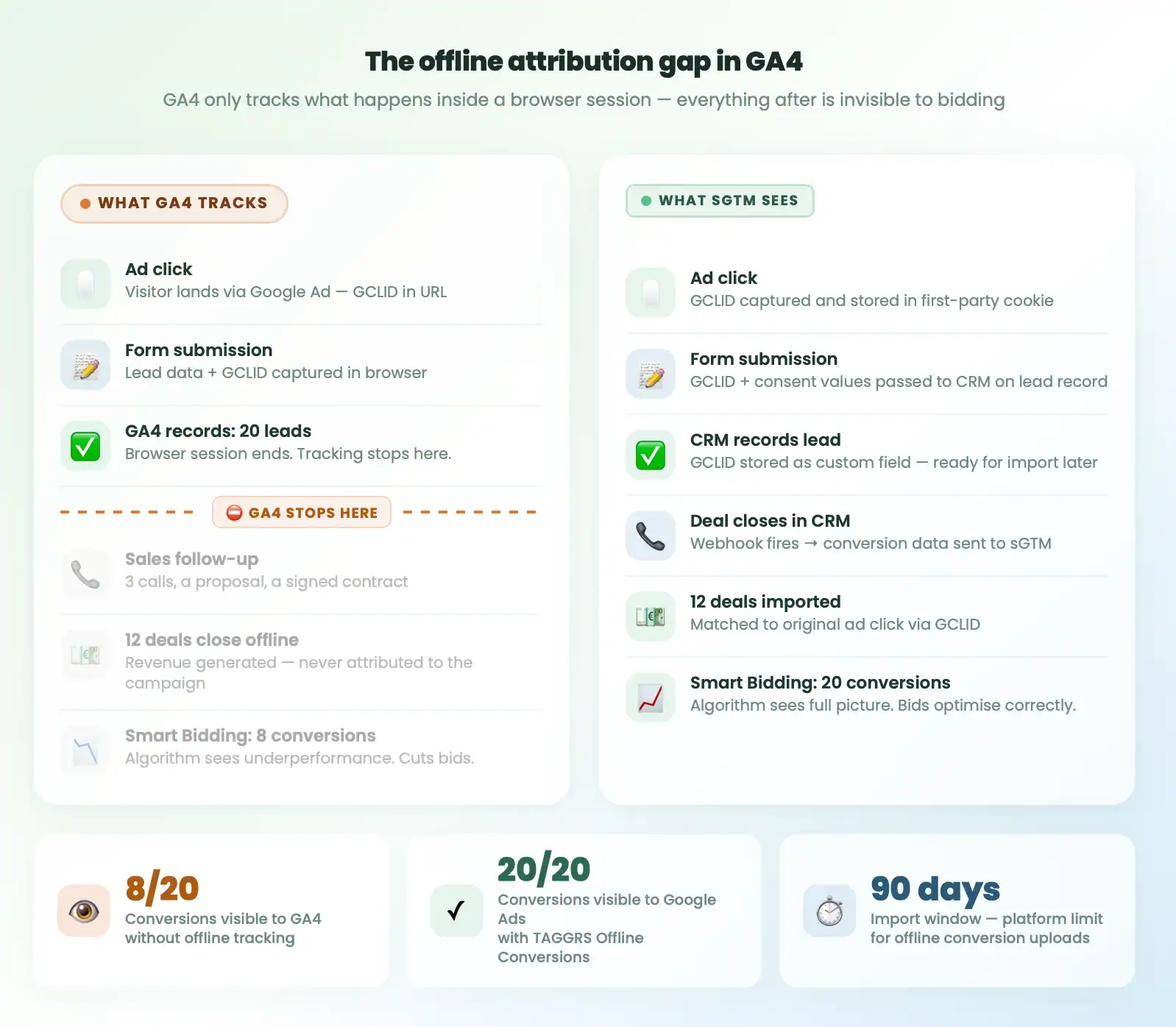
The problem is clearest in B2B lead generation. A campaign drives contact form submissions. GA4 records all of them. Looking at last month's data, the campaign produced 20 leads.
What you can't see: 12 of those leads closed offline. A sales rep followed up, sent a proposal, had several calls, signed the deal. That revenue never gets attributed to the campaign that started the conversation. GA4 still shows 20 leads. To the bidding algorithm, the campaign looks like it generated 8 conversions with no revenue attached.
Bids get reduced. Budget shifts toward campaigns that show cleaner conversion data, which usually means campaigns where the entire path happens inside a browser session. Your best lead source gets treated as a weak one because the closing half of the funnel is invisible.
This isn't only a B2B problem. Phone orders, in-store purchases driven by paid ads, transactions that happen through a different channel days after the initial click - all of it falls off the attribution picture without a deliberate fix. GA4 has no mechanism to receive data after the session ends. Closing the loop requires a pipeline that connects your CRM or sales system back to Google Ads with the original click ID intact.
If you haven't audited your current setup, this guide on tracking signal loss is a good starting point.
How the bidding algorithm is affected
Google Ads' Smart Bidding learns from the conversion signals it receives. It adjusts bids based on which campaigns, keywords, and audience segments produced conversions, and how much value those conversions carried. Meaning that, when a significant share of your real results never gets reported, the algorithm is working from an incomplete picture.
Most accounts don't realise how much volume they're missing. Consistently low conversion counts are also one of the main reasons Smart Bidding underperforms: the algorithm needs enough signal to establish a learning pattern. Add offline conversions back and that threshold becomes reachable.
How TAGGRS fixes it: closing the loop with Offline Conversions
The fix requires a pipeline that connects your CRM or back-end sales system back to Google Ads, with the original click ID intact. Here's how it works in practice:
- Capture the GCLID at form submission. When a visitor lands via a Google Ad, the click ID (GCLID) sits in the URL as a parameter. JavaScript on your landing page reads it and stores it in a first-party cookie. A hidden form field picks it up and passes it to your CRM alongside the lead's contact data.
- Store it on the lead record. Your CRM saves the GCLID as a custom field. HubSpot does this natively via its forms. Salesforce and Pipedrive handle it through custom fields and form integrations. Without this capture step at submission time, there is no match key for the import later.
- Send a webhook when the deal closes. When a deal is marked as won in your CRM, a webhook fires and sends the conversion data (including the stored GCLID and consent values) to your server-side GTM container.
- Import to Google Ads with the click ID. Your sGTM container forwards the data to Google Ads. The platform matches the closed deal back to the exact campaign, keyword, and ad that started it.
One important constraint to be aware of. Google Ads only accepts offline conversion imports within 90 days of the original click. For long sales cycles, the standard approach is to import an intermediate conversion event (a qualified lead stage or signed proposal) rather than waiting for the final close. This keeps the attribution within the allowed window while still giving the algorithm a meaningful signal about which campaigns drive real pipeline.
With TAGGRS Offline Conversion you handle the full offline conversion pipeline, from the sGTM container to the Google Ads import, so you don't need to build and maintain the infrastructure yourself.
The setup scales across multiple client accounts without rebuilding from scratch each time.
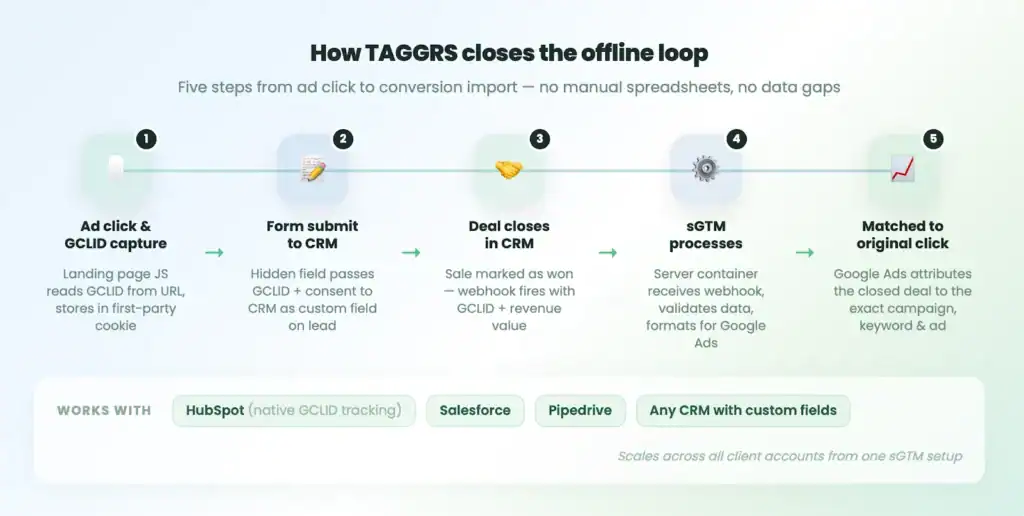
This way, the algorithm stops seeing 8 conversions and starts seeing 20, with actual revenue attached to the ones that closed. Bidding adjusts accordingly, and the campaigns that were starved of budget start competing on accurate terms.
Blind spot 2: revenue ≠ profit
The problem
Even with complete conversion tracking, ROAS calculated on order value can be seriously misleading.
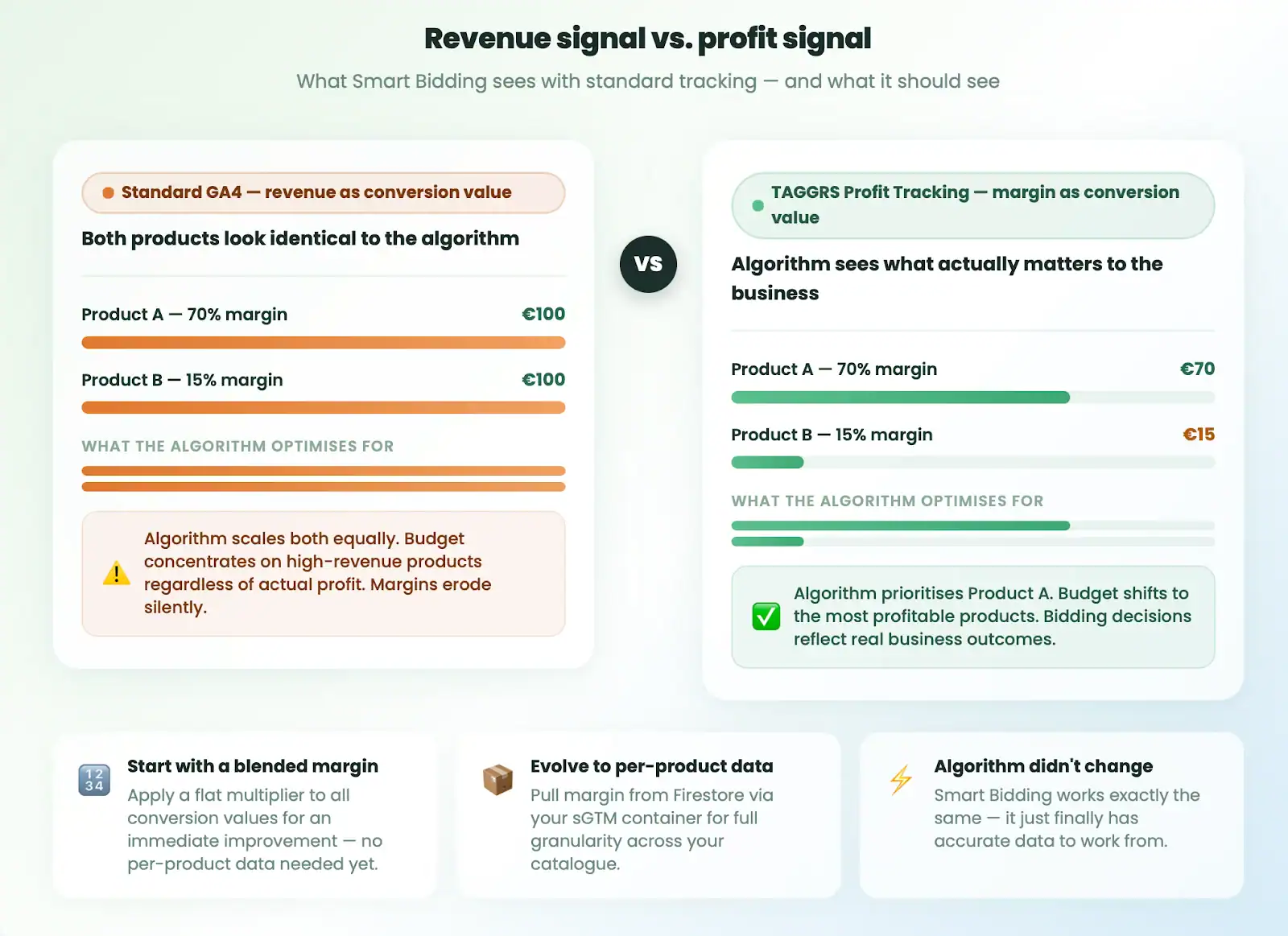
A campaign running across two product categories can show identical ROAS figures while one generates a strong margin and the other barely covers cost. Google Ads has no way to distinguish between them unless you send different conversion values. Without margin data in the signal, the algorithm scales both equally and tends to favour whichever product drives higher-order totals.
For agencies managing accounts across multiple clients or product lines, this pattern is common. Dashboard numbers look clean. ROAS targets are being hit. Meanwhile, the budget is concentrating on products that generate revenue while eroding profitability. The standard report has no way to surface that.
How it distorts bidding
Smart Bidding optimises toward the conversion value you send it. If that value is the transaction amount, it optimises toward revenue. Products that generate strong margin and products that barely cover cost look identical in the signal.
The algorithm isn't doing anything wrong. It's learning from the data it has. The problem is that the data doesn't reflect what actually matters to the business.
How TAGGRS fixes it: profit-based conversion values
The fix sits at the conversion signal level. The value that gets sent to Google Ads at conversion time needs to reflect margin, not price.
TAGGRS lets you send profit as the conversion value instead of revenue. The POAS Tracking Connector reads a JSON product feed you already maintain in a tool like Channable, looks up every item in the order and returns the profit for that order as a single variable. Instead of the transaction amount the customer paid, the platform receives the actual margin for that order.
Worth knowing before setting this up: it requires a server-side container. The lookup happens there on purpose, so cost prices and margins never reach the browser where visitors, competitors and browser extensions could read them. TAGGRS handles that server infrastructure, making the margin data available at conversion time.
Once margin values are flowing through the signal, campaigns compete on actual profit. Products that looked like winners based on revenue alone now get evaluated on what they actually return.
What accurate ROAS actually looks like
When both fixes are in place, the picture that reaches Google Ads changes drastically.
Google Ads receives offline conversion records matched to original clicks via GCLID, alongside margin-adjusted values instead of raw order totals. Campaigns that were being underbid because their offline deals were invisible start recovering budget. Products with real margins attract more spend.
Campaigns that looked strong on revenue but were running on thin margin get deprioritized. The algorithm didn't change. It just got accurate data to work from.
There's also a volume effect. Smart Bidding needs enough conversion data to work well - most accounts don't meet that threshold when offline conversions are missing. Add them back and campaigns start unlocking better automated bidding strategies. The learning cycle shortens.
For agencies, there's a reporting angle here too. Server-side conversion tracking makes it possible to connect Google Ads spend to actual business outcomes rather than browser events. The infrastructure scales across accounts once it's in place.
If your current ROAS reporting doesn't account for offline conversions or product margin, book a demo to audit where the gaps are and what it would take to close them.
FAQ
How does a CRM get access to the GCLID in the first place?
The CRM doesn't read browser cookies directly. The GCLID has to be captured at the moment a lead submits a form. JavaScript on your landing page reads the click ID from the URL parameter, stores it in a first-party cookie during the session, and a hidden form field passes it to your CRM alongside the contact's name, email, and other lead data. The CRM stores it as a custom field on the lead record. When the deal closes later, the webhook pulls that stored GCLID from the lead and sends it to TAGGRS. Without this capture step at form submission, there is no match key for the offline conversion import. Most CRMs support this out of the box or through a lightweight script. HubSpot has native GCLID tracking built into its forms. Others like Salesforce and Pipedrive handle it through custom fields and form integrations.
What if the deal closes more than 90 days after the original click?
Google Ads only accepts offline conversion uploads within 90 days of the original click. If a deal closes after that window, the conversion can't be matched and the import is rejected. For long sales cycles, the standard approach is to import an intermediate conversion event - a qualified lead stage, a signed proposal, or a committed opportunity - rather than waiting for the final close. This keeps the attribution within the window while still giving the algorithm a meaningful signal about which campaigns drive real pipeline.