All about the Cookie Recovery (iOS 16.4) tool

 Małgorzata Poddębniak | 17 October 2023 | Last updated:
 Safari's Intelligent Tracking Prevention (ITP) shortens the lifespan of first-party cookies to as little as 7 days. When those cookies expire, marketers lose the ability to connect a later purchase back to the ad that started it, which distorts attribution and understates campaign performance. TAGGRS Cookie Recovery restores marketing cookies that Safari and iOS remove, so your tracking stays accurate across longer decision cycles. This article explains what the tool does, how it works, when it helps, and how to turn it on.
In short: Cookie Recovery stores a single ITP-compliant first-party cookie holding the visitor's unique ID. On each visit it rewrites marketing cookies (Google Analytics, Google Ads, Meta, TikTok, affiliates) that Safari or iOS have deleted, restoring each to its original value so it keeps working for its intended lifetime. It requires the Enhanced Tracking Script.
What is Cookie Recovery?
Since iOS 16.4 (Safari 16.4, released April 2023), Safari caps the lifetime of some first-party cookies at 7 days. This applies even to cookies set by your own server if Safari decides the cookie doesn't come from genuine first-party infrastructure.
Two situations trigger the cap:
- IP mismatch. The server setting the cookie resolves to an IP address whose first half differs from your website's server IP. Most Server-side Tracking setups run on a separate host, so they fall into this category by default.
- CNAME cloaking. The cookie is set behind a CNAME (a domain alias) that points to a third-party host. Safari treats this as a tracker disguised as first-party and applies the 7-day limit.
A cookie meant to last months is silently deleted after a week. TAGGRS Cookie Recovery works around this by keeping one compliant first-party cookie alive and using it to rebuild the marketing cookies that get removed.
The 7-day cap introduced in iOS 16.4 was one step in a longer sequence of Safari privacy changes. Later versions added protections against browser fingerprinting rather than changing this cookie rule. For a breakdown of what came after, see Safari 26 tracking changes explained.
First-party vs. third-party cookies
A first-party cookie is set by the domain the visitor is actually on (for example, a cookie set by yourshop.com while someone browses yourshop.com). A third-party cookie is set by a different domain, typically an ad or analytics network loaded on the page. Browsers now block most third-party cookies outright and restrict first-party ones under specific conditions, which is what ITP does. Cookie Recovery keeps your marketing cookies on the first-party side and within the rules Safari enforces.
How does Cookie Recovery work?
- Cookie Recovery uses a cookie to remember each user's unique ID. This cookie complies with all ITP regulations and is stored as a first-party cookie on the website.
- With each visit to the website, the cookie is verified to identify the user's unique ID.
- When a marketing cookie (Google Analytics, Google Ads, Meta, TikTok, or an affiliate cookie) is missing because Safari removed it, Cookie Recovery rewrites it using the ID stored in the recovery cookie.
- The restored cookie carries the original value, so analytics and ad platforms continue to recognize the returning visitor and attribute their actions correctly.
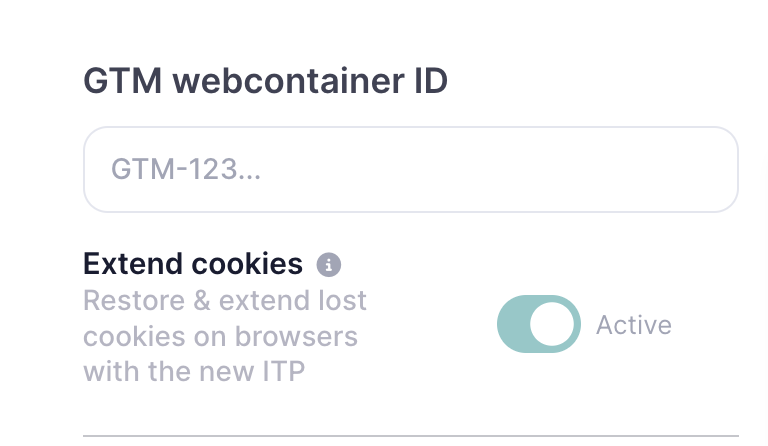
Note: The Cookie Recovery feature only works if the Enhanced Tracking Script has been added to the website. Learn more about how the script helps you recover data lost to ad blockers.
Why do you need Cookie Recovery?
One of the biggest pain points in digital marketing is assigning conversions to specific campaigns, especially for products or services with a longer decision cycle. If someone clicks an ad but does not buy until 1 or 7 days later, that conversion is no longer associated with the original campaign because of cookie restrictions.
Let's say you see an online campaign for a product that interests you and click it out of interest. The decision to actually buy may not come until two weeks later. By then the cookies have been deleted or expired, and the final purchase is not attributed to that ad campaign. This is a missed opportunity, because in reality that ad did trigger the purchase.
Here's the difference the tool makes in our example:
- Without Cookie Recovery: The click ID cookie expires after 7 days. When the visitor returns on day 14 and buys, the purchase is recorded without a link to the original campaign. The campaign that actually drove the sale gets no credit, so its reported return on ad spend (ROAS) looks worse than reality.
- With Cookie Recovery: The visitor's ID is preserved in a compliant first-party cookie. On the return visit, the marketing cookies are rebuilt and the purchase is attributed to the original campaign.
This matters most for products and services with long consideration windows, such as high-value retail, B2B, travel and subscriptions, where the gap between first click and purchase routinely exceeds Safari's 7-day limit.
Activate Cookie Recovery
Once Cookie Recovery is active and the Enhanced Tracking Script is installed, TAGGRS restores the following cookies and extends them to the durations shown. These are the maximum lifetimes browsers currently allow for each cookie type.
| Platform | Cookie | Lifetime |
| Google Analytics | _ga | 13 months |
| FPID | 13 months | |
| Google Ads | FPAU | 90 days |
| FPGCLAW | 90 days | |
| _gcl_au | 90 days | |
| FPGCLGB | 90 days | |
| wbraid | 90 days | |
| Facebook (Meta) | _fbp | 90 days |
| _fbc | 90 days | |
TikTok | _ttp | 13 months |
| ttclid | 1 month | |
| Affiliates | awin_awc | 13 months |
| awin_source | 13 months | |
| rakuten_site_id | 13 months |
FPID is a server-managed, HttpOnly first-party cookie that replaces Google Analytics' standard _ga cookie. The other FP-prefixed cookies follow the same server-side first-party pattern for Google Ads, which is what allows them to meet Safari's first-party requirements.
Where Cookie Recovery fits in your setup
Cookie Recovery addresses one specific gap: cookies that Safari and iOS delete before a decision cycle finishes. It restores the marketing cookies your analytics and ad platforms depend on, which improves attribution accuracy for returning visitors.
It works alongside the rest of your Server-side Tracking setup. It does not recover data across different devices or browsers, and it depends on the Enhanced Tracking Script being installed. Used together with server-side data collection, it closes one of the larger measurement gaps Safari introduced.
Find out how much data you're losing
Before you decide whether Cookie Recovery is worth turning on, it helps to know how much of your data Safari and iOS are already removing. The free website tracking checker scans your site in seconds and shows where your tracking breaks, including cookie lifetimes, consent setup, and which conversions aren't reaching your ad platforms. You get a Data Trust Score and a prioritized list of fixes, with no signup and no access to your analytics or ad accounts required.
From there, you can activate Cookie Recovery in the TAGGRS Dashboard. If you're not yet running Server-side Tracking, you can start for free and set it up.
FAQ
What is the longest a marketing cookie can last with Cookie Recovery?
Up to 13 months, depending on the cookie. That is the longest storage period browsers currently allow for these cookies; after it, they are removed regardless of setup.
Is Cookie Recovery only relevant for Safari and iOS?
That is where it matters most, because Safari's ITP enforces the 7-day cap that deletes cookies mid-journey. The tool is built for that restriction, which is why it is labelled for iOS 16.4.
Is Cookie Recovery compliant with privacy regulations?
The recovery cookie is a first-party cookie that follows the same ITP rules as any compliant first-party cookie, and it depends on the Enhanced Tracking Script, which TAGGRS positions as a tool for improving consented measurement. Consent still governs whether tracking runs at all. Keep your consent management, privacy policy, and PII controls in place, since Cookie Recovery does not replace them.
Do I need anything else for it to work?
Yes. Cookie Recovery requires the Enhanced Tracking Script. Without it, the recovery cookie has no way to rewrite the marketing cookies.
Does Cookie Recovery track users across devices?
No. It preserves and restores cookies within one browser on one device. Cross-device measurement needs a separate method, such as a logged-in user ID.
Will Cookie Recovery slow down my website?
No meaningful impact. Cookie Recovery runs through your server-side setup and the Enhanced Tracking Script rather than adding heavy tracking code to each page.