How to optimize your cookie banner? 5 ways (+ bonus tip)


Your cookie banner is an important link for collecting your data. If users don't accept your cookie banner, you could be missing out on valuable data. In this blog we highlight 5 ways (plus 1 bonus tip) through which you can optimize your cookie banner so that you not only comply with legal requirements, but also ensure a better user experience and higher acceptance rate.
Note: Since our original post, the regulatory landscape has changed significantly. Authorities across Europe are actively enforcing stricter rules, Google has updated how Consent Mode and Tag Manager work, and new tools have emerged to give marketers better insight into consent data. We’ve updated this guide to give you the most accurate and practical advice for 2026.
What is the optimal cookie banner?
And what does the optimal cookie banner look like? The optimal cookie banner is one that effectively collects data while respecting visitor and consumer choice. It needs to be clear, compliant, and conversion-conscious without crossing into deceptive design.
What is and isn't allowed in a cookie banner?
What is and is not allowed in a cookie banner varies from country to country. In September 2021, the European Data Protection Board (EDPB) established a "cookie banner task force," which published a report with their findings and recommendations in January 2023. The 2024 noyb's consent banner report compares the task force's findings with the guidelines and decisions of national data protection authorities (DPAs).
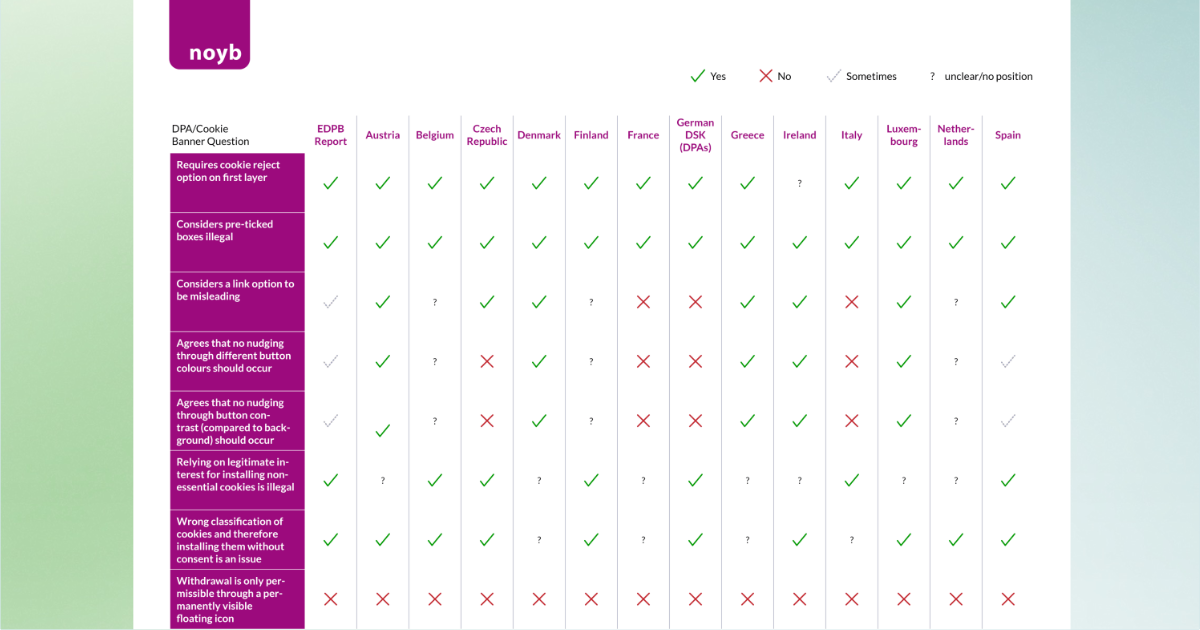
What has changed since 2024? Here are the most important developments that affect how your cookie banner must work today.
1. Stricter enforcement against dark patterns
Privacy regulators are cracking down on cookie banners that make it harder to say "no" than "yes." France's CNIL has issued formal notices to website publishers whose banners confused users or made rejection unnecessarily difficult. They also confirmed that refusing cookies must be just as easy as accepting them: one extra click to decline is enough to trigger enforcement action. See: CNIL formal notice on dark patterns.
2. 'Reject All' must actually stop tracking
It's no longer enough to show a "Reject All" button: it must actually work. CNIL found that some banners were placing tracking cookies even after users refused, resulting in a €750,000 fine for the publisher of vanityfair.fr. Sweden's privacy authority (IMY) has also clarified that withdrawing consent must be as easy as giving it, meaning a persistent, accessible way to change consent preferences is required.
3. More practical guidance from Germany
Germany's data protection group (DSK) published clearer requirements for what must appear on the first screen of a cookie banner. This includes how data will be used, whether profiling is involved, and whether data is transferred outside the EU. Courts have also warned against designs like "Accept & close X" because they pressure users into accepting. Additionally, even the use of Google Tag Manager may require consent first, depending on how it is configured. See: DSK guide on online access.
4. Consent Mode updates and GTM behaviour
Starting in April 2025, Google Tag Manager began automatically loading some tags, and Google Ads started collecting more site events by default. See: Google Tag Manager documentation. This means it is critical to test whether your Consent Mode setup is working properly. Google now highlights the need to send clear consent signals (like ad_user_data and ad_personalization) especially for EEA users, before any personalised advertising can happen. After any banner changes, double-check that consent signals are being passed correctly.
5. TAGGRS Consent Tool improvements
TAGGRS has made significant improvements to how it helps marketers understand consent data. Our Consent Approval Graph no longer just tracks user clicks: it also shows what consent signals actually reach tools like Google Analytics and Google Ads. This helps uncover invisible data loss, where a user clicks "Accept" but the signal never makes it through to your analytics stack.
In September 2025, TAGGRS partnered with Axeptio to give marketers even more control. This integration connects CMP-level consent decisions with downstream tracking results, making it easier to measure "no choice" traffic, flag weak points in your consent flow, and fix them. See: TAGGRS x Axeptio partnership announcement.
Stay abreast of privacy laws and regulation (GDPR) and adjust your cookie banner accordingly to stay compliant and maintain your users' trust.
How can I see what the opt-in rates are?
How many people accept my cookie banner? You can see this for yourself with some CMP providers:
Option 1: Cookiebot
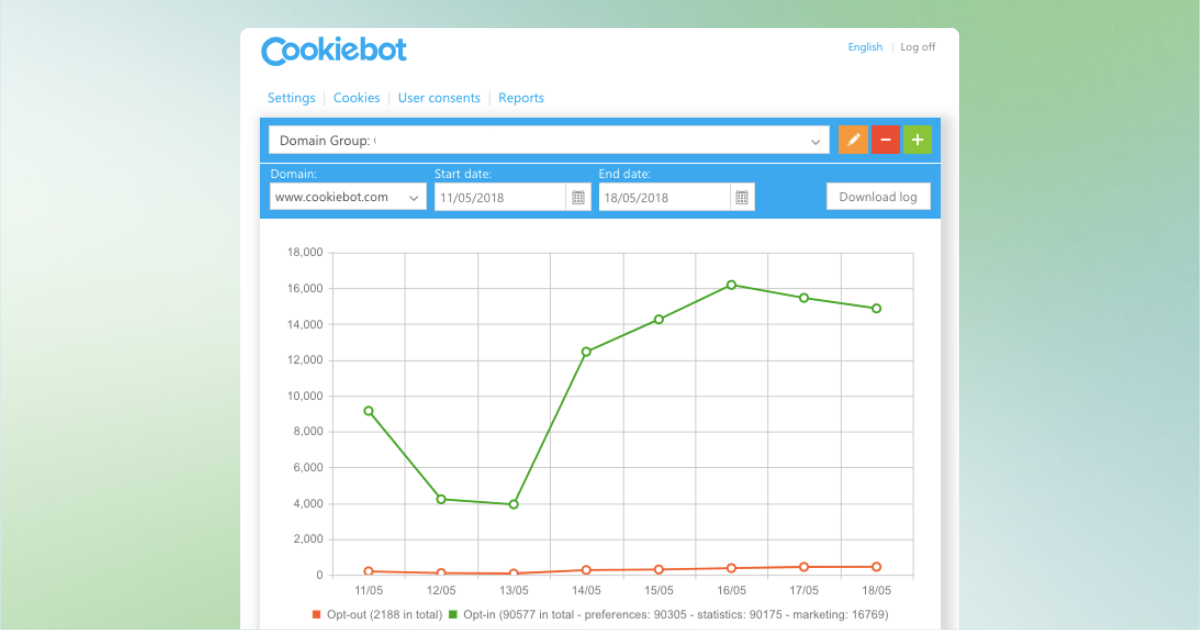
Are you using Cookiebot as your CMP provider? You can see the acceptance rate in the dashboard.
Option 2: TAGGRS Consent Approval Graph
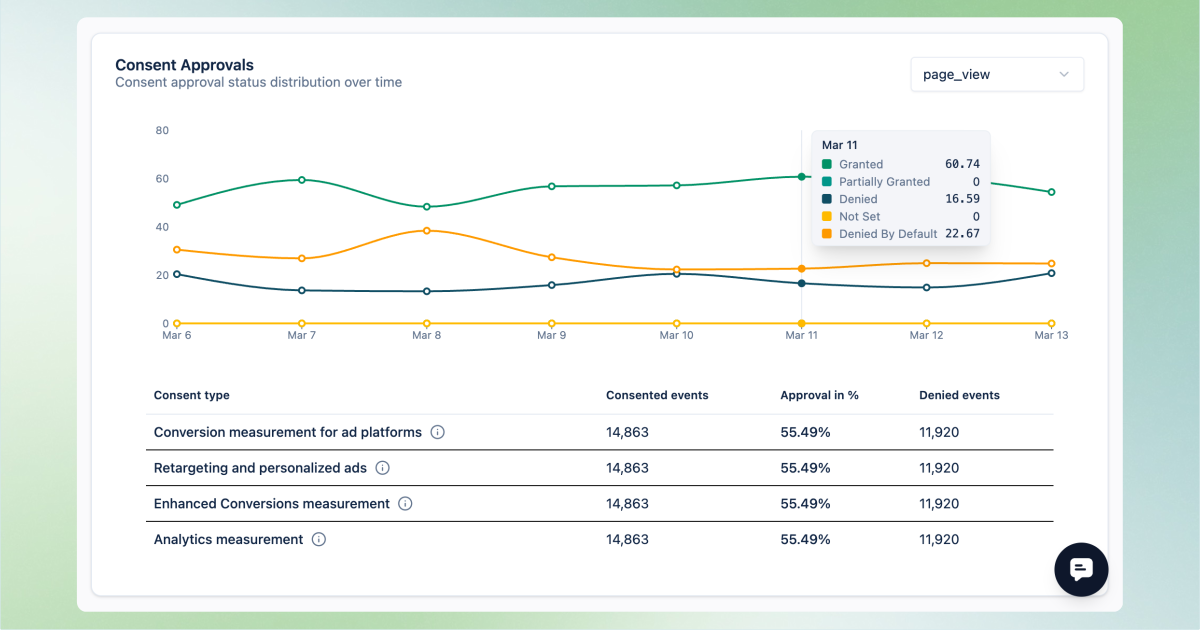
The TAGGRS Consent Approval Graph, part of TAGGRS Server-side Analytics, allows you to measure your Web site's consent rates with Server-side Tracking and understand what percentage of data you may be missing.
The graph is optimized with Consent Mode v2 data and unique measurements in our ecosystem:
- Consent Mode V2 parameters
- Visualized percentage of partial acceptance
- Missed pageviews/events visualized
- Data loss due to no choices on cookie banner
With these charts, we provide an accurate and actionable view for marketers looking to maximize their opt-in rates.
What is a normal acceptance rate?
On average, the Cookie Banner acceptance rate is 31%, but this can range from 4% to 85%. This also varies by country: Poland has the highest acceptance rate (64%), while the United States has the lowest (32%).
Cookie Consent rates vary by industry. Websites with a blog often see higher consent rates because users want to read the content.
5 ways to optimize your opt-in rates
After you have insight into consent rates and know what the guidelines are in your country, it's time to optimize the cookie banner. You can A/B test different aspects to improve performance:
1. Placement of the cookie banner
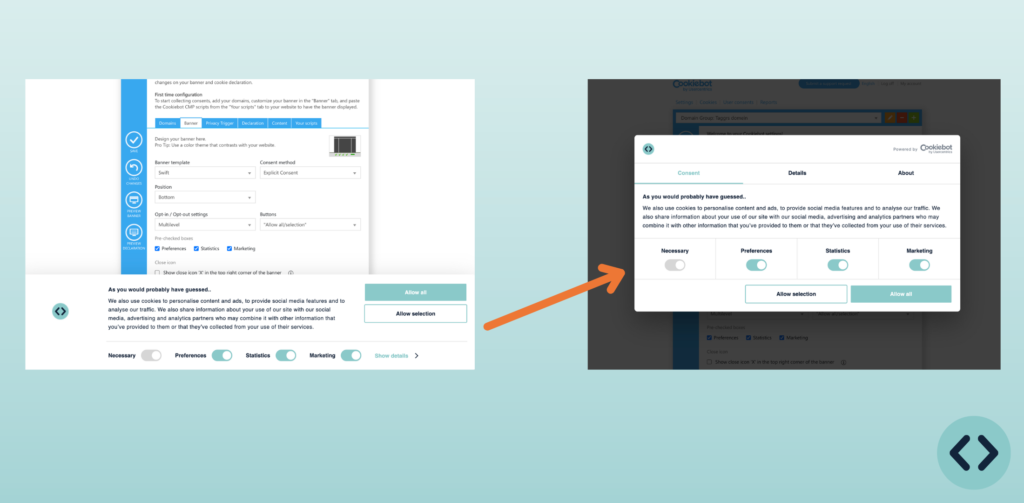
The location of the cookie banner can determine a lot. Make sure the cookie banner is prominently displayed, so that people have to make a choice immediately. By doing so, you reduce the number of "no choice made" cases. If it is not in a prominent place, such as at the bottom of the page, no data may be collected until the choice is made. For example, if a visitor moves on to the next page, no data should be collected until that choice is made.
A banner at the top of the page or in the middle of the screen attracts more attention and leads to higher acceptance rates.
2. Transparency and simplicity
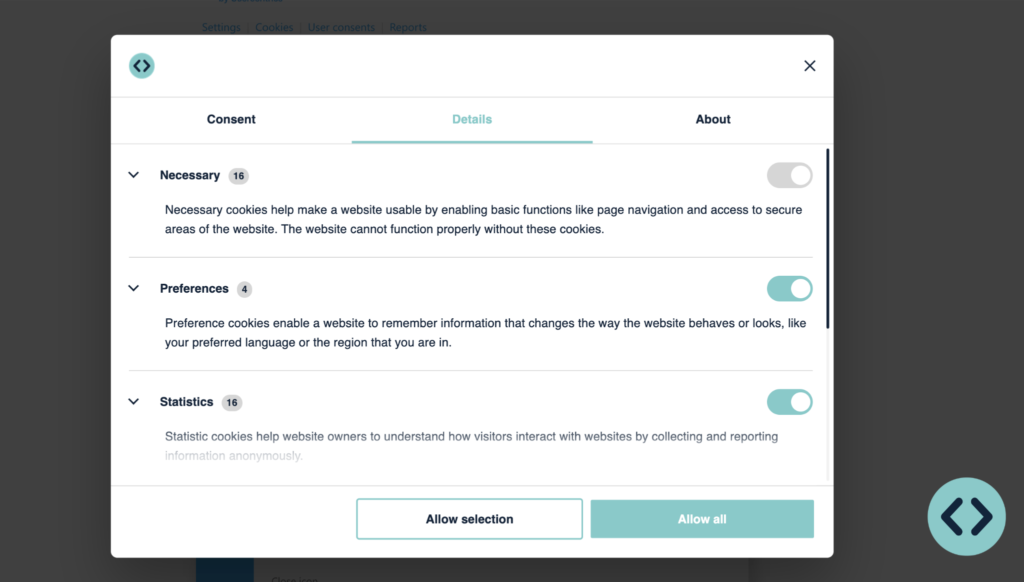
Users should immediately understand what the pop-up screen is about. Strike a balance between transparency and privacy in the cookie banner. Users should immediately know what consent means for their personal data. This promotes trust and informed decision-making.
3. Color and position of buttons
A 2021 Finnish study examined the influence of the color and position of Accept/Decline buttons on user choices for cookies. The findings were:
- Color of buttons: Users were more likely to accept cookies if the Accept button was blue and the Decline button was gray, rather than both buttons being the same color.
- Position of buttons: The position of the Accept button (to the left or right of the Decline button) did not significantly affect the acceptance rate.
By experimenting with these factors, you can improve the effectiveness of your cookie banner.
Think of your Cookie banner as a CTA. Like any other CTA, performance varies depending on how it is designed.
4. Button placement
The positioning of buttons can affect the acceptance rate. By placing buttons in different locations, you can experiment with higher acceptance rates. Check local laws and regulations to make sure you meet the requirements in your country.
By experimenting with button placement, you can optimize the effectiveness of your cookie banner.
5. Remove the cross from the cookie banner
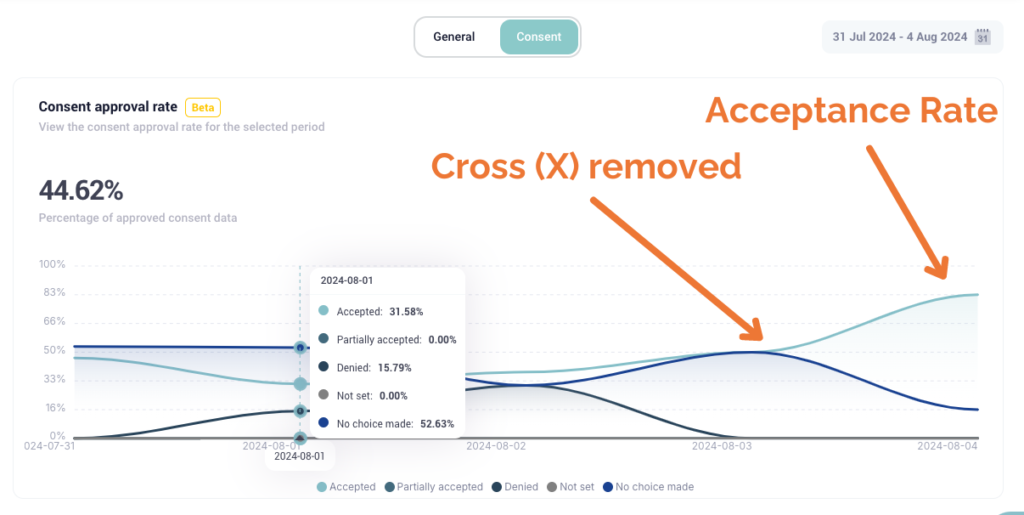
If you add a cross to the cookie banner and people click on it, they have not given consent and you may not track them. As a result, you get a lot of "no choice made" cases.
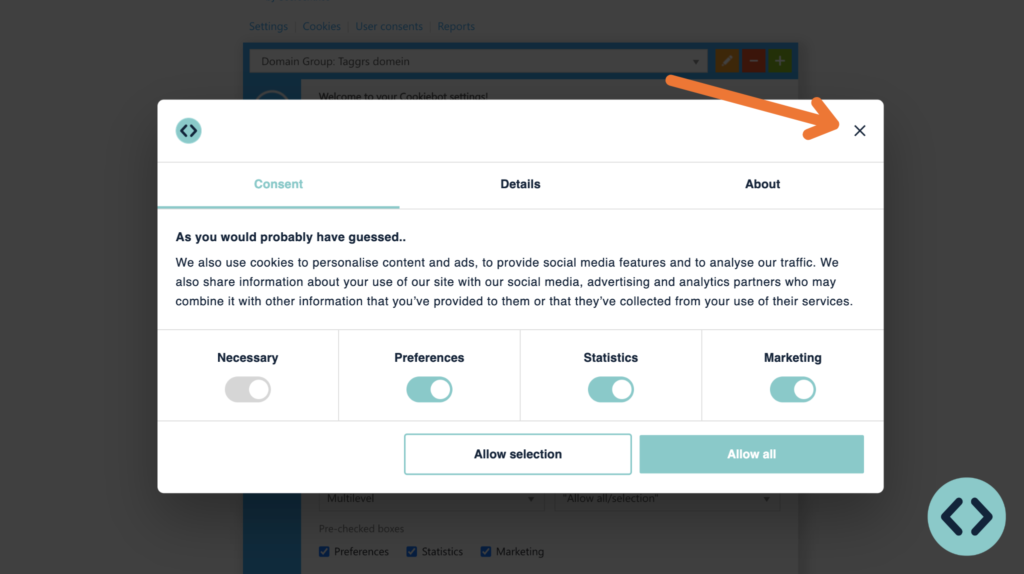
An example showed that the consent acceptance rate increased to 83.33% after removing the cross in the cookie banner.
Bonus tip: Remove the CMP logo from the cookie banner
You can test by removing the CMP logo from your cookie banner. Often the CMP provider does not provide an option for this, but with a piece of HTML code and a tag in Google Tag Manager, you can accomplish this.
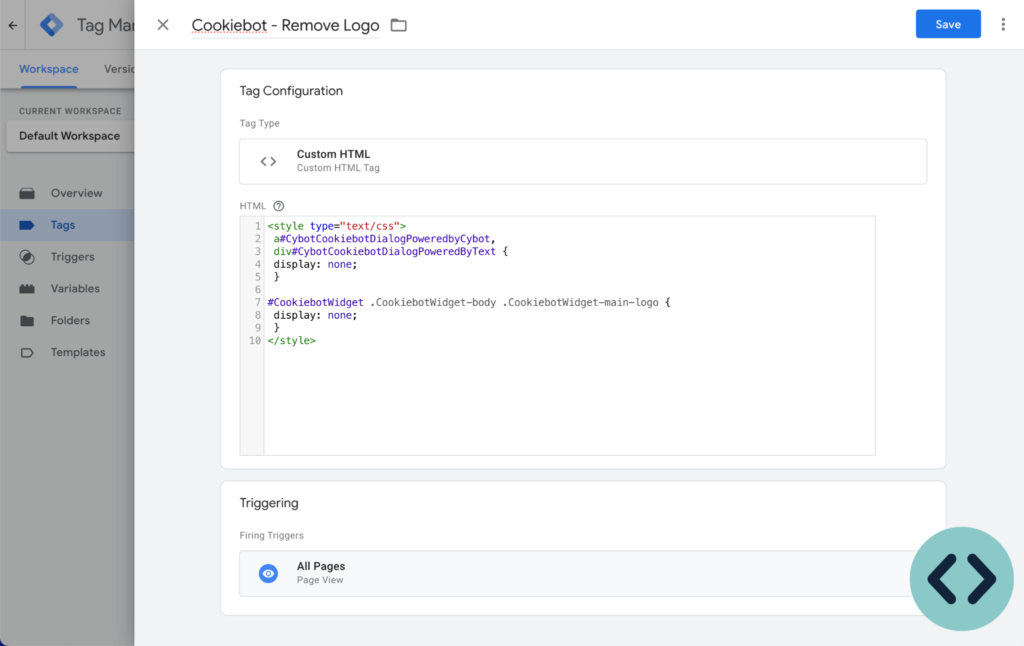
The code you can add in Google Tag Manager:
<style type="text/css">
 a#CybotCookiebotDialogPoweredbyCybot,
 div#CybotCookiebotDialogPoweredByText {
 display: none;
 }

#CookiebotWidget .CookiebotWidget-body .CookiebotWidget-main-logo {
 display: none;
 }
</style>
Outro: Check out the final results
Perfect cookie banner design requires ongoing effort in personalization and compliance. Test the aforementioned points to optimize your cookie banner. Using the TAGGRS Consent Approval Graph? Then create a free TAGGRS account (no credit card required).