Server-side A/B testing: better experiments, better measurement

 Mariusz Brucki | 20 March 2026 | Last updated:
 Server-side A/B testing is a method where experiment variations are assigned and rendered on the server before the page loads in the browser. This way of testing improves experiment reliability because it removes some of the most common client-side problems at the source:
- ad blockers stripping out scripts
- delayed execution that changes what the visitor sees
- the flicker effect, where the original page appears before the variant catches up.
These issues distort experiment results. A test that loads late or behaves inconsistently is already mixing delivery problems into the outcome, which makes it harder for marketers and agencies to trust what the result actually means.
For agencies especially, that matters. The job is rarely just to launch an experiment. The job is to run experiments that are reliable, privacy-aware, and strong enough to support budget decisions across clients and channels. When the experiment setup itself is fragile, reporting can look convincing while the data underneath is incomplete.
There is also a performance angle. Client-side tests often rely on extra JavaScript and page-hiding techniques that can hurt perceived speed and Core Web Vitals. You can deep dive into the relationship between server-side setups, flicker, and page speed is worth understanding in more detail, check How does Server-side Tracking affect page speed.
Server-side A/B testing is not just about cleaner experimentation: it’s part of a broader shift toward privacy-first measurement and better data quality. Understanding it well helps agencies build experimentation programs that actually hold up under scrutiny.
Client-side testing works until the environment starts pushing back
Client-side A/B testing is flexible, familiar, and relatively easy to launch. Tools like VWO and Optimizely gave teams visual editors, quick setup, and the ability to test page-level changes without heavy engineering support. For landing pages, messaging tests, and simple layout experiments, that still matters.
The trouble starts when those experiments get treated as if they happen in a controlled lab. Reality is: they do not. They happen in the browser, which is one of the messiest places in the stack to depend on.
A client-side A/B test has to survive a fairly long chain of events. The page loads, the testing script loads, the browser allows it to run, any blocker or privacy extension leaves it alone, required storage stays available, the DOM gets updated correctly, and the tracking call still fires afterwards. When all of that works, the experiment can look clean. When even one step slips, the reporting still tends to look more certain than it should.
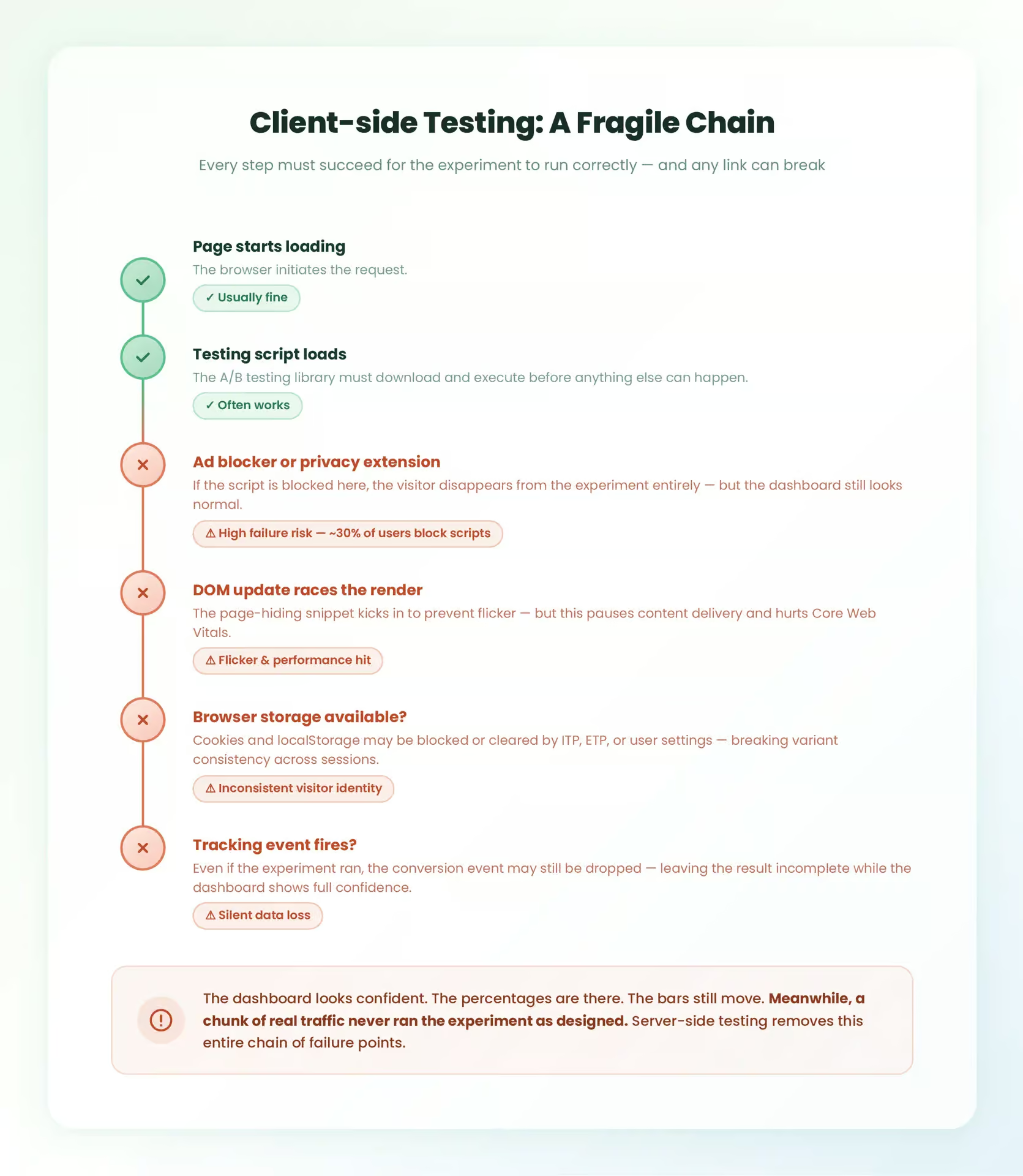
Flicker is the most visible example. A visitor lands on the page, sees the original version for a fraction of a second, and then watches the variant snap into place. It may sound minor, but it changes the experience in exactly the moment the test is supposed to measure. Some people click faster than expected. Some hesitate. Some leave because the page briefly feels broken. At that point, the experiment is no longer measuring only the design change. It is also measuring the side effects of the delivery method.
Performance is tied up in the same problem. Many testing tools try to reduce flicker by hiding parts of the page until the variant is ready. That workaround can protect the visual transition, but it creates a different issue in return. The page pauses. Content arrives later than it should. Core Web Vitals start carrying the cost of the test, and that is rarely what teams intended when they set out to compare a new hero image or button colour.
Ad blockers create a less visible but arguably worse form of damage. If the testing script gets removed before it runs, the visit can disappear from the experiment entirely or fall into reporting in a distorted way. What makes this frustrating is how normal the dashboard can still look afterwards. The experiment appears to have collected data. The percentages are still there. The confidence bars still move. Meanwhile, a chunk of the traffic never experienced the test as designed.
And then there is the issue of scope, which tends to get underestimated until a team wants to test something that actually affects the business. Client-side A/B testing is good at changing what appears in the browser after the page starts loading. It is far less natural for experiments tied to pricing logic, ranking models, recommendation systems or checkout behavior to be decided before the page is assembled. Those are server-side concerns, and browser tools arrive too late to own them properly.
How server-side A/B testing works
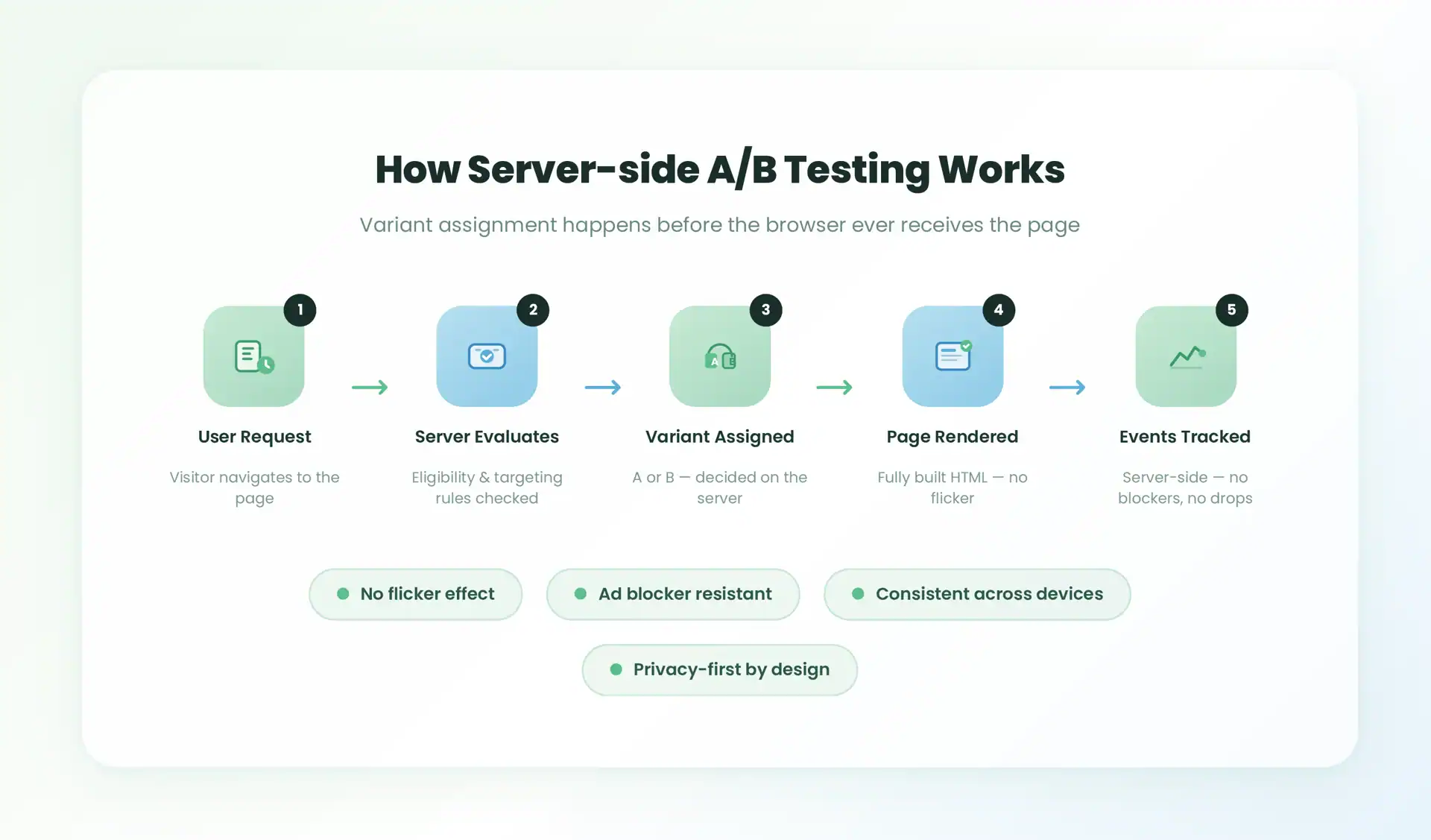
Server-side A/B testing follows a simple flow:
- A user request reaches the server
- The server evaluates eligibility and assigns a variant
- The response is generated based on that variant
- The user receives a fully rendered version with no client-side modification
- Events and outcomes are tracked (ideally server-side)
Because the decision happens before the page loads, the experiment is not dependent on browser scripts, storage, or execution timing.
How server-side A/B testing changes the picture
Server-side A/B testing moves the decision closer to the application itself. The request comes in, eligibility is evaluated, a variant is assigned, and the response is built for that version before the browser sees anything. By the time the page arrives, the experiment has already happened.
That changes more than people first expect.
The flicker problem largely disappears because there is no more visual swap after load. The chosen version is already in the HTML. Ad blockers have much less influence over the experiment itself because there is no client-side testing script that needs to survive the trip. And the assignment can be logged in a system the team actually controls instead of one more browser event that may or may not fire under real-world conditions.
There is also a broader strategic shift that comes with this model. Once experiment logic lives on the server, the test is no longer limited to surface changes. Product ranking, eligibility rules, pricing decisions, onboarding flows, recommendation logic, and even parts of the checkout experience can all become part of the experimentation layer. That is a very different category of work from changing a CTA colour.
The performance story improves too, although it is worth being precise here. Server-side testing is not automatically fast in every implementation. Bad architecture can always slow down anything. But it avoids a lot of the browser-side overhead that client-side tools add by default. No page-hiding snippet, no last-second DOM rewrite, no extra dependency that has to load before the experiment feels stable. In practice, that usually leaves the experience in a better place.
Client-side vs server-side A/B testing
| Client-side | Server-side | |
| Ownership & implementation | Gives marketers more short-term autonomy. Easy to launch with visual editors. | Usually needs engineering ownership up front. More control, but higher setup cost. |
| Performance & Core Web Vitals | Can introduce flicker, page-hiding delays, and extra JavaScript. | Avoids most browser overhead. Variations render before the page reaches the user. |
| Data accuracy | Results can be skewed by blocked scripts, delayed execution, or visual swaps after page load. The experiment may look complete in the dashboard while missing a portion of traffic entirely. | Experiment assignment happens on the server, so ad blockers, script delays, and DOM timing issues do not affect which variant a visitor receives or whether the result gets recorded. |
| Flexibility | Strongest for surface-level page changes like copy, layout, and images. | Can evaluate deeper logic: eligibility rules, pricing, ranking, recommendations. |
Why this is really a measurement architecture decision
Most teams first see A/B testing as a CRO activity. That is understandable, but once experiments move to the server, the stakes change. What looked like a page optimisation tactic starts becoming a measurement architecture decision.
The shift happens in a few clear ways:
The first is scope. Client-side testing usually stays close to the UI. Server-side testing can reach pricing logic, search ranking, recommendation systems, onboarding flows, and other decision layers that shape the full experience.
The second is context. Instead of isolated page tests, teams can think in terms of broader journeys that connect to attribution, retargeting, and signal quality across channels. That wider measurement problem is explained in more detail here: https://taggrs.io/retargeting-strategies-signal-loss/
The third shift is operational. Browser-based experiments run in an environment full of blockers, delayed scripts, and inconsistent identifiers. Server-side experiments move more of that logic into systems the team actually controls.
And the fourth shift is regulatory. When experiments run across regions, devices, and stricter privacy environments, server-side setups are often easier to align with GDPR-minded data handling because collection and processing can be designed more deliberately.
This is also why agencies should care. Agencies are rarely judged only on whether a variant lifts clicks on one page. They are judged on whether the result can be trusted across clients, channels, reporting systems, and budget decisions. That is why server-side A/B testing is better understood as infrastructure, not just optimisation.
Where client-side still makes sense
Client-side A/B testing is not obsolete.
It remains useful for:
- Fast page-level experiments
- Temporary campaigns
- Lightweight design changes
Client-side testing is convenient when a small level of uncertainty is acceptable. Server-side testing becomes necessary when uncertainty becomes expensive.
That shift can happen for several reasons. Maybe the experiment touches revenue logic. Maybe the organisation operates at enough scale that a small measurement error has a real financial impact. Maybe the same test needs to stay consistent across devices or logged-in states. Or maybe the company is simply tired of pretending that browser delivery and browser measurement are stable enough for decisions that carry real weight.
5 ideal scenarios for server-side A/B testing
Server-side A/B testing makes the most sense when the experiment goes beyond cosmetic page changes and starts touching logic that is harder to trust in the browser.
- Complex personalisation and eligibility logic that needs to be evaluated before the page is rendered
- High-traffic or high-risk environments where even small measurement errors can become expensive
- Validating website, app, or product changes where performance, stability, and data accuracy all matter at the same time
- Running experiments without adding page-hiding scripts, flicker, or extra client-side overhead that can damage UX consistency
- Teams that have outgrown GA4 for experiment analysis and need a proper experimentation toolset such as Optimizely Feature Experimentation, Amplitude Experiment, Statsig, VWO, or LaunchDarkly.
Implementation basics
A server-side setup usually starts with a platform that supports server-side SDKs or feature evaluation in the backend. Optimizely Feature Experimentation, Amplitude Experiment, Statsig, VWO, and LaunchDarkly all appear in this conversation for a reason. Each one gives teams a slightly different mix of experiment management, targeting, and statistical tooling, and the right choice depends heavily on the stack around it.
From there, variant evaluation needs a home inside the application. In some stacks that lives in backend services. In others, it sits in middleware, edge logic, or the rendering layer. What matters most is timing. The assignment has to happen before the response is assembled, not after the page begins loading in the browser.
Metrics deserve just as much attention as assignment logic. This is the part teams often underestimate. An experiment is only as useful as the event stream that measures it, and that event stream can still degrade if it depends on browser scripts that face blockers, storage restrictions, or dropped requests. Getting the treatment right is only half of the job.
It is also why GA4 is usually not the best tool for serious experiment analysis. GA4 is excellent for many analytics use cases, but controlled experimentation puts different pressure on the data. Sampling, session boundaries, and attribution logic can all make interpretation harder than it needs to be. Dedicated experimentation platforms are built for that type of analysis in a way that general analytics tools are not.
Where TAGGRS fits
TAGGRS matters when a team wants server-side experimentation to lead to reporting they can actually trust, not just cleaner variant delivery.
Server-side A/B testing solves one part of the problem. It decides the variant before the page reaches the browser, which removes a lot of the usual client-side noise. That is important, but it is only half of the measurement chain. The other half is what happens after the user sees the page: which events get captured, how they are enriched, where they are forwarded, and whether they still arrive intact when browsers, blockers, or fragile scripts get in the way.
That is the gap TAGGRS helps close. TAGGRS runs server-side Google Tag Manager infrastructure, so experiment events, conversion events, and attribution signals can be processed on the server instead of depending so heavily on the browser. In practical terms, that means no blocked requests, no dropped signals, and a better chance that platforms like Google Ads, Meta, and GA4 receive data that still matches what actually happened in the experiment.
Without that layer, a company can upgrade the experiment setup while leaving the reporting setup stuck in the same weak position as before. The variant assignment becomes more reliable, but the conversion data can still be incomplete. Ad blockers can still interfere. Browser restrictions can still strip out identifiers or prevent requests from firing. Attribution can still drift away from reality. So the experiment looks cleaner on paper, while the measurement behind it remains inconsistent.
With TAGGRS in place, the setup becomes more coherent. The experiment is decided server-side, and the measurement pipeline is also moved closer to the server. That gives teams tighter control over how data is collected, transformed, and sent onward. It also makes it easier to standardise event handling across experiments, ad platforms, and analytics tools instead of letting each browser session determine what survives.
That matters most when experiments influence real decisions. If an agency is using test results to defend a budget recommendation, if a product team is changing pricing logic, or if leadership is comparing variants that affect revenue, then partial measurement is a serious weakness. In those cases, TAGGRS is not just a tracking add-on. It is part of the infrastructure that helps make the experiment results usable in the first place.
No analytics setup becomes perfect, and TAGGRS does not magically remove every source of noise. But it does make the system much harder to break. That is the point. Server-side testing gives you a cleaner experiment. TAGGRS helps make sure the data coming out of that experiment is cleaner too.
Conclusion
Server-side A/B testing becomes more valuable as experimentation moves beyond UI tweaks and starts influencing product logic, attribution, and revenue decisions. Client-side testing still has a role. But for teams that care about decision confidence, server-side testing provides a stronger foundation.
When combined with TAGGRS, it creates a system where both experimentation and measurement are more reliable.
That is the real advantage: not just better tests, but better decisions.
FAQ: Server-side A/B testing
What is server-side A/B testing?
Server-side A/B testing assigns experiment variations before the page loads, ensuring consistent delivery and more reliable data.
Is server-side A/B testing better than client-side?
It depends. Server-side is better for accuracy, performance, and complex logic. Client-side is faster for simple tests.
Does server-side A/B testing improve data accuracy?
Yes. It reduces the impact of ad blockers, script delays, and dropped tracking events.